An IT audit for small business is a structured check of every technology your company depends on (the website, email, hosting, backups, devices, accounts and the vendors behind them) to find what is broken, what is risky and what to fix first.
Most owners never run one, because it sounds like something that happens to big companies. In practice it is the cheapest insurance in technology: an afternoon of looking, written down, before a failure turns the same findings into an emergency. Below is a free 12-point IT audit checklist you can run yourself this week, a simple way to score what you find, and the signs that it is time to bring in someone who does this for a living.
What an IT audit for small business actually covers
A good IT audit is wide rather than deep. It starts from the way work really flows: a customer finds your website, submits a form, the message crosses DNS and mail servers, someone replies, files are saved and backed up. Then it checks every link in that chain, because that is where small businesses get hurt. The website company blames the host, the host blames the plugin, and the email provider blames DNS, while the customer's message goes missing.
That makes an IT audit a different job from a penetration test (which tries to break in), a compliance certification (which proves you meet a specific standard) or a legal opinion. An audit tells you what is true about your setup today and ranks what to do about it.
The frameworks written for small organizations take a similar view. CISA's Cyber Essentials, aimed at the leaders of small businesses, organizes the work into six areas: yourself, your staff, your systems, your surroundings, your data and your crisis response. The NIST Cybersecurity Framework 2.0, which the FTC summarizes in its small-business guidance, groups outcomes as Govern, Identify, Protect, Detect, Respond and Recover. The checklist below covers the same ground in plain terms.
DIY audit or professional audit?
Do the DIY IT audit first, even if you plan to hire help. You arrive with the inventory and the access list already done, which makes a paid audit faster and cheaper. Here is how the two compare.
| DIY audit | Professional audit | |
|---|---|---|
| Best for | A first baseline and the obvious gaps | Anything you cannot verify yourself; e-commerce, multiple domains or custom software |
| Time | An afternoon to a day | Scoped and scheduled up front; depends on size |
| Blind spots | You cannot see what you do not know to look for; DNS, email authentication and restore tests are usually skipped | Depends on the auditor: ask whether they test email delivery, backups and DNS, not just run a scanner |
| Output | Your own notes | A written report ranked by urgency, impact and effort |
| Cost | Your time | Varies with scope; MEI's Business Tech Rescue Audit starts at $497 |
The 12-point IT audit checklist
Score each point of your IT audit green (confirmed fine), amber (partly there, or you have not verified it) or red (missing or known broken). Treat "I assume so" as amber at best: if you cannot prove it, it is unknown.
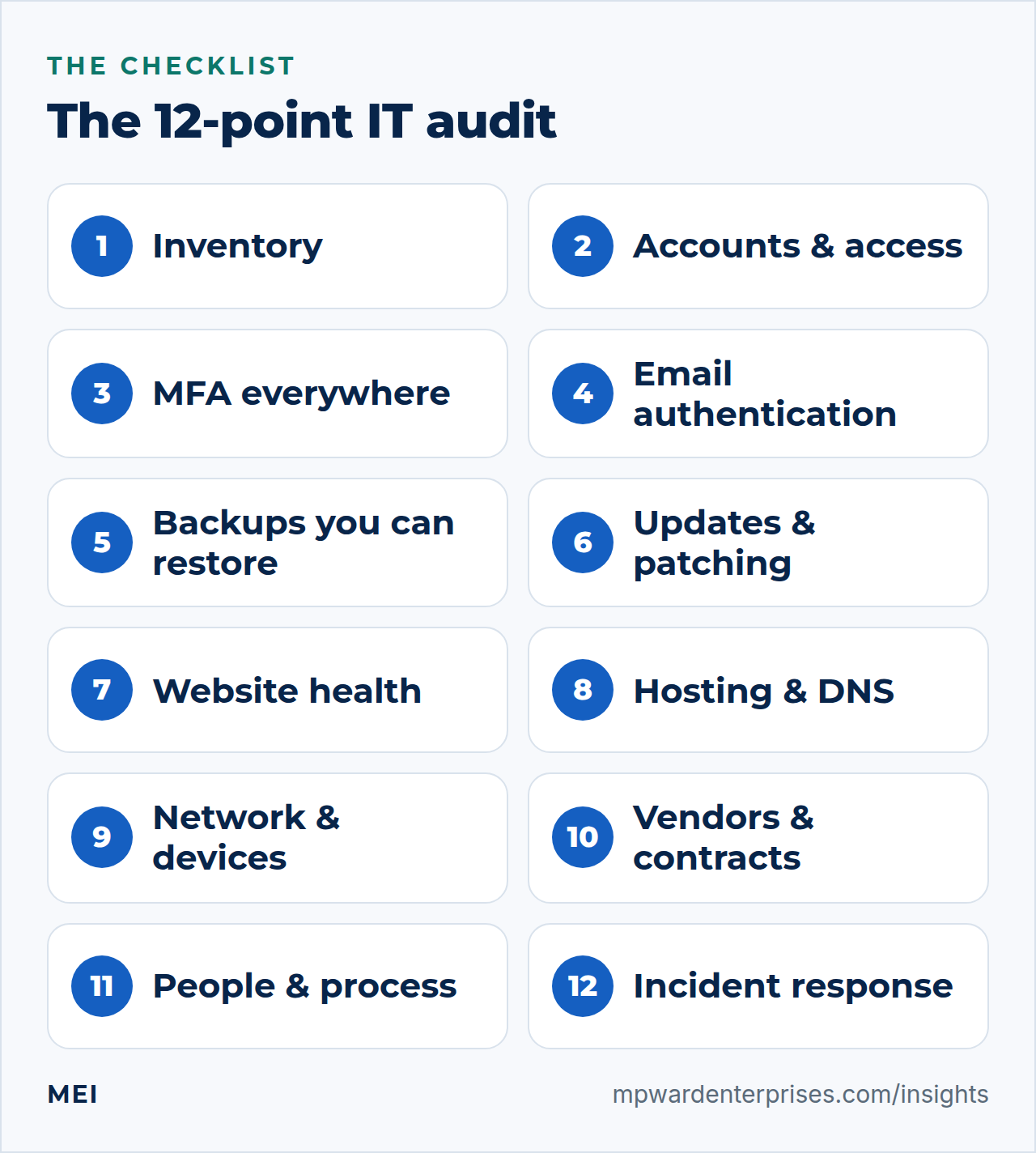
1. Inventory: what you own, what you pay for, who controls it
Check: list your devices, software and subscriptions, domain names, DNS host, web host, email provider and payment processors. For each one, note the account owner and the renewal date. Red flag: a domain or hosting account registered in a former employee's or developer's name, or a renewal on a card nobody watches. Fix: move business-critical accounts under a company-owned email address, store logins in a password manager, and set renewal reminders.
2. Accounts and access: only what each person needs
Check: list who has administrator rights on email, the website, hosting, accounting and DNS, then compare that list with who works with you today. Red flag: shared logins, former staff or vendors still active, everyone an administrator. Fix: one account per person, admin rights only where needed, and a written offboarding checklist so leavers lose access the same day.
3. Multi-factor authentication on the accounts that matter
Check: is a second factor required on email, banking, your domain registrar, hosting, website admin and your password manager? Red flag: email without it, because whoever controls your inbox can reset almost every other password. Fix: turn it on for email and the registrar first, using an authenticator app or security key rather than text messages where you can.
4. Email authentication: SPF, DKIM and DMARC
Check: send a test message to a Gmail address, open it, choose "Show original", and read the SPF, DKIM and DMARC lines. They should all say PASS. Do the same for messages sent by your website forms and invoicing tools. Red flag: any FAIL, any missing record, or a tool sending as your domain without being listed. Fix: authenticate every legitimate sender; our plain-English guide to SPF, DKIM and DMARC walks through it, and the FTC explains why it matters in its email authentication section.
5. Backups you can actually restore
Check: what is backed up, where the copies live, how often it runs and, the part most people skip, when you last restored from one. Red flag: backups stored in the same account or on the same server as the thing they protect, never test-restored, or deletable by any administrator. Fix: follow the 3-2-1 backup rule and run a restore test every quarter.
6. Updates and patching
Check: operating systems, applications, WordPress core, plugins and themes, and the firmware on your router and firewall. Red flag: software that no longer receives updates, abandoned plugins, or "we will update later" for a year. Fix: automatic updates where they are safe, a monthly maintenance window for the rest, and a short list of anything that cannot be updated and why.
7. Website health
Check: the site loads over HTTPS with a certificate that is not about to expire, every contact and checkout form actually delivers (submit a test), it loads quickly on a phone, and something alerts you if it goes down. Red flag: a form that says "thank you" while nobody receives the message, or a hosting plan running an unsupported PHP version. Fix: test every form monthly and add uptime monitoring; our WordPress maintenance checklist shows what to schedule.
8. Hosting and DNS
Check: who hosts the website and the email, who controls DNS, which registrar holds the domain, whether it is locked, when it renews, and whether any one account or person is a single point of failure. Red flag: several vendors editing DNS with no record of who changed what. Fix: export a copy of your DNS zone, turn on the registrar lock, and write down who to call for each service.
9. Network and devices
Check: router and firewall settings (are the default admin passwords still in place, is the firmware current), separate guest and staff Wi-Fi, endpoint protection, full-disk encryption on laptops, and what happens when a laptop is lost. Red flag: default passwords, unencrypted laptops holding customer data, personal devices with full access. Fix: change the defaults, turn on BitLocker or FileVault, and keep guests off the staff network.
10. Vendors and contracts
Check: which vendors touch your data or systems (host, web developer, IT provider, payroll), what access each has, and what the contract says about security, breach notification and getting your data back. The FTC's vendor guidance recommends written security provisions in contracts, verifying compliance, controlling access and agreeing a response procedure if a vendor is breached. Red flag: a vendor who holds the only copy of your site, code or credentials. Fix: ask each one for an exit plan: what you would receive, and how fast, if you left tomorrow.
11. People and process
Check: do staff know how to spot a phishing message and who to tell? Is there a written onboarding and offboarding checklist? Are the procedures for key tasks written down somewhere other than one person's head? Red flag: "only Dana knows how that works". Fix: one-page procedures for the ten things that would hurt most if the person who knows them disappeared, and a short phishing refresher twice a year.
12. Incident response and continuity
Check: if the website went down, email stopped or a laptop was stolen tomorrow, who gets called, in what order, and how long can you afford to be without each system? Do you have cyber insurance, and do you know what it requires you to have in place? The FTC's cyber insurance section is a good primer. Red flag: no contact list, or insurance that assumes controls you do not have. Fix: a one-page incident plan with names and phone numbers, printed; then build it into a full business continuity plan.
How to score the results and decide what to fix first
Count your greens, ambers and reds, then work the reds in this order: anything that lets a stranger in (accounts without multi-factor authentication, default passwords), anything that loses data (backups never restored), anything that loses customers (forms, email, a site that is down), and then the rest.
- Fix the quick reds today.Anything under an hour: turn on multi-factor authentication, remove a leaver's account, change a default password.
- Schedule the project reds.Email authentication, a proper backup plan and vendor exit plans need an owner and a date.
- Verify the ambers.Turn "I assume so" into a test result you can write down, such as a restored file or a form submission that arrived.
- Put the next IT audit on the calendar.Once a year at minimum, and after any big change such as a new host, a rebuild, a staff change or an incident.
Rule of thumb
If your IT audit ends with more than a few reds, or with any red you cannot explain, that is the point to ask for help. The cost of a second pair of eyes is small next to the cost of finding out the hard way.
What a good professional IT audit report looks like
If you do hire someone to run the IT audit, ask for the same things you would want from any expert: a written scope before work starts, findings in plain English, and a ranking by urgency, business impact and effort so you know what to do on Monday. You should receive evidence (test results and screenshots, not just a scanner printout), and you should own the report outright so you can take it to any provider.
That is how MEI's Business Tech Rescue Audit works. It examines the website, email, forms, hosting, security, backups and workflows together and delivers a 5 to 10 page action report, findings grouped by risk and effort, a "fix first" roadmap and a 30-minute review call. It starts at $497, and you are free to fix what it finds in-house or take it to anyone else. Like any IT audit, it is a practical assessment of the most material, visible risks; it is not a penetration test, a compliance certification or a legal opinion.
Be wary of "free" IT audits that arrive bundled with a sales pitch for the same company's services. Ask who owns the report, and whether the findings would be the same if you never bought anything.
How often should a small business run an IT audit?
Run a full IT audit once a year at the minimum, and a lighter check every quarter on the two items that drift fastest: who has administrator access, and whether a backup can still be restored. Run a fresh audit whenever something major changes: a staff departure, a new vendor, a website rebuild, a move to a different host, an acquisition, or any security incident.
If you want a shorter starting point, the free Small Business Tech Risk Checklist covers the highest-impact items in a few minutes, and our guide to small business IT support cost explains what ongoing help typically involves.
Frequently asked questions
How long does an IT audit for a small business take?
The DIY version takes an afternoon to a day for a business with one website, one email system and a handful of devices. A professional audit depends on scope: larger sites, multiple domains, e-commerce or custom applications take longer, and the scope should be agreed in writing before work starts.
Is an IT audit the same as a security audit?
No. A security audit focuses on protection: access, patching, monitoring and exposure. An IT audit is wider. It also checks reliability (does the website stay up, do forms deliver), email delivery, backups, continuity and who owns each account, as well as security.
Do I need an IT audit for cyber insurance or compliance?
It helps, because insurers and regulators usually ask for evidence of basic controls such as multi-factor authentication, backups and patching. But an audit is not a compliance certification, so check what your policy or regulator actually requires.
What if the audit finds nothing serious?
Then you have a dated, written baseline and proof that the basics are covered, which is a valuable result. Repeat it once a year, and after any big change.
Can I run the audit myself and still hire someone to fix the problems?
Yes. Keep the findings and hire help item by item. A written, scored list also makes any quote you receive easier to compare.
Sources and further reading
- FTC: Cybersecurity for Small Business — email authentication, hiring a web host, vendor security and cyber insurance guidance
- CISA: Cyber Essentials — the six elements of cyber readiness for small business leaders
- NIST: Small Business Cybersecurity Corner — quick-start guides and topic pages on MFA, phishing, ransomware and incident response