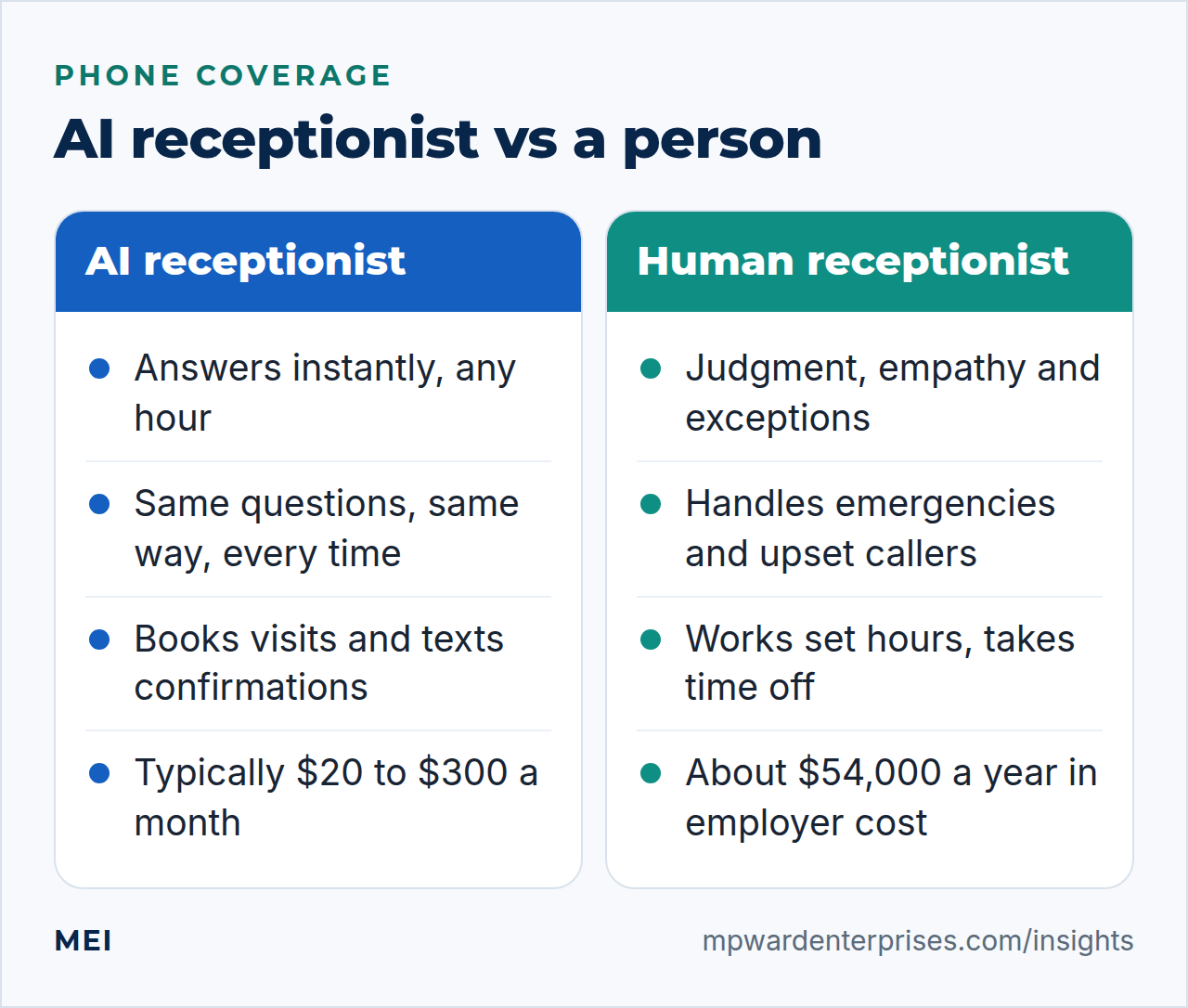
An AI receptionist for small business is software that answers your phone, and often your website chat and texts, in a natural voice. It picks up at once, answers routine questions, captures the caller's details, books appointments and hands anything difficult to a person, including after hours. Published prices for small businesses mostly run from about $20 to $300 a month. It is a strong fit for routine calls and a poor fit for emergencies and upset customers.
That price is the headline, and it can mislead in both directions. It is cheap next to a human receptionist, whose employer cost is around $54,000 a year by the Bureau of Labor Statistics' figures, but an AI is narrower and you remain responsible for what it says. This guide covers the five jobs it does best, what it costs, what it cannot do, the recording and consent rules, and how to decide between AI, an answering service and a person.
What is an AI receptionist for small business?
An AI receptionist is a voice assistant, built on speech recognition and a large language model, that answers inbound calls for a business. Unlike an old-style phone menu ("press 1 for sales"), it holds a conversation. Unlike an answering service, it is not staffed by people reading a script. The better ones can look up your hours and services, check a calendar and book a visit, take a message, text the caller a confirmation, and transfer the call to a person when a rule says so.
You will also see it called a virtual receptionist or an AI answering service. The label matters less than three questions: what it is allowed to say, what it does when it is unsure, and how quickly a human can take over. Everything else in this guide follows from those.
The 5 best uses of an AI receptionist
1. After-hours and overflow coverage
The simplest win is the call nobody answers: evenings, weekends, lunch breaks and the moments when everyone is busy with a customer. An AI that answers, captures the reason for the call and promises a callback beats voicemail, because many callers hang up on voicemail and call the next business. Start here, in overflow mode, before you let it handle the daytime.
2. Lead capture and qualification
A new caller is a lead. The assistant can ask the same few questions every time (name, number, what they need, where, when) and send the answers to your inbox or CRM within seconds, followed by an instant text. Speed matters: our guide to automated lead follow up covers the research showing that the first useful reply usually wins.
3. Appointment booking and rescheduling
Phone tag is expensive. Connected to your calendar, an AI receptionist can offer open slots, book one, send a confirmation and reminders, and handle reschedules and cancellations. This works best for businesses with a few standard appointment types and clear availability rules.
4. Answering routine questions
Hours, location, parking, services offered, how to prepare for a visit, and price ranges you have approved: a large share of calls are questions your team has answered a thousand times. Give the assistant approved answers and tell it to say "let me have someone call you" for everything else. That one instruction prevents most problems.
5. Call screening and routing
Not every call deserves a person. An AI can filter spam and sales calls, recognize an existing customer, separate urgent from routine, and transfer the calls that matter to the right person with a short summary. It can also send a text transcript so you can see what happened without listening to a recording.
AI receptionist cost: what to expect
Pricing is not standardized, and the published guides are written by vendors, so treat the ranges as a map rather than a quote. The shape is consistent across the 2026 guides we read: AI-only plans are cheapest, plans with booking and texting cost more, and hybrid plans that add human agents cost the most. One guide puts the general small business range at $100 to $1,000 a month, with team plans up to $2,500, which shows how far prices spread.
| Plan type | Published range | What it usually includes |
|---|---|---|
| AI-only plans | About $20 to $80 a month | Answering, message-taking, a set number of minutes |
| AI with booking and texting | About $80 to $200 a month | Calendar booking, text follow-up, integrations |
| Hybrid AI plus human agents | About $200 to $300 a month and up | A person handles escalations |
| Per-call pricing | About $0.75 to $2.40 a call | Short, predictable calls |
| Per-minute pricing | About $0.25 to $0.48 a minute | Variable call lengths; one guide cites overage at $2.00 a minute |
Beyond the plan price, the guides list the usual extras: setup fees of about $50 to $200, overage charges, integration fees for your calendar or CRM, surcharges for a second language, extra phone numbers, text message volume and annual contracts with minimums. Ask for all of them in writing, and compare the total, not the headline.
For perspective, the Bureau of Labor Statistics puts the median wage for receptionists at $38,010 a year (May 2025). Add the roughly 30 percent of total compensation that benefits make up for private-industry workers, and the employer cost is about $54,000. That buys a person who is warm, flexible and works business hours. An AI receptionist is not a replacement for that person; it is coverage for the hours and the routine calls that person cannot cover.
The missed-call math
The case for an AI receptionist rests on the value of calls you currently miss. Here is an illustrative calculation; replace the numbers with your own. If you miss 20 calls a month, one in four of those callers would have become a customer, and an average job is worth $400, the missed calls cost about $2,000 a month. A $100 monthly plan that captures even a quarter of them pays for itself. If you miss two calls a month, voicemail and an automatic text-back may be enough.
What an AI receptionist cannot do, and the risks
- Emergencies. A burst pipe, a medical issue or a safety risk needs a person and a clear escalation rule. Test it with real phrases before you rely on it.
- Upset or complex callers. Complaints, negotiations and sensitive situations need empathy and judgment. Route them to a human.
- Anything that creates a commitment. Prices, guarantees, legal or medical advice and policy exceptions should come from you, not from a model.
- Accuracy. Speech recognition mishears names, numbers and accents, and language models can state wrong things confidently. Review transcripts regularly.
- Caller reluctance. Some customers dislike talking to a machine. Give them an easy way to reach a person.
- Vendor risk. If the vendor changes terms or closes, so does your phone line. Keep your number portable and your data exportable.
The accuracy point has legal weight. In 2024, a British Columbia tribunal ruled in Moffatt v. Air Canada (2024 BCCRT 149) that the airline was responsible for wrong information its website chatbot gave a customer. The tribunal rejected the argument that the chatbot was a separate entity and said a company is responsible for all the information on its website, whether it comes from a static page or a chatbot. The lesson for any small business: you own what your AI says.
Recording, consent and other rules
This is general information, not legal advice; check your own situation with a lawyer, especially if you serve callers in several states.
- Recording and transcribing calls. Federal law allows recording when one party to the call consents, and as the business you are a party. Some states go further. New Jersey requires the consent of at least one party, while California requires all parties to a confidential call to consent, and for calls involving a cell or cordless phone, all parties must consent regardless of confidentiality. You often cannot tell where a caller is, so the safe course is to say so at the start: "This call may be recorded, and you are speaking with an automated assistant."
- Outbound AI calls. If your assistant also makes calls, the FCC ruled in February 2024 that the Telephone Consumer Protection Act's restrictions on artificial or prerecorded voices cover AI-generated human voices. Callers must obtain the called party's prior express consent before such calls, with limited exceptions. Answering inbound calls is different from initiating calls, but check with your vendor before enabling callbacks or outbound campaigns.
- Healthcare data. If you are a HIPAA covered entity, a vendor that creates, receives, maintains or transmits protected health information on your behalf needs to give satisfactory assurances, documented in a written agreement. Do not route patient calls through a tool without one.
- Privacy and retention. Recordings and transcripts hold personal data. Ask how long the vendor keeps them, who can access them and whether they are used to train models.
Decision rules: AI, answering service or a person?
| Your situation | Usually the best fit |
|---|---|
| Mostly routine calls (hours, directions, booking) and you miss some after hours | AI receptionist, in overflow mode first |
| Complex or emotional calls: legal, medical, complaints | A person or a trained answering service, with AI only after hours and a clear handoff |
| Emergencies are possible (leaks, outages, safety) | A person, or an AI with strict, tested escalation to a person |
| Very low call volume | Voicemail plus an automatic text-back |
| You handle regulated health or financial data | Only a vendor that signs the required agreements, or a person |
| Your brand depends on a personal touch | A person in business hours, AI for overflow |
How to set one up safely
- Write the scope.List the calls it may handle, the questions it may answer and the actions it may take. Everything else goes to a person.
- Write approved answers.Hours, services, service area and approved price ranges. Tell it to say it will arrange a callback for anything outside them.
- Set escalation rules.Keywords and situations (emergency, complaint, legal, "speak to a person") that transfer immediately, and a fallback if nobody picks up.
- Disclose it.Say at the start that it is an automated assistant and that the call may be recorded.
- Test with real calls.Call it yourself with 20 or more realistic scenarios, including bad connections, accents, interruptions and trick questions.
- Start in overflow mode.Let it answer only when staff are busy or the office is closed, then widen the scope.
- Review weekly at first.Read transcripts, fix wrong answers and add missing ones.
- Measure it.Calls answered, leads captured, appointments booked, handoffs and complaints.
Questions to ask any vendor
- What does the assistant say when it does not know?
- How do I control and update its approved answers?
- How fast and how reliably does it hand off to a person?
- Where are recordings and transcripts stored, for how long, and are they used to train models?
- Will you sign the agreements my industry requires?
- What happens to my phone number and data if I leave?
- What are the setup, overage, integration and language fees?
- Is there an annual contract or minimum?
- Can I hear and read real calls before I buy?
- Who is accountable when it gets something wrong?
Getting help
You can try an off-the-shelf AI receptionist in an afternoon. The harder part is the rules behind it: approved answers, escalation, integration with your calendar and CRM, and monitoring. MEI's AI Chat Assistant & Virtual Receptionist starts at $99 a month, with a one-time setup quoted after scoping. It is built around guardrails: the assistant says only what you approve, and anything sensitive, such as pricing you would rather quote, medical or legal questions or an upset customer, goes to a person rather than being guessed at.
It works best as one part of a connected system. Pair it with automated lead follow up, read our broader guide to AI for small business owners, and see where it fits in your small business tech stack. If you are unsure where calls and leads are leaking today, the Business Tech Rescue Audit starts at $497.
Frequently asked questions
What is an AI receptionist?
An AI receptionist is a voice assistant that answers your business phone in a natural conversation. It can answer routine questions, take messages, capture lead details, book appointments, text confirmations and transfer calls to a person when a rule says so. It differs from a phone menu because it holds a conversation, and from an answering service because it is not staffed by people.
How much does an AI receptionist cost for a small business?
Published guides put most small business plans between about $20 and $300 a month, with AI-only plans at the low end and hybrid plans with human agents at the high end. Per-call prices run about $0.75 to $2.40 and per-minute prices about $0.25 to $0.48. Watch for setup fees, overage charges, integration fees and annual contracts. MEI's AI Chat Assistant & Virtual Receptionist starts at $99 a month.
Can an AI receptionist replace a human receptionist?
Not entirely. It can cover after-hours and overflow calls and handle routine questions and booking, but emergencies, upset callers and decisions that create commitments need a person. A receptionist's median wage is $38,010 a year and the employer cost is about $54,000 with benefits, so many small businesses use AI to extend coverage rather than to replace the role.
Is it legal for an AI receptionist to record calls?
Often, with disclosure. Federal law allows recording with one party's consent, and as the business you are a party. Some states, such as California, require every party to a confidential call to consent, and you often cannot tell where a caller is. Say at the start that the call may be recorded and is answered by an automated assistant. This is general information, not legal advice.
What can an AI receptionist not handle?
Emergencies, upset or emotional callers, negotiations, legal or medical advice, and anything that commits your business to a price or a guarantee. Set strict escalation rules so these calls go to a person, and test them with realistic phrases before going live.
Do I need special permission to use AI for outbound calls?
Yes, treat it carefully. The FCC ruled in February 2024 that the Telephone Consumer Protection Act's restrictions on artificial or prerecorded voices cover AI-generated voices, so callers generally need the called party's prior express consent. Answering inbound calls is different from initiating them, but check with your vendor and a lawyer before you enable callbacks or outbound campaigns.
Sources and further reading
- US Bureau of Labor Statistics: Receptionists — median pay of $38,010 a year for receptionists (2025)
- US Bureau of Labor Statistics: Employer Costs for Employee Compensation — benefits as 30.0 percent of total private-industry compensation (June 2026)
- AIRA: AI Receptionist Cost 2026 — per-call, per-minute and monthly price ranges and the extras to watch for (vendor guide, updated August 2026)
- AI Answering Finder: How Much Does an AI Receptionist Cost? — AI-only, mid-range and hybrid plan ranges and cost drivers (updated June 2026)
- My AI Front Desk: AI Receptionist for Small Business Cost — plan tiers, per-minute overage and what is included (vendor guide, March 2026)
- McCarthy Tétrault: Moffatt v. Air Canada: A Misrepresentation by an AI Chatbot — the 2024 BCCRT 149 decision that a company is responsible for what its chatbot tells customers
- FCC 24-17: Declaratory Ruling on AI technologies and the TCPA — AI-generated voices fall under the TCPA's artificial or prerecorded voice rules (February 2024)
- 18 U.S.C. § 2511: Interception and disclosure of wire, oral, or electronic communications — the federal rule that one party's consent is enough
- Reporters Committee: Recording guide for New Jersey — New Jersey requires the consent of at least one party to record a call
- Reporters Committee: Recording guide for California — California requires all parties' consent for confidential calls and for calls on cellular and cordless phones
- 45 CFR § 164.502: Uses and disclosures of protected health information — satisfactory assurances and a written agreement with business associates