Automated lead follow up means a system, not someone's memory, makes sure every inquiry gets a fast first reply and a consistent set of follow-ups until the lead books, buys or says no. You do not need a big platform for it. You need five small workflows: an instant reply, a human alert, a missed-call text, a short nurture sequence, and quote and appointment reminders. This guide gives you the timing and the wording for each.
The reason is speed. A well-known Harvard Business Review study found that firms which contacted a web lead within an hour were nearly seven times as likely to qualify it as firms that waited even an hour longer. Yet the average response took 42 hours, and almost a quarter of the companies never responded at all. For a small business, answering first is often the whole competitive advantage.
Why speed matters more than polish
The research behind that claim, published in 2011 by James Oldroyd, Kristina McElheran and David Elkington, has two parts. In an audit of 2,241 U.S. companies, each was sent a web-generated test lead. Only 37 percent replied within an hour, 16 percent replied within one to 24 hours, 24 percent took longer than a day, and 23 percent never replied. The average response time, among companies that replied within 30 days, was 42 hours.
A separate study of 1.25 million leads at 42 companies found the cost of that delay. Firms that tried to contact a lead within an hour were nearly seven times as likely to have a meaningful conversation with a key decision maker as firms that tried even an hour later, and more than 60 times as likely as firms that waited 24 hours or longer. The study dates from 2011 and covers companies that buy or generate online leads, so treat the multiples as a direction rather than a promise.
The direction is hard to argue with: the first useful reply usually wins.
What automated lead follow up actually is
Automated lead follow up is a short chain of steps that runs the same way for every lead. A form, call, chat or email arrives. The system replies at once, tells a person, and keeps nudging the lead on a schedule that stops the moment they respond. Everything is logged in one place, so you can see who is waiting for what.
It does not replace the human conversation. It protects the first minutes and the quiet days afterwards, which are exactly the moments busy owners drop. The aim is simple: no inquiry waits for someone to remember it, and no lead is chased by a robot after they have already spoken to you.
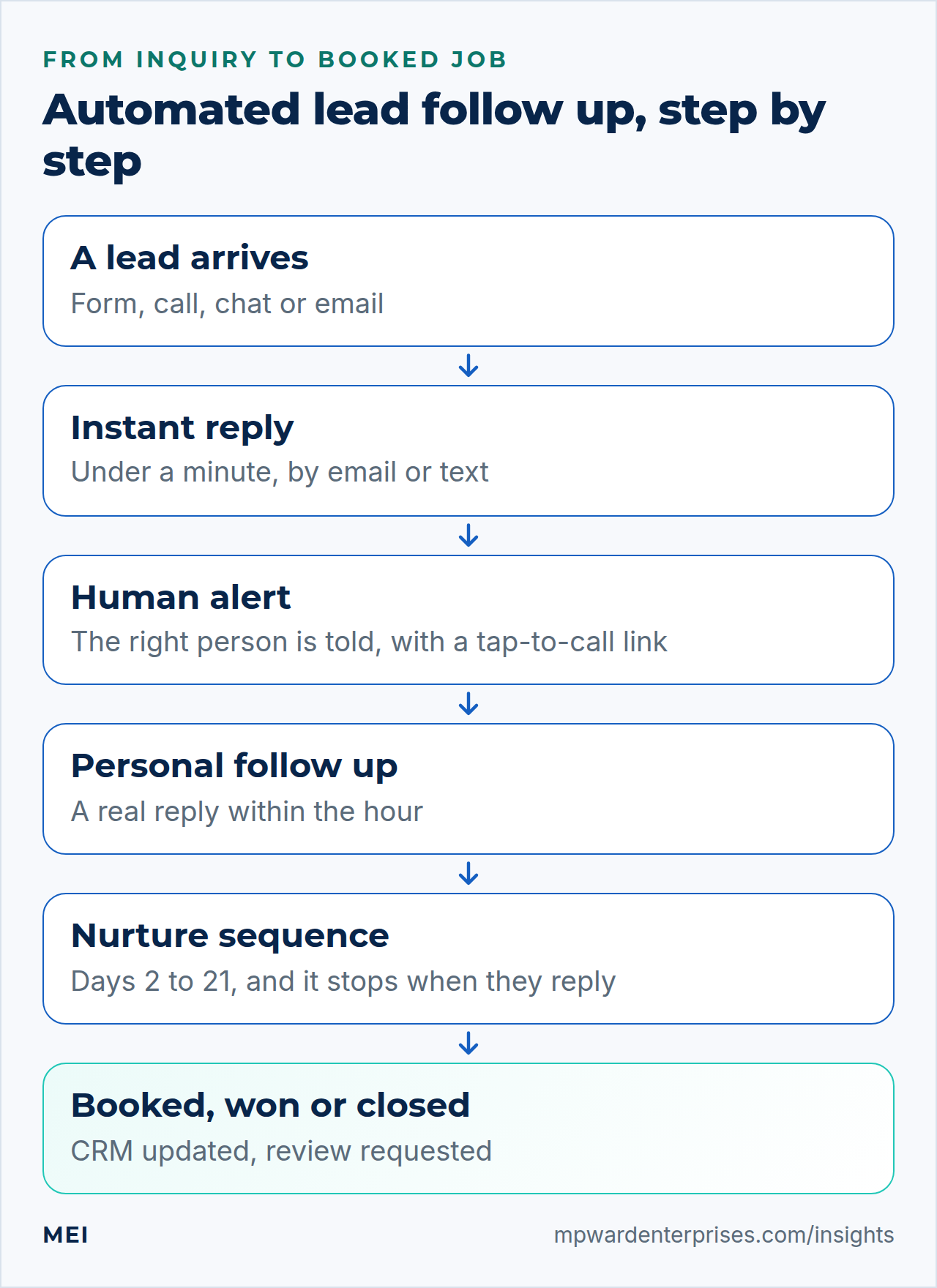
5 automated lead follow up workflows that win jobs
Workflow 1: The instant reply (within one minute)
When a form is submitted, send an immediate email, and a text if the person gave a mobile number and agreed to be texted. Its job is to confirm that the message arrived, say what happens next and by when, and offer a faster route such as a booking link. It does not need to be clever. It needs to be fast, accurate and sound like you.
Sample wording
"Thanks, [Name]. We have your request and a real person will reply by [time]. If it is urgent, call us on [number], or pick a time that suits you here: [link]. [Business name]"
Workflow 2: The human alert (within five minutes)
The instant reply buys you time; it does not win the job. At the same moment, alert the person who will actually respond, by text, chat message or email, with everything they need: name, number, what the lead asked for, and where it came from. Add a tap-to-call link. Set a target such as "a human reply within 15 minutes in business hours", and an escalation if nobody acts: after ten minutes, alert the backup person.
Workflow 3: The missed-call text-back (within one minute)
Callers who reach voicemail often move on to the next business. When a call goes unanswered, send a short text to that number straight away. Keep it informational, not promotional, and include a way to opt out.
Sample wording
"Sorry we missed your call to [Business name]. How can we help? Reply here or book a time: [link]. Reply STOP to opt out."
Workflow 4: The nurture sequence (days 2 to 21)
Most leads are not ready on day one. A short sequence keeps you in mind without nagging. Five touches over three weeks is a sensible default for most service businesses, and every touch should offer something useful rather than "just checking in". Stop the sequence the moment the lead replies, books or opts out.
| When | Channel | Purpose | Example opening |
|---|---|---|---|
| Day 0 | Email and text | Confirm and set expectations | "We have your request..." |
| Day 2 | Answer the most common question | "The question we hear most is..." | |
| Day 5 | Text or call | A personal check-in | "Did you get what you needed?" |
| Day 10 | Proof: a short case or review | "Here is how we helped a business like yours..." | |
| Day 21 | A polite close-out | "We will close your request unless..." |
Workflow 5: Quote, appointment and review follow-up
The leaks after the first conversation are as costly as the ones before it. Automate the reminders that people forget. Send an appointment reminder a day before and a couple of hours before, and a polite no-show message with a rebooking link. Follow up on quotes at two, five and twelve days. After the job, ask for a review while the experience is fresh, and ask satisfied customers for referrals.
- Appointment reminders at 24 hours and 2 hours, with a one-tap reschedule link.
- A no-show message within an hour that makes rebooking easy.
- Quote follow-ups at days 2, 5 and 12, each with a different reason to reply.
- A review request a day or two after the job is done, with a direct link.
- A referral ask for customers who gave a five-star review.
Capture every channel, not just the form
Automated lead follow up only works on the leads it can see. Many small businesses have a good form workflow and a leaky everything else. List every place an inquiry can arrive and make sure each one lands in the same system with the same timers.
| Channel | How it arrives | What to automate |
|---|---|---|
| Website forms | Email or form entry | Instant reply, alert, CRM record |
| Phone calls | Answered or missed | Missed-call text-back, voicemail transcript sent to the owner |
| Website chat | A conversation | Capture contact details, alert a person for anything sensitive |
| Shared inbox | info@ or sales@ | Auto-forward to the CRM, acknowledgment, assignment |
| Social and business profile messages | Direct messages | Notification to a person, then log the lead by hand or by integration |
A worked example
Picture a two-person home services business. A homeowner fills in the quote form at 7 p.m. The instant reply arrives in seconds and offers a booking link. The owner's phone buzzes with the details and a tap-to-call link; if nobody acts within ten minutes, the partner is alerted. The next morning a person calls. If the homeowner books, the sequence stops and a reminder schedule starts. If not, the day 2, 5, 10 and 21 messages go out. At every step the pipeline shows who is waiting for what.
Compliance basics for email and text
Automation makes it easy to send a lot of messages, so know the rules before you switch it on. This is general information, not legal advice; check your situation with a lawyer.
- Email: under the CAN-SPAM Act, the FTC says your sender and routing information must be accurate, the subject line must reflect the content, a commercial message must be identified as an advertisement, and it must include your valid postal address and a clear way to opt out. Opt-outs must be honored within 10 business days, and you cannot contract away responsibility by hiring another company to send for you. The FTC lists penalties of up to $53,088 per violating email.
- Text and calls: FCC rules require prior express written consent for telemarketing calls or texts made with an autodialer or an artificial or prerecorded voice. A person can revoke consent by any reasonable method, and replies such as "stop", "quit", "end", "cancel" or "unsubscribe" count automatically. Honor requests within a reasonable time not exceeding ten business days.
- Your own rules: ask for consent in the form itself, keep a record of it, and build "stop" handling into every sequence.
What you need to build it
You do not need much. Four parts cover almost every setup: a way to capture leads in one place (forms, call tracking, chat), a CRM or at least a shared pipeline, an email and text service, and an automation tool that connects them and runs the timers. Our guide to API integration for small business explains how the pieces talk to each other, and the small business tech stack guide shows where the customer system fits among your other tools.
Before you build, test the front door. If a contact form does not deliver, no automation can help. See WordPress contact form not sending email if yours is flaky, and make sure the email you send is authenticated, as covered in SPF, DKIM and DMARC explained, so it does not land in spam.
What to measure
Four numbers tell you whether automated lead follow up is working. Track them weekly at first.
- Time to first response.Median minutes from inquiry to the first reply, automated and human separately. Aim for an automated reply in under a minute and a human reply in under an hour in business hours.
- Contact rate.The share of leads you actually spoke with. This is the number the speed research is really about.
- Booking or quote rate.The share of contacted leads who book, or who receive a quote.
- Win rate by source.Which channels bring leads that become customers, so you know where to put effort.
Mistakes that make automation backfire
- No stop rule. Nothing is more annoying than a follow-up that arrives after you have already spoken. Stop on reply or booking.
- No human step. Automation protects the first minutes; a person must take over for qualification and anything sensitive.
- Too many messages. Five useful touches beat fifteen reminders.
- Ignoring opt-outs. It breaks the rules and damages your sender reputation.
- Leads in the wrong place. Leads in a personal inbox cannot be tracked or followed up by anyone else.
- Never reading the numbers. If you do not look at response time, it drifts back to days.
Getting help
Many owners can build the first two workflows themselves in an afternoon. Wiring in the CRM, the text messages, the reminders and the reporting is where a partner saves time. MEI's Automated Lead Follow-Up & CRM service starts at $1,500, with monthly management optional. It captures leads from forms, calls and messages into one place, sends instant auto-responses and internal alerts, runs follow-up sequences by text and email, keeps a simple CRM pipeline, and reports on response time and conversion, with a human review step where judgment matters.
If missed calls and after-hours inquiries are the main leak, an AI assistant can cover them; see our guides to the AI receptionist for small business and AI for small business owners. If you are not sure where leads are slipping, the Business Tech Rescue Audit starts at $497 and tests your forms, email delivery and workflows together.
Frequently asked questions
What is automated lead follow up?
Automated lead follow up is a system that replies to every new inquiry within a minute, alerts a person, and sends scheduled follow-ups by email or text until the lead books, buys or opts out. It protects the first minutes and the quiet days afterwards, so no lead depends on someone remembering to reply.
How fast should you respond to a new lead?
As fast as you can. A Harvard Business Review study found that contacting a lead within an hour made a firm nearly seven times as likely to qualify it as contacting it an hour later. A sensible target is an automated reply within a minute and a human reply within 15 minutes to an hour during business hours.
Is automated lead follow up legal?
Yes, if you follow the rules. For email, the CAN-SPAM Act requires accurate sender information, honest subject lines, a postal address and a working opt-out honored within 10 business days. For texts and calls made with an autodialer or prerecorded voice, FCC rules require prior express written consent and prompt handling of opt-outs. This is general information, not legal advice.
How many times should you follow up with a lead?
A sensible default for service businesses is about five touches over three weeks, mixing email, text and a personal call, with each message offering something useful. Stop the sequence as soon as the lead replies, books or opts out, and follow up on quotes at roughly two, five and twelve days.
Do I need a CRM for automated lead follow up?
You need at least one place where every lead is recorded, with a status and an owner. A CRM adds the timers, reminders and reports that make automation reliable. A well-structured shared spreadsheet can work at very small scale, but it cannot send the messages or stop a sequence for you.
How much does automated lead follow up cost?
The software is often inexpensive; the effort is in the set-up, the wording and the connections between your forms, phone, email and CRM. You can build the first two workflows yourself in an afternoon. MEI's Automated Lead Follow-Up & CRM service starts at $1,500, with monthly management optional.
Sources and further reading
- Harvard Business Review: The Short Life of Online Sales Leads (2011) — the audit of 2,241 companies, the 42-hour average response and the study of 1.25 million leads
- FTC: CAN-SPAM Act: A Compliance Guide for Business — the requirements for commercial email, opt-outs and penalties
- 47 CFR § 64.1200: Delivery restrictions — prior express written consent for autodialed and prerecorded telemarketing, and revocation of consent by text