API integration for small business means connecting the software you already use so that data moves between the tools automatically. A form submission becomes a CRM contact, a paid invoice updates your books, a booking creates a calendar entry and a reminder. Done well, it removes double entry and delay. Done badly, it creates silent failures and duplicate records. This guide shows five integrations worth doing, how to choose between no-code tools and custom code, and what makes an integration safe.
If your team re-types the same details into two or three systems, or a lead waits because nobody copied it across, you have an integration problem. You do not need to understand programming to fix it, but you do need to understand a few ideas: what an API is, how data is triggered, and where these projects usually fail. We cover each, with examples from small-business work.
What is API integration for small business?
AWS defines an API, or application programming interface, as a mechanism that lets two software components communicate with each other using a set of definitions and protocols. One application, the client, sends a request; the other, the server, processes it and sends a response. The most popular style on the web today is the REST API, which uses ordinary web requests such as GET to read data and PUT to change it.
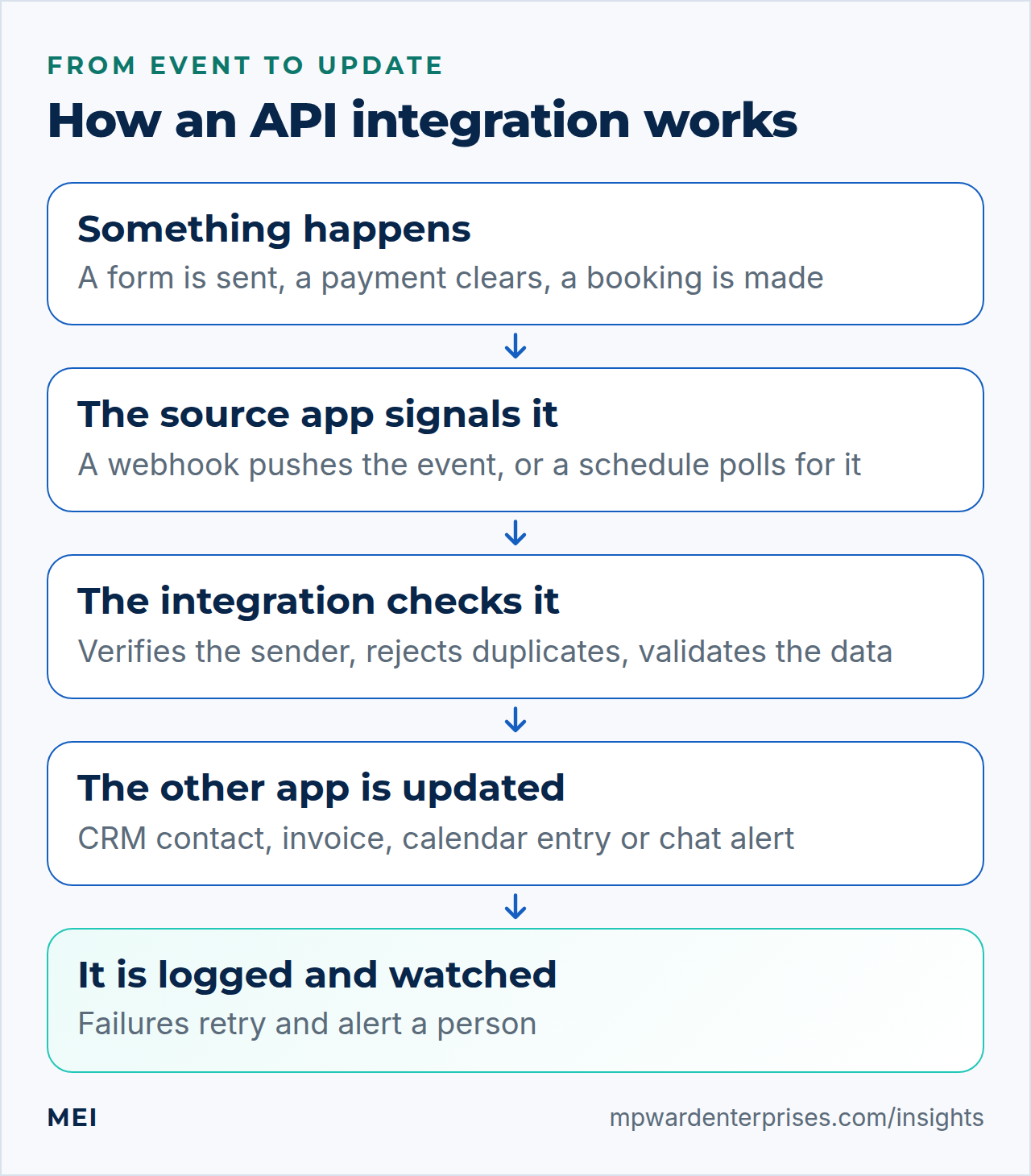
An API integration is the working link between two such systems: software that automatically updates data between them. There are two main ways to trigger it. Polling asks the other system, on a schedule, whether anything has changed. A webhook works the other way: the system pushes an event to your endpoint as soon as something happens. Stripe, for example, pushes real-time data to a registered endpoint when events occur in your account, such as a customer's bank confirming a payment or a recurring payment succeeding.
Signs you need an integration
- The same customer details are typed into two or more systems.
- Leads or orders wait until someone remembers to copy them across.
- Your invoices, bookings and payments do not match without a monthly clean-up.
- Staff keep a spreadsheet only to link what two tools could share.
- You discover problems from customers instead of from your own systems.
- Switching tools feels impossible because everything is wired together by hand.
5 API integration examples worth doing
1. Website form to CRM, instant reply and alert
When a visitor submits a quote request, the integration creates a contact in your CRM, sends a confirmation email or text, and alerts the person who should respond. It replaces a form that emails an inbox where leads wait. The payoff is speed and a single record; see automated lead follow up for the timings and wording. Watch for: duplicates when the same person submits twice, and forms that silently stop delivering.
2. Payment to accounting and fulfillment
When a customer pays, the payment processor sends an event to your system, which marks the order paid, creates the invoice or receipt in your accounting package, and starts fulfillment. This removes hand-keying of sales. Watch for: duplicate events and events that arrive out of order, both of which Stripe's documentation warns about. Log the event IDs you have processed, and do not depend on delivery order.
3. Booking to calendar, reminders and deposit
A booking tool creates the calendar entry, sends reminders, collects a deposit and tells the team. For a service business, reminders and deposits cut no-shows, and the calendar entry removes double booking. Watch for: time zones, canceled bookings that fail to remove the calendar entry, and refunds that do not reach accounting.
4. CRM or help desk to team chat and tasks
When a high-value lead arrives, a ticket is escalated or a quote is accepted, the integration posts a message in your team chat and creates a task for the owner. It turns passive records into prompts. Watch for: alert fatigue. Notify only on events that need action, and route them to the right person.
5. CRM and email marketing, kept in sync
A newsletter list that drifts away from your customer records causes two problems: customers who never hear from you, and unsubscribed people who keep receiving email. An integration that syncs new contacts, tags and opt-outs between the two keeps both lists honest. Opt-outs matter legally; the FTC says you must honor an email opt-out within 10 business days. Watch for: one-way syncs that re-add people who have unsubscribed.
No-code tools or custom code?
Both are legitimate. No-code automation tools connect hundreds of products with a visual builder; custom integrations are written in code and run on your own infrastructure or a cloud service. Zapier, the best-known no-code tool, counts a task whenever it successfully completes a unit of work, and its listed prices in October 2026 included a free plan with 100 tasks a month and paid plans from $19.99 a month for 750 tasks, $49 for 2,000 and $89 for 5,000 on annual billing. As volume grows, so does the bill.
| Question | No-code automation | Custom integration |
|---|---|---|
| Time to first working version | Hours | Days to weeks |
| Cost at low volume | Free or low monthly fee | Higher upfront build |
| Cost at high volume | Rises with the number of tasks | Mostly flat running cost |
| Complex logic and data cleaning | Limited and awkward | Fully flexible |
| Reliability and error handling | Depends on the tool's features | You design it, so you can make it stricter |
| Control of sensitive data | Passes through a third party | Stays in systems you choose |
| Who maintains it | You, through the tool's interface | A developer, or the partner who built it |
A sound rule is to start with a no-code tool for simple, low-volume, non-critical flows, and move to custom code when volume, logic, reliability or data sensitivity demand it. If you are deciding more broadly between buying and building, read custom software vs off the shelf.
What does API integration for small business cost?
There are three kinds of cost. First, the tool: a no-code plan, or the hosting for custom code. Second, the build: your own hours or a partner's. Third, and most often forgotten, the upkeep: watching for failures, renewing credentials and adapting when a vendor changes its API. Custom work is mostly people's time.
The Bureau of Labor Statistics puts the median software developer's wage at $135,980 (May 2025), which is roughly $93 an hour in employer cost once benefits are added, before overhead and profit, so a clear scope matters more than a low rate.
As a guide, a single simple flow between two popular products is often a few hours of work, while an integration with custom logic, several systems and proper monitoring is a project. Ask any provider for a fixed scope, a list of what happens when something fails, and a separate quote for ongoing support.
How to plan an integration: six steps
- Map the process and the data.Write down what triggers the flow, which fields move, and what should happen at the end. Include the unhappy paths.
- Choose the system of record.Decide which tool holds the truth for each piece of data, so that two systems never fight over a contact's phone number.
- Check what the APIs allow.Confirm that the products expose the data you need, and note authentication, rate limits and any plan that gates API access.
- Pick the trigger and the error rules.Webhooks for speed, polling where webhooks do not exist. Decide what happens on failure: retry, alert, or both.
- Build with logging and alerts.Record what moved and when, and tell a person when something fails.
- Test the awkward cases, then document.Duplicates, missing fields, an outage at either end, and a customer who changes their mind. Write down how it works and who owns it.
What goes wrong, and how to prevent it
| Failure | What it looks like | Prevention |
|---|---|---|
| Silent failure | Leads or orders stop flowing and nobody notices | Alerts on errors, and a weekly look at the logs |
| Duplicates | Two invoices or two contacts for one event | Log processed event IDs, and check before creating |
| Out-of-order events | A payment arrives before the order record | Do not depend on order; fetch the current object when needed |
| Rate limits | Bursts get rejected | Queue the work and process it at a steady pace |
| Expired credentials | Everything works, then stops | Track expiry dates, and alert on authentication errors |
| API changes | A field is renamed or removed | Pin API versions where offered, and watch vendor notices |
| Bad data in | Blank or malformed values corrupt the target system | Validate before writing, and reject what does not fit |
| Partial failure | The invoice is created but the email is not sent | Make steps retryable, and design them to run safely twice |
Stripe's documentation is a good model of the thinking. It notes that endpoints may occasionally receive the same event more than once, that delivery order is not guaranteed, that failed deliveries are retried for up to three days in live mode, and that handlers should return a success response quickly and do heavy work on an asynchronous queue. The same habits apply to any integration.
API integration security checklist
An integration holds the keys to your systems, so treat it as part of your security perimeter. OWASP's API Security Top 10 for 2023 starts with broken object level authorization and broken authentication, and also lists unrestricted resource consumption, security misconfiguration and unsafe consumption of APIs. The practical checklist is short.
- Verify the source of every incoming webhook. Stripe warns that without signature verification an attacker could send fake events to trigger actions such as fulfilling orders or changing records.
- Use HTTPS everywhere. Stripe requires HTTPS endpoints in live mode and supports only TLS 1.2 and 1.3.
- Keep keys and secrets out of code and spreadsheets, and store them in a password manager or secrets store.
- Give each integration the least access it needs, using a dedicated account or token, not a personal administrator login.
- Rotate secrets periodically and whenever you suspect exposure. Stripe recommends rolling signing secrets periodically.
- Use separate test and live credentials, and test with fake data.
- Validate everything that comes in, and never assume the other system is correct.
- Keep an inventory of your integrations, with owners, and review it quarterly. Our small business tech stack guide shows a one-page register.
Own it: monitoring, documentation and recovery
An integration is infrastructure, and it deserves infrastructure habits. Name an owner and a backup. Send alerts to a mailbox or channel that someone reads. Keep a short runbook that says what the integration does, what it connects to, where the credentials are kept and how to restart it. Back up the configuration and the code, and include integrations in your business continuity plan, because a broken lead or payment flow is an outage even when every individual system is up.
Getting help
You can build simple flows yourself in an afternoon with a no-code tool. The harder work is the reliable version: handling duplicates and failures, protecting credentials, and making the flow observable. MEI's Integration, Backup & Recovery service starts at $1,200, scoped by systems. It connects the software your business already runs, including websites, CRMs, accounting and email, through APIs and automation, and builds backup and recovery that is tested to confirm your data and systems can be restored.
If you need custom code, our Custom Software Development service builds connectors with code and documentation you own, and for WordPress sites see custom WordPress plugin development. If you are not sure which of your systems should talk to which, the Business Tech Rescue Audit starts at $497 and maps your tools and workflows.
Frequently asked questions
What is API integration?
API integration is a working link between two software systems that uses their application programming interfaces to exchange data automatically. For example, when a customer pays, the payment system sends an event that marks the order paid and creates an invoice in your accounting package, without anyone retyping the details.
Do I need a developer for API integration?
Not always. Simple, low-volume flows between popular products can be built with a no-code automation tool. You need a developer, or a partner, when the logic is complex, volume is high, data is sensitive or the flow is critical to revenue, because those cases demand error handling, security and monitoring.
How much does API integration cost?
No-code tools charge by usage: in October 2026 Zapier listed a free plan with 100 tasks a month and paid plans from $19.99 a month for 750 tasks on annual billing. Custom integrations cost more up front and less per transaction. MEI's Integration, Backup & Recovery service starts at $1,200, scoped by your systems.
What is the difference between an API and a webhook?
An API is the set of rules that lets one system request data from, or send data to, another. A webhook is a way of using that connection in reverse: the source system pushes an event to your endpoint as soon as something happens, instead of your system asking repeatedly whether anything has changed. Webhooks are faster and cheaper than polling.
Is API integration secure?
It can be, if you design for it. Verify the source of every webhook, use HTTPS, keep keys and secrets out of code, give each integration the least access it needs, use separate test and live credentials, rotate secrets, validate incoming data, and keep an inventory of integrations. OWASP's API Security Top 10 is a useful list of what goes wrong.
What is API to API integration?
API to API integration connects two systems directly through their APIs so that data flows between them without a person in the middle. It can be built with a no-code automation tool or with custom code, and it usually includes a trigger, a check on the data, an update in the target system, and logging and alerts.
Sources and further reading
- AWS: What is an API? — what an API is, the client and server model, REST, and API integrations
- Stripe: Receive Stripe events in your webhook endpoint — webhooks, signature verification, duplicate events, ordering, retries and best practices
- Zapier: Pricing — how tasks are counted and the Free and Professional plan prices (checked October 2026)
- OWASP: API Security Top 10 2023 — the most common API security risks
- FTC: CAN-SPAM Act: A Compliance Guide for Business — honoring email opt-outs within 10 business days
- US Bureau of Labor Statistics: Software Developers — median annual wage of $135,980 for software developers (May 2025)
- US Bureau of Labor Statistics: Employer Costs for Employee Compensation — benefits as 30.0 percent of total private-industry compensation (June 2026)