SPF DKIM DMARC explained in one breath: SPF lists which servers may send email for your domain, DKIM signs each message so it cannot be forged or altered unnoticed, and DMARC tells receiving servers what to do when those checks fail and sends you a report. Together, SPF, DKIM, DMARC decide whether your email reaches the inbox.
SPF, DKIM, DMARC sound like alphabet soup, and most explanations bury you in syntax. This one starts with a picture, then takes each record in turn, shows the one part everybody misses (alignment), and ends with a five-minute check you can run on your own domain today.
SPF DKIM DMARC explained with a mailroom
Picture the mailroom of an office building. Anyone can write a return address on an envelope, so the mailroom needs ways to decide which letters are genuine.
- SPF is the guest list at the door. The building keeps a list of couriers allowed to deliver letters for a given company. A courier who is not on the list is turned away or flagged.
- DKIM is the tamper-evident seal. The company stamps each letter with a seal only it can make. The mailroom checks the seal; a broken or forged seal means the letter was changed or is not from them.
- DMARC is the building's policy. It says: if a letter claiming to be from this company fails the list or the seal check, here is what to do (deliver anyway, set it aside, or refuse it), and please send the company a report.
In email terms the "company" is your domain, the "courier" is a mail server, and the "return address" is the From line that people see. The rest of this guide fills in the real details of SPF, DKIM, DMARC.
SPF in plain English: who is allowed to send
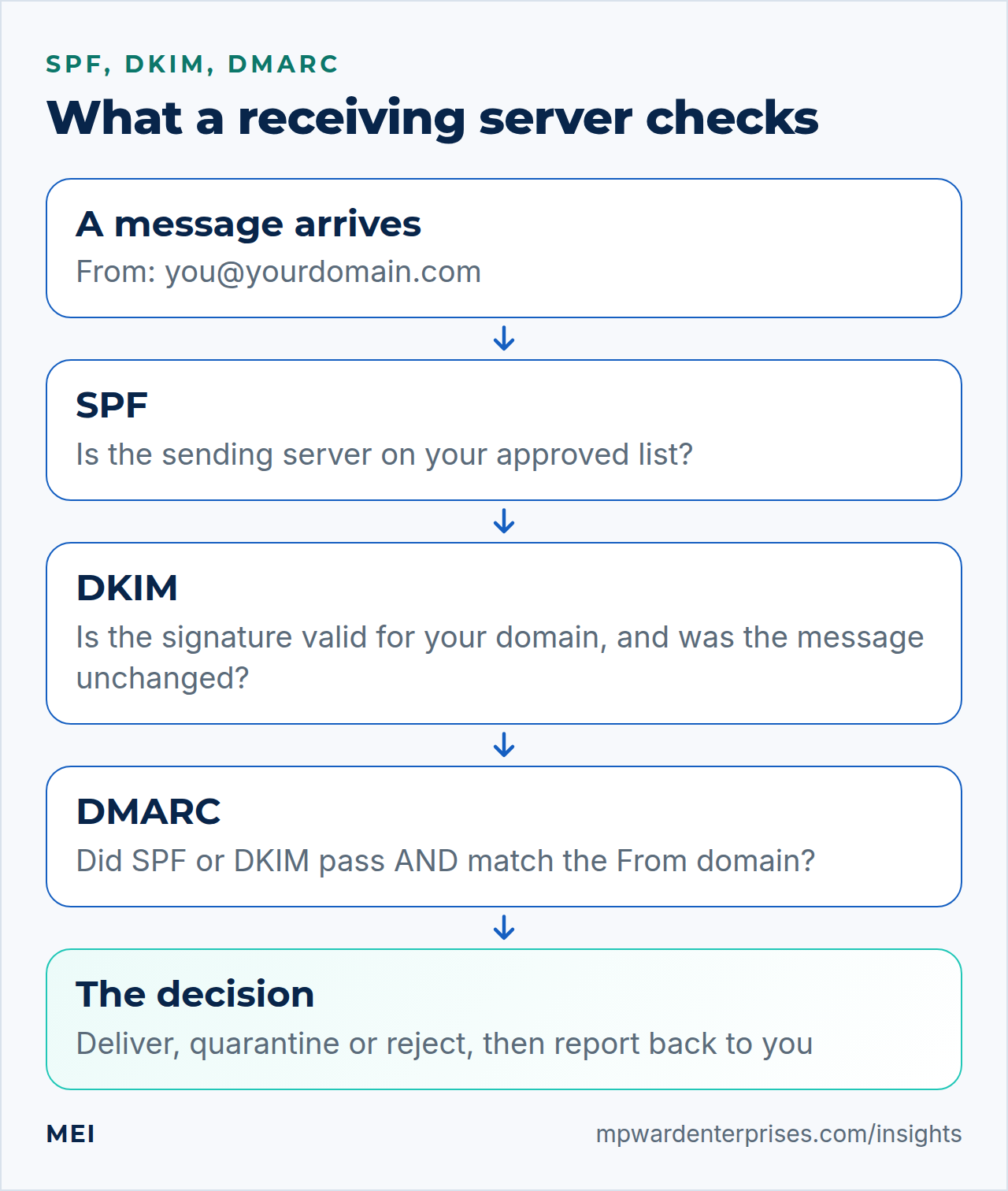
Sender Policy Framework is one DNS TXT record on your domain that lists the servers and services allowed to send mail for it. A receiving server looks up the domain used in the message's hidden envelope sender (the MAIL FROM or return-path address, and sometimes the server's HELO name), reads your list and checks whether the connecting server is on it. A record looks like this:
v=spf1 include:_spf.google.com include:your-form-service.example ~allReading left to right: version 1; allow whatever Google Workspace sends from; allow whatever the form service sends from; and for everyone else, ~all means "softfail". RFC 7208 defines four qualifiers: + pass, - fail, ~ softfail and ? neutral. Many domains start with ~all while testing and move to -all once they are sure the list is complete.
SPF has three habits worth knowing. A domain can publish only one SPF record, so a second one breaks the first. SPF evaluation is capped at 10 DNS lookups, and include, a, mx, ptr, exists and redirect each count toward it. And SPF checks the envelope sender, not the From line people read, which is why it cannot stop forgery on its own. It also breaks when mail is forwarded, because the forwarding server is not on your list.
DKIM in plain English: a signature that proves the message is yours
DomainKeys Identified Mail works with a pair of cryptographic keys. Your sending service keeps the private key and uses it to add a DKIM-Signature header to every outgoing message. You publish the matching public key in DNS, where receivers can fetch it. If the signature verifies, the receiver knows two things: the message was signed by someone who controls that domain, and the signed parts of it have not been altered on the way.
Three details make DKIM easy to read. The d= tag names the signing domain. The s= tag is the selector, which lets one domain have several keys; the public key lives at selector._domainkey.yourdomain.com, as RFC 6376 specifies. The bh= tag is a hash of the message body, so any change to the body breaks the signature. Because the signature travels inside the message, DKIM usually survives forwarding, unlike SPF. It can break when a mailing list or gateway rewrites the content.
Each service that sends as you signs with its own key, so you will normally publish several DKIM records, one per sender. Use 2048-bit keys where the service allows it.
DMARC in plain English: the policy, the alignment and the reports
Domain-based Message Authentication, Reporting and Conformance sits on top of the other two. So what is DMARC, in one line? It is a policy that says what to do with mail that fails the checks, plus a way to be told about it. It does three jobs. It defines a pass: a message passes DMARC only if SPF or DKIM passes and the domain that passed matches the domain in the visible From address. It sets a policy for failures: none (monitor only), quarantine (treat as suspicious) or reject (refuse).
And it asks for reports, so you can see who is sending as your domain.
A starter record, published at _dmarc.yourdomain.com, looks like this:
v=DMARC1; p=none; rua=mailto:[email address]The tags you will meet most are p (the policy), sp (the policy for subdomains), rua (where to send aggregate reports), pct (the percentage of mail the policy applies to, 100 by default), and adkim and aspf (strict or relaxed alignment, relaxed by default). Our DMARC setup guide shows how to move from monitoring to enforcement without losing legitimate mail.
Alignment: the part of SPF, DKIM, DMARC everyone misses
Alignment is the match between the domain that passed a check and the domain in the From line. In relaxed mode the two only need to share the same organizational domain, so mail.example.com aligns with example.com. In strict mode they must be identical.
This is where real-world failures hide. Suppose a booking platform sends mail "from" [email address]. Its server passes SPF, but for its own domain, and it signs DKIM with its own domain. Both checks pass, yet neither matches your From line, so DMARC fails. The fix is to configure the platform to sign with your domain (often called a custom or branded sending domain). If you remember one thing from this guide, make it this: passing SPF or DKIM is not enough; the passing domain has to be yours.
SPF, DKIM, DMARC at a glance
| SPF | DKIM | DMARC | |
|---|---|---|---|
| Question it answers | Is this server allowed to send for the domain? | Is the message signed by the domain and unaltered? | Does a passing check match the From domain, and what should happen if not? |
| Where it lives | TXT record on the domain | TXT or CNAME at selector._domainkey | TXT record at _dmarc |
| What it checks | The envelope sender and connecting server | A signature inside the message | Alignment with the visible From address |
| Survives forwarding? | Usually not | Usually yes | Passes if DKIM survives |
| Typical mistake | Two records, or more than 10 lookups | Signing off for one sender but not the others | Going to reject before reading the reports |
Why SPF, DKIM, DMARC matter now
Authentication used to be optional polish. It is now table stakes. Since February 2024 Google requires SPF or DKIM from every sender and both, plus DMARC and aligned From domains, from anyone sending 5,000 or more messages a day to Gmail. Yahoo asks bulk senders for SPF, DKIM and a DMARC policy of at least p=none, and Microsoft requires SPF, DKIM, DMARC and alignment from high-volume senders to Outlook.com, rejecting non-compliant mail.
The FTC's small-business guidance also tells owners to set up SPF, DKIM, DMARC so scammers cannot spoof their domain. Most small senders fall under those volume thresholds, but receivers apply the same suspicion to everyone, which is why authentication is the first fix in our guide to emails going to spam.
Check your own SPF, DKIM, DMARC in five minutes
Start with a real message. Send a test from your normal mailbox to a Gmail address, open it, click the three dots and choose Show original. Gmail shows SPF, DKIM and DMARC at the top, each PASS or FAIL. For DKIM, look at the header.d= value: it should be your own domain.
Then look at the records themselves with two DNS lookups. On a Mac or Linux terminal, or in Windows PowerShell with Resolve-DnsName:
dig +short TXT yourdomain.com | grep spf
dig +short TXT _dmarc.yourdomain.com
dig +short TXT selector._domainkey.yourdomain.com
You want exactly one line starting with v=spf1, one starting with v=DMARC1, and a key record for each selector your senders use. A free online DNS checker does the same without the terminal. If anything is missing, duplicated or failing, work through the nine fixes in our emails going to spam guide, and add the checks to your yearly IT audit.
Five SPF, DKIM, DMARC mistakes that break email
- Two SPF records.A new service tells you to "add this SPF record" and someone does, instead of merging it into the existing one.
- Too many lookups.Every marketing, CRM and form tool adds another include until SPF silently stops working past 10.
- Enforcing DMARC too early.Jumping straight to reject before reading the reports blocks legitimate mail from the sender you forgot.
- Forgetting the website.The contact form and shop emails send from the web server, which is in none of your records.
- Leaving subdomains and parked domains unprotected.Domains you do not send from still need a DMARC policy so scammers cannot use them.
If you would rather have all three set up and tested by someone who does it every week, MEI's email deliverability service inventories every sender, fixes the DNS and verifies delivery. It is also part of every Business Tech Rescue Audit.
Frequently asked questions
What is the difference between SPF, DKIM and DMARC?
SPF checks which server sent a message, DKIM checks that the message is signed by the domain and unchanged, and DMARC checks that one of them matches the visible From domain, then tells receivers what to do and reports back. They answer three different questions, which is why you need all of them.
Do I need all three of SPF, DKIM, DMARC?
Yes. SPF or DKIM alone proves little about the From address people see, and DMARC cannot work without at least one of them. Google and Yahoo now require SPF, DKIM, DMARC from bulk senders, and Microsoft asks the same of high-volume senders to Outlook.com.
Can I have more than one SPF record?
No. A domain must publish exactly one SPF record. Two separate SPF records cause SPF to fail with a permanent error. Merge every sender into a single record instead.
What is DMARC in simple terms?
DMARC is a policy record that tells receiving servers what to do with mail that claims to be from your domain but fails authentication, and asks them to send you reports about it. It is the part that turns SPF and DKIM into protection for the address people actually see.
What does p=none mean in DMARC?
It is monitoring mode. Receivers do not change how they treat failing mail, but they send you reports showing who is sending as your domain and whether they pass. It is the safe place to start before moving to quarantine and reject.
Will SPF, DKIM, DMARC stop all spam and phishing?
No. They stop other people forging your exact domain and improve how your own mail is treated. They do not stop look-alike domains, compromised accounts or spam sent from other domains.
Sources and further reading
- IETF RFC 7208: Sender Policy Framework (SPF) — qualifiers, the MAIL FROM and HELO identities, and the 10-lookup limit
- IETF RFC 6376: DomainKeys Identified Mail (DKIM) Signatures — selectors, the _domainkey namespace and signature tags
- IETF RFC 7489: DMARC — policy tags, alignment modes and aggregate reports
- FTC: Cybersecurity for Small Business, email authentication — why small businesses should authenticate their email
- Google: Email sender guidelines — the SPF, DKIM and DMARC requirements for Gmail senders