A small business cybersecurity checklist should tell you what to do first, not only everything that could be done. These 12 steps are in priority order. The first five (multi-factor authentication, a password manager, automatic updates, tested backups, and protected email) cost little, take days rather than months, and close the doors attackers use most. The other seven build on them.
Security advice for small companies tends to swing between "you are too small to matter" and a wall of enterprise jargon. Neither helps. This guide draws on CISA's Cyber Essentials, the NIST Small Business Quick-Start Guide and the latest Verizon breach data, turns them into twelve plain steps, and tells you what each one costs in time and money, so you can start this week.
Why a small business cybersecurity checklist matters
Verizon's 2026 Data Breach Investigations Report counts ransomware in 48 percent of all the breaches it studied, up from 44 percent the year before. Among ransomware cases where the victim's size was known, about 96 percent were small and medium-sized businesses. Verizon counts any organization with fewer than 1,000 employees as small, so the figure covers firms larger than most of our readers, but the direction is clear: smaller organizations are hit hardest.
The same report explains why. Many of these attacks are opportunistic: attackers cast wide nets, and it is less about industry or revenue than about victims having compromised credentials (38 percent) or unpatched vulnerabilities in edge devices (29 percent), the figures Verizon cites for these attacks. In other words, the common causes are the ordinary ones that this small business cybersecurity checklist is built to fix.
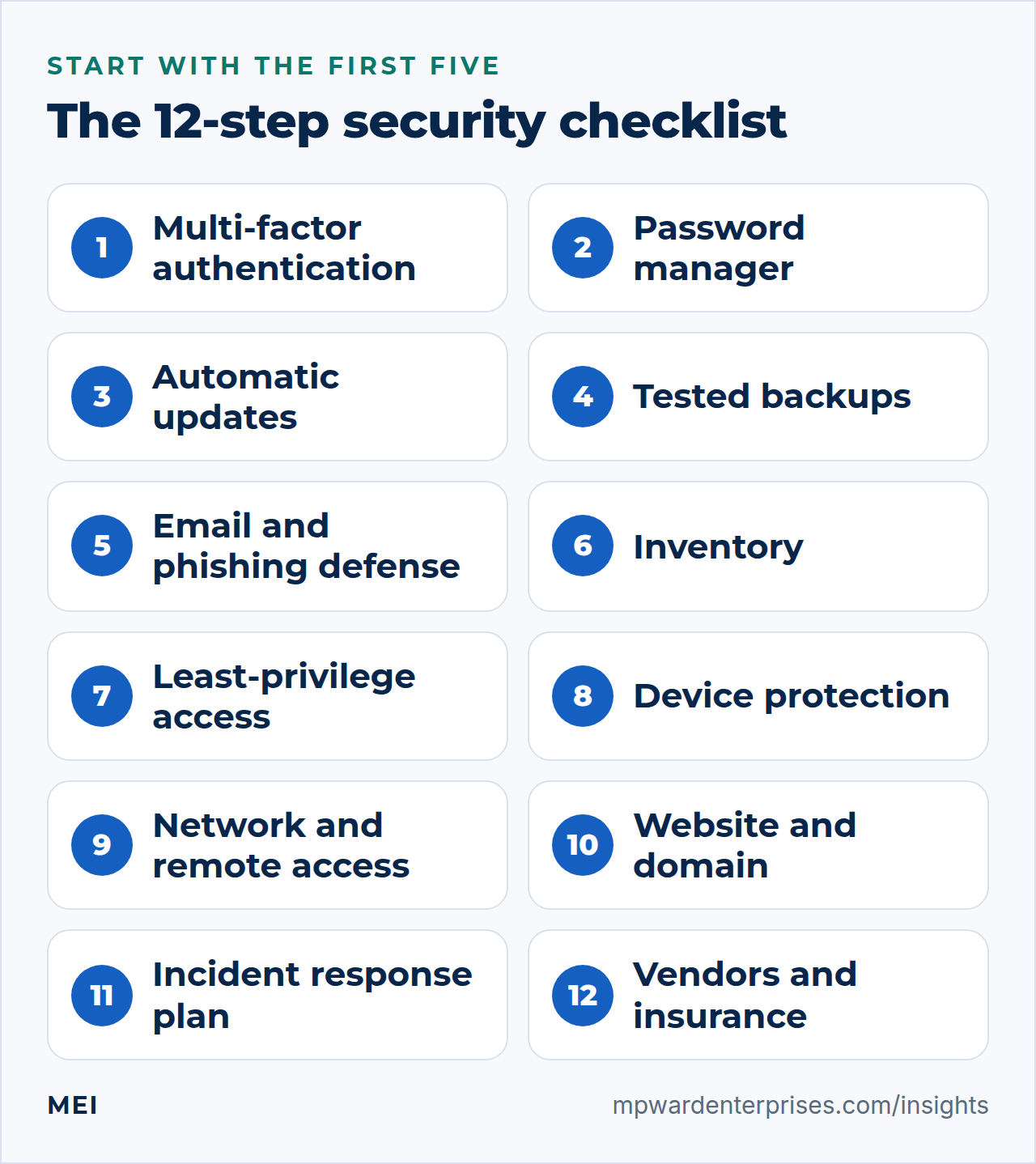
The small business cybersecurity checklist: 12 steps in priority order
Each step below says why it matters, what to do and roughly what it costs. Costs and times are our estimates for a business of up to a few dozen people; they vary with your setup.
1. Turn on multi-factor authentication
NIST's small business guide calls multi-factor authentication one of the fastest, cheapest ways to protect your data, and says to begin with the accounts that can reach the most sensitive information: banking, accounting and tax, merchant accounts, email, your Google, Microsoft or Apple ID, your password manager and your website. CISA's Cyber Essentials lists it as a baseline: multi-factor authentication for all users.
Not all second factors are equal. CISA ranks security keys first, then authenticator apps with number matching, then apps that show a code, then biometrics, with text-message and email codes weakest. Use an app or key on your most important accounts and text messages only where nothing better is offered. Cost and time: free for most services; an afternoon for the first ten accounts.
2. Use a password manager and unique passwords
Reused passwords turn one breach into many. Cyber Essentials says to use unique passwords for all user accounts, and NIST suggests a password manager to help you and your staff generate and protect strong ones. Pick a business plan with shared vaults and an administrator console, and change any default manufacturer password on routers, cameras and other devices. Cost and time: a low monthly fee per user; a few hours to roll out.
3. Update everything, especially devices facing the internet
Verizon's small-business data shows exploited vulnerabilities as the most common way in, ahead of stolen credentials and phishing. Turn on automatic updates for operating systems and third-party software, as both CISA and NIST advise, and do not forget firmware on routers, firewalls and VPN appliances. Remove software and hardware that no longer receive security updates. Cost and time: free in most cases; replacing unsupported equipment is the real expense.
4. Back up your data and test the restore
Backups are your way out of ransomware, and attackers know it: CISA warns that many variants try to delete or encrypt any backup they can reach. Keep three copies on two kinds of media with one off-site, make one copy offline or immutable, encrypt them all, and restore a real backup every quarter. Our guide to the 3-2-1 backup rule shows the setup. Cost and time: low to moderate, depending on data volume; a day to set up and an hour a quarter to test.
5. Protect email and train people to spot phishing
Email is the front door for both phishing and impersonation. CISA lists the signs to teach: urgent or emotional language, requests for personal or financial information, untrusted shortened links, and misspelled addresses. Its advice is to recognize, resist (do not click) and report, then delete. It also notes that AI-written phishing may have perfect grammar, so do not rely on spelling mistakes. Add the technical layer too: the FTC points out that scammers can use your domain name to send phishing emails that look as if they come from you.
SPF, DKIM and DMARC stop that; see SPF, DKIM and DMARC explained. Cost and time: free to low; a morning for the DNS records and a short training session each year.
6. Keep an inventory of devices, software and accounts
You cannot protect what you cannot list. Cyber Essentials tells you to maintain inventories of hardware and software assets, and NIST suggests a simple table of each asset, its owner, the sensitive data it can reach and whether multi-factor authentication is required. Our small business tech stack guide shows a one-page register you can copy. Cost and time: free; two to three hours, then half an hour each quarter.
7. Limit access, and remove it when people leave
Give people access based on need-to-know and least privilege, as Cyber Essentials advises, and keep administrator rights to as few accounts as you can. Write down a procedure for changes in user status: when someone joins, changes role or leaves, their access changes the same day. NIST's questions are blunt: are we restricting access to those who need it, and are we removing it when they no longer do? Cost and time: free; an hour to write the procedure and a few minutes per change.
8. Encrypt and protect every device
NIST recommends full-disk encryption on laptops and tablets so a lost device is not a data breach, and antivirus and anti-malware software on all business devices, including servers, desktops and laptops. Add a screen lock, automatic updates and, for staff who use personal phones for work, a written acceptable use policy. Cost and time: low per device; built-in encryption is free on current systems, and paid protection is a modest monthly fee.
9. Secure your network and remote access
Know who and what is on your network, and keep a separate Wi-Fi network for guests. Replace any consumer-grade router that no longer gets updates, close ports you do not use, and never leave an administration page open to the internet. For staff or vendors who need to reach internal systems, use a VPN or a similar secure remote access method rather than opening services to everyone. For servers, work through our Linux server hardening checklist. Cost and time: moderate; one-time equipment and set-up, or a few hours from a partner.
10. Secure your website, domain and DNS
Verizon lists basic web application attacks among the top three breach patterns for small organizations. Keep the site, its plugins and its theme updated, use HTTPS everywhere, protect administrator logins with multi-factor authentication, back up files and database, and keep the domain locked at the registrar with a login only the company holds. The FTC's advice on choosing a web host is to prioritize security, including TLS encryption and email authentication tools. Our WordPress website maintenance checklist sets out the routine. Cost and time: low to moderate; weekly and monthly routines, or a maintenance plan.
11. Write an incident response plan and practice it
Decide before the bad day who is in charge, who to call and what to report. NIST's guide lists a business champion who owns the plan, a "who to call" list with contact details, responsibilities and authority, and a note of what, when and how to report to regulators, customers, insurers and your bank. CISA adds that you should learn who to call for help and build an internal reporting structure. Our business continuity plan guide includes a one-page template and a first-hour checklist.
Cost and time: free; a few hours, plus one practice run a year.
12. Manage your vendors and consider cyber insurance
Verizon found third parties involved in 55 percent of small-organization breaches in its 2026 data, so your suppliers are part of your security. The FTC suggests putting provisions for security into vendor contracts and monitoring compliance, and NIST suggests assessing the cyber risk of suppliers before you sign. Both also point to cyber insurance as a way to recover from an attack; read what it covers and what it requires, because policies can set conditions on the controls you have in place.
Cost and time: insurance premiums vary widely; the vendor review is free and takes an hour per key supplier.
Cost and time at a glance
| Step | Typical cost | Time to start | Priority |
|---|---|---|---|
| 1. Multi-factor authentication | Free | An afternoon | First five |
| 2. Password manager | Low, per user | A few hours | First five |
| 3. Updates | Free to moderate | An hour, then ongoing | First five |
| 4. Backups and restore test | Low to moderate | A day | First five |
| 5. Email protection and training | Free to low | A morning | First five |
| 6. Inventory | Free | 2 to 3 hours | Next |
| 7. Access control | Free | An hour | Next |
| 8. Device protection | Low per device | A day | Next |
| 9. Network and remote access | Moderate | A day or two | Next |
| 10. Website and domain | Low to moderate | A day, then routine | Next |
| 11. Incident response plan | Free | A few hours | Next |
| 12. Vendors and insurance | Varies | A few hours | Next |
A 30-60-90 day rollout
- Days 1 to 7: the accounts.Turn on multi-factor authentication for email, banking, accounting, your domain registrar and your website, then start the password manager.
- Days 8 to 30: the foundations.Switch on automatic updates, set up and test the backups, publish SPF, DKIM and DMARC records, and hold a short phishing awareness session.
- Days 31 to 60: know and limit.Build the inventory, remove access nobody needs, encrypt laptops and protect every device.
- Days 61 to 90: plan and prove.Harden the network and website, write the incident response plan, review your vendors and insurance, and run a one-hour tabletop exercise.
Three myths that keep small businesses exposed
- "We are too small to be a target." Many attacks are automated and opportunistic, and the data show small organizations are the majority of ransomware victims. Attackers look for open doors, not for famous names.
- "Antivirus covers us." Antivirus is one control among twelve. It does not stop stolen passwords, unpatched routers or a staff member who approves a fake invoice.
- "Our cloud provider handles security." Providers secure their infrastructure; you still manage accounts, configuration, data and user behavior. See self hosted vs cloud for how the responsibility splits.
If you think you have been breached
Speed and order matter more than perfection. Disconnect affected devices from the network but do not wipe them, change passwords from a clean device, call your IT partner and your insurer, write down what you see and when, and do not pay or reply to a ransom note until you have taken advice. Then work through your incident response plan. A real-world checklist for those first hours is in our business continuity plan guide, and after the dust settles, a root cause analysis helps you fix the cause rather than the symptom.
Getting help
You can do the first five steps yourself in a few days. The later steps, especially network hardening, secure remote access and monitoring, benefit from experience. MEI's Network Architecture & Security service starts at $1,500, scoped after an assessment, and covers firewall and network hardening, secure remote access, server and endpoint hardening, monitoring, access control, a backup and recovery review and incident-response basics. We say plainly that no one can promise perfect security; we focus on the highest-impact, most likely risks for a business your size.
If you would like a prioritized view first, the Business Tech Rescue Audit starts at $497, and our IT audit checklist lets you start yourself.
Frequently asked questions
What are the most important cybersecurity steps for a small business?
Start with multi-factor authentication on your key accounts, a password manager with unique passwords, automatic updates (including routers and firewalls), tested backups with an offline or immutable copy, and protected email with phishing awareness. These five address the causes attackers use most. Then add an inventory, access control, device protection, network and website security, an incident plan and a vendor review.
How much does cybersecurity cost for a small business?
Less than most owners expect for the basics. Multi-factor authentication, updates, an inventory, access reviews and an incident plan are free apart from time. Password managers, backups and device protection are low monthly fees. Network hardening, monitoring and insurance cost more and vary with your setup, so get a scoped quote.
Do small businesses really get attacked?
Yes. Verizon's 2026 Data Breach Investigations Report found about 96 percent of ransomware victims with a known size were small and medium-sized businesses, which Verizon defines as organizations with fewer than 1,000 employees. Many attacks are opportunistic and automated, aimed at anyone with compromised credentials or unpatched systems.
Which multi-factor authentication method is best?
CISA ranks physical security keys as the strongest, followed by authenticator apps with number matching, authenticator apps with one-time codes and biometrics, with codes sent by text message or email the weakest. Use a key or an app on important accounts and any method, rather than none, everywhere else.
How often should I review my cybersecurity checklist?
Review access and your device and software inventory every quarter, test a restore every quarter, and run a tabletop exercise on your incident plan at least once a year. Repeat the review after any major change, such as a new system, a new vendor or staff turnover.
Is cyber insurance worth it for a small business?
It can be, as a way to recover financially from an attack, but it restores nothing by itself and policies can set conditions on the controls you have in place. NIST suggests assessing whether cyber insurance is appropriate for your business. Read exactly what is covered and excluded, and treat the checklist as the way to qualify for, and to need, it less.
Sources and further reading
- CISA: Cyber Essentials — the six elements and their actions, from unique passwords and updates to backups and incident response
- CISA: Require Multifactor Authentication — how security keys, authenticator apps, biometrics and text-message codes rank
- CISA: Recognize and Report Phishing — the common signs of phishing and the recognize, resist, delete and report steps
- CISA: #StopRansomware Guide — offline, encrypted backups and why ransomware targets accessible backups
- NIST SP 1300: Cybersecurity Framework 2.0 Small Business Quick-Start Guide — multi-factor authentication, updates, encryption, backups, antivirus, incident response and vendor and insurance considerations (February 2024)
- FTC: Cybersecurity for Small Business — email authentication, hiring a web host, vendor security and cyber insurance
- Verizon: 2026 Data Breach Investigations Report — ransomware share of breaches, the small and medium-sized business findings and initial access vectors