This mariadb secure installation guide shows what the script really changes, which of those changes Ubuntu already made for you, and how to finish the job. It covers Ubuntu 24.04 LTS and 26.04 LTS, so pick yours with the switch below. You inspect the server, run the script with the right answers, give each site its own least-privilege account, keep passwords off command lines, decide where MariaDB listens, and restore a backup once to prove it works. Allow about 75 minutes. You need MariaDB from Ubuntu's own repository (10.11 on 24.04, 11.8 on 26.04) and a user who can run sudo.
Every command here was run twice in disposable labs, once on Ubuntu 24.04 (MariaDB 10.11.14) and once on Ubuntu 26.04 (MariaDB 11.8.6), each with a real WordPress 7.1.3 database, never on a live server. We rebuilt the old insecure state on purpose (anonymous users, a test database, a remote root account) to watch the script remove it, and a second virtual host stood in for a separate web server. Where the two releases differ, the page shows only the one you picked.
The answer most guides give to one prompt actually weakens Ubuntu's default, and we show the test.
Choose your Ubuntu version
This guide covers both releases. Commands, file paths and version numbers change with your choice; everything else is the same.
JavaScript is off, so both versions are shown below and each block says which release it is for.
Before you start
You need a server running Ubuntu 24.04 LTS or 26.04 LTS with mariadb-server installed from Ubuntu's own repository, as in our guide to installing WordPress with Nginx on Ubuntu. Hardening the server and the UFW guide cover the layers around the database. The script edits MariaDB's privilege tables, so three habits keep this safe.
- Take a copy of the accounts first.
sudo sh -c 'umask 077; mariadb-dump --system=users > /root/mariadb-accounts-before.sql'writes every account definition to a file only root can read. It contains password hashes, so treat it as a secret. - Keep a second terminal open with a
sudoshell, so a mistake does not lock you out of the one session you have. - Do not run the script on a Galera cluster. MariaDB's documentation warns that it edits system tables directly, which Galera does not replicate. This guide is for a single server.
On Ubuntu 26.04, sudo is now sudo-rs, a Rust rewrite, and the everyday tools used below (ls, cat, tee, install, tail and date, among others) are the Rust versions from the uutils project, with cp, mv and rm still GNU. We ran every command as the admin user alex, including sudoedit, and each behaved as it does on 24.04, so nothing in this guide changes because of them. ls --version tells you which implementation you have.
Why run the script carefully, and not the other ways
Ubuntu's MariaDB package arrives in a much safer state than the databases the script was written for. That changes which option is best. These are the realistic ones.
| Option | In plain English | Our verdict |
|---|---|---|
| Run the script and answer yes to everything | Accept every default the prompts suggest | The common advice, and one answer makes things worse on Ubuntu: "Change the root password" gives root a password login next to its socket login, which we tested below |
| Run it with Ubuntu's answers (this guide) | Say no to the two root questions and yes to the rest | Our choice. It removes leftovers, changes nothing on a clean server (we checked), and takes a minute |
| Do the same steps by hand in SQL | List the risky accounts and databases, then drop them yourself | Identical result with nothing hidden. Good for audits, automation and clusters. Step 2 gives the statements |
| Skip it because Ubuntu is already safe | Trust the packaged defaults | True on a clean install, which step 1 proves. Not safe to assume on an old server, a restored backup or after an installer created accounts |
| A managed database service | Your provider runs and patches MariaDB | Removes the patching and backup chores and adds cost and a network hop. Outside this guide, but the account and TLS advice still applies |
The reasoning is the one a landlord uses at a handover. A new building arrives with the locks changed and the spare keys collected, so you check instead of re-keying everything. A building that has had tenants for years needs the full inspection. The script is the inspection, and step 1 tells you which kind of building you have.
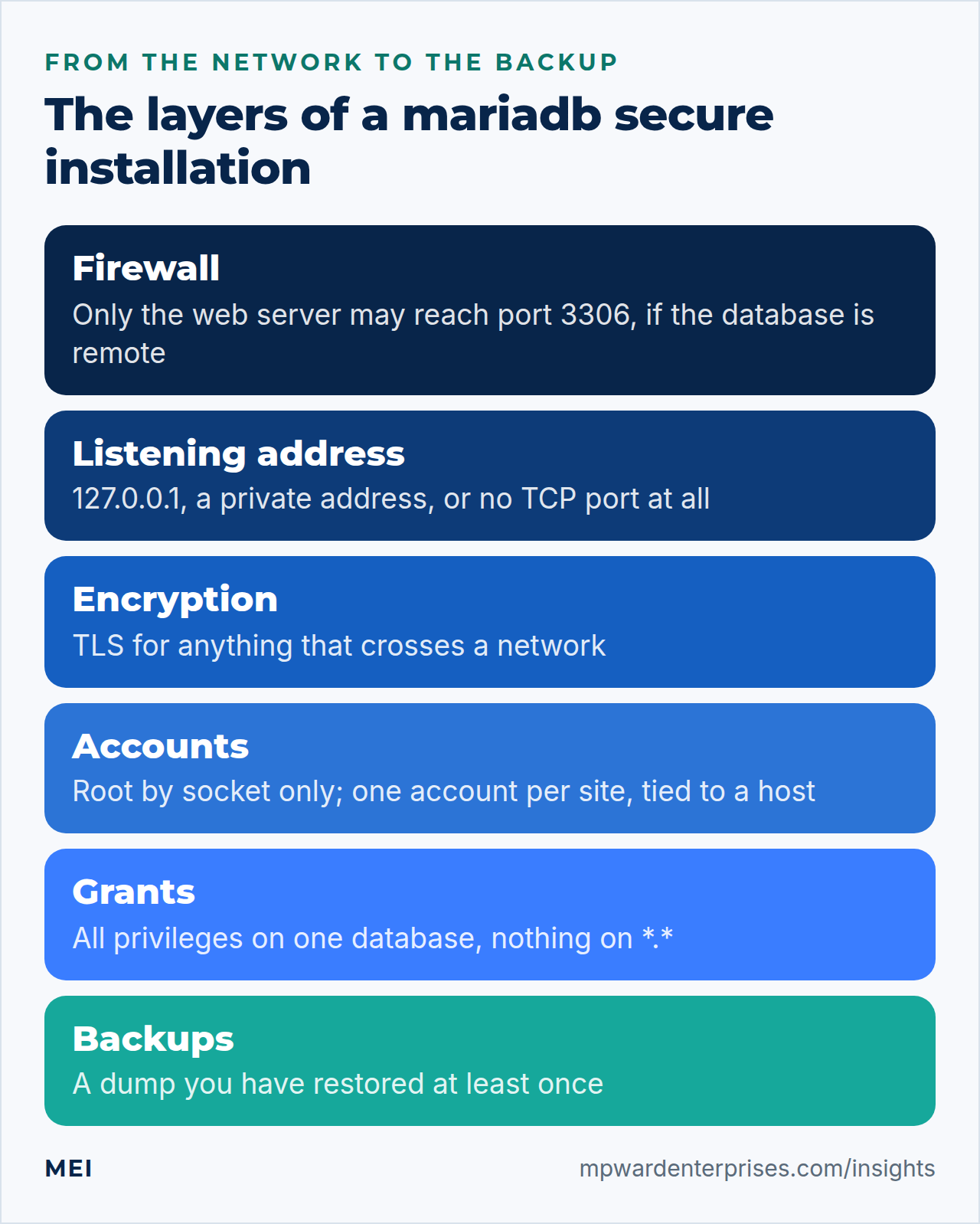
What the mariadb secure installation script changes, in plain English
The script is a shell program of about 580590 lines, and most of it is prompts. Reading it shows that it runs only a handful of SQL statements. It also passes your password to the client through a temporary option file with mode 600, never on a command line, which is the technique step 4 recommends. The table lists each prompt, the statement behind it, and whether a fresh Ubuntu install already did it.
| Prompt | What it does | Already true on a fresh Ubuntu install? | Our answer |
|---|---|---|---|
| Enter current password for root | Logs the script in. Press Enter: running as root, it connects through the socket | Yes: root has no usable password | Enter |
| Switch to unix_socket authentication | Makes root log in by operating-system identity, with an unusable password beside it | Yes: the script itself says you can answer n |
n |
| Change the root password | Stores a real password hash for root@localhost |
Not needed, and harmful (see below) | n |
| Remove anonymous users | DELETE FROM mysql.global_priv WHERE User='' |
Yes: none exist | Y |
| Disallow root login remotely | Deletes root accounts whose host is not localhost, 127.0.0.1 or ::1 |
Yes: none exist | Y |
| Remove test database and access to it | DROP DATABASE IF EXISTS test and the matching rows in mysql.db |
Yes: no such database | Y |
| Reload privilege tables | FLUSH PRIVILEGES |
Harmless | Y |
The root password question needs explaining. MariaDB's documentation says many reasons for the script no longer apply, because socket authentication has been the default since MariaDB 10.4. On Ubuntu, root@localhost is already IDENTIFIED VIA ... unix_socket, so only the operating-system root can use it. If you answer yes and set a password, the account gains a real password hash and keeps the socket login.
We tried it. After answering yes, an unrelated operating-system user (nobody) logged in as the database root with the new password, and was refused without it. Any compromised web account that learns or guesses that password now owns every database. So on Ubuntu, leave root alone and spend the effort on the accounts that applications use.
Good to know: on 26.04 the script says it is on its way out
The script on Ubuntu 26.04 opens with a banner: MariaDB is secure by default in Debian, running the script is useless at best and misleading at worst, and it will be removed in a future MariaDB release in Debian. The package's own README.Debian agrees, and adds that the script reports success after every step even when it did nothing. It still worked in our lab, and the seven answers in step 2 are unchanged: the banner adds one line, "Enter root user password or leave blank", but no new question.
Expect the script to disappear one day, which is why step 2 also gives the same changes as plain SQL.
Step 1: Look before you change anything
Ask the server what it has today. These queries read, and change nothing. Run them as root with sudo, so MariaDB recognizes you by your operating-system identity.
sudo mariadb -e "SELECT @@version AS version, @@bind_address AS bind_address, @@skip_networking AS skip_networking, @@have_ssl AS have_ssl"
sudo mariadb -e "SELECT User, Host, plugin FROM mysql.user ORDER BY User, Host"
sudo mariadb -e "SHOW CREATE USER root@localhost"
sudo mariadb -e "SHOW DATABASES"
sudo mariadb -e "SELECT User, Host, Db FROM mysql.db"
sudo ss -ltnp | grep 3306
On a fresh install, our lab reported version 10.11.14, bind_address 127.0.0.1, networking on, and have_ssl DISABLED, meaning no encryption is configured. It listed three accounts, mariadb.sys, mysql and root, all for localhost. Root was IDENTIFIED VIA mysql_native_password USING 'invalid' OR unix_socket: the password is a placeholder that nothing can match, so only the socket login works. The databases were information_schema, mysql, performance_schema and sys, and mysql.db was empty. One listener showed 127.0.0.1:3306.
On a fresh install, our lab reported version 11.8.6, bind_address 127.0.0.1, networking on, and have_ssl YES. That last value is new: since MariaDB 11.4 the server makes its own certificate when it starts, so TLS is available without any setup (step 5 shows what that does and does not give you). It listed three accounts, mariadb.sys, mysql and root, all for localhost.
Root was IDENTIFIED VIA mysql_native_password USING 'invalid' OR unix_socket: the password is a placeholder that nothing can match, so only the socket login works. The databases were information_schema, mysql, performance_schema and sys, and mysql.db was empty. One listener showed 127.0.0.1:3306. The data lives in /var/lib/mariadb on this release.
Three more queries answer the script's questions directly. On a clean server they all return nothing:
sudo mariadb -e "SELECT User, Host FROM mysql.user WHERE User = ''"
sudo mariadb -e "SELECT User, Host FROM mysql.user WHERE User = 'root' AND Host NOT IN ('localhost', '127.0.0.1', '::1')"
sudo mariadb -e "SHOW DATABASES LIKE 'test%'"
One more fact from the lab. In the default state the unprivileged user nobody could not use the root account at all, and even mariadb -h 127.0.0.1 run as the real root was refused with error 1698, because a TCP connection never carries the socket identity. Root works only through the socket. That is a feature: nobody can attack it across a network.
Why this way?
We look first because the right answer depends on what you find. A clean result means the script has nothing to do, and you can skip to step 3. A result with rows means the server came from an older install, a restore or an installer that created accounts, and the next step matters. Reading before writing is also how you avoid the one dangerous answer.
Step 2: Run the script with Ubuntu's answers, or do it by hand
To see the script work, we recreated the old default state on purpose in the lab: two anonymous accounts, a test database they could use, and a root account open to any host. If your server came back clean in step 1, run the script anyway; it is safe to repeat. We ran it a second time on a server with application accounts, and a checksum of the privilege tables and the database list was identical before and after.
sudo mariadb-secure-installationAnswer Enter, n, n, Y, Y, Y, Y, in the order of the table above. In our lab, the anonymous accounts, the remote root@%, the test database and its privilege rows all disappeared, and root@localhost was unchanged. For automation you can feed the same answers on standard input; the script prints harmless stty warnings when it has no terminal.
printf '\nn\nn\nY\nY\nY\nY\n' | sudo mariadb-secure-installationIf you prefer to do it by hand, list first, then remove what you found. Fill in the host part of each DROP USER from the output of the first query, because anonymous accounts can have other host names than the two shown.
sudo mariadb -e "SELECT User, Host FROM mysql.user WHERE User = '' OR (User = 'root' AND Host NOT IN ('localhost', '127.0.0.1', '::1'))"
sudo mariadb <<SQL
DROP USER IF EXISTS ''@'localhost';
DROP USER IF EXISTS ''@'%';
DROP USER IF EXISTS 'root'@'%';
DROP DATABASE IF EXISTS test;
SQL
sudo mariadb -e "SELECT Host, Db, User FROM mysql.db"
Dropping an account also removes its rows in mysql.db, so no separate cleanup is needed. Run the three checks from step 1 again; they should print nothing. The documented DROP USER is the cleaner route because it never edits system tables by hand.
Watch out: do not "fix" root with a password
If you already answered yes in the past, check with SHOW CREATE USER root@localhost. A line ending in USING 'invalid' OR unix_socket or IDENTIFIED VIA unix_socket OR mysql_native_password USING 'invalid' is the safe state. A real hash, like USING '*0FC2...', means root accepts a password. Undo it with ALTER USER root@localhost IDENTIFIED VIA unix_socket OR mysql_native_password USING 'invalid';.
Why this way?
The script and the hand method end in the same state. We keep the script as the default because the next person will recognize its name, and it explains each step as it runs. The by-hand route earns its place in an automated build, where you want every statement visible in your own scripts.
Step 3: Give each site one database and one account
The account the website uses is usually the bigger risk than root, because its password sits in a file on the web server. Make that account as small as you can: one account per site, tied to localhost, with all privileges on that site's database and nothing else. Generate the password with openssl, and keep it in a shell variable so it never appears in a command.
DB_PASS=$(openssl rand -base64 24 | tr -d '/+=')
sudo mariadb <<SQL
CREATE DATABASE sitedb CHARACTER SET utf8mb4 COLLATE utf8mb4_unicode_ci;
CREATE USER 'sitedb_user'@'localhost' IDENTIFIED BY '$DB_PASS';
GRANT ALL PRIVILEGES ON sitedb.* TO 'sitedb_user'@'localhost';
SQL
sudo mariadb -e "SHOW GRANTS FOR 'sitedb_user'@'localhost'" | grep -v 'ON \*\.\*'
sitedb.* means every table in that one database. ALL PRIVILEGES at that level covers creating and altering tables, which WordPress needs for some updates and plugins, and MariaDB's documentation notes it does not include the right to hand out privileges. The last command hides the line with the password hash. To see what the scope buys you, we compared this account with a broad one, created with GRANT ALL PRIVILEGES ON *.*.
| What the account tried | sitedb_user (one database) |
A *.* account |
|---|---|---|
SHOW DATABASES |
information_schema and sitedb only |
All six, including mysql |
| Read a table in another site's database | Refused, error 1142 | Worked |
Read the mysql.user table |
Refused, error 1142 | Worked: it counted every account |
| Create a new account | Refused: needs the CREATE USER privilege |
Worked |
| Create and drop tables inside its own database | Worked | Worked |
The host part matters as much as the privileges. 'sitedb_user'@'localhost' matches only connections from the server itself, so a leaked password is useless from anywhere else. Avoid @'%', which matches any address; MariaDB's documentation lists the wildcard and netmask forms for when a real range is needed. The account name in wp-config.php should be this one, never root. Our multi-site guide repeats the pattern for every extra site.
Why this way, and why a password at all?
Password accounts use mysql_native_password, which every client supports and which stores only a hash. A second option is socket authentication, as root uses. We tested it: CREATE USER 'siteuser'@'localhost' IDENTIFIED VIA unix_socket let the operating-system user siteuser reach the database with an empty password, through WP-CLI and PHP's mysqli, and refused every other user. It leaves no password to leak, but it needs PHP-FPM to run as that user, as in the multi-site guide.
We did not test it through a web request.On 26.04 we also loaded a WordPress site through its PHP-FPM pool that way, with an empty database password, and it answered 200; the web server's own account was refused.
Step 4: Keep passwords off command lines
A command line is visible to every user on the machine. We started a client with the password on its command line and listed processes as the unprivileged user nobody. The mariadb client overwrites the password in its own arguments, so ps showed -px xxxxxxxx instead, which is better than nothing. But the hiding happens after the process starts, your shell history keeps what you typed, and other programs do not hide anything. A small Python script, our stand-in for any tool started with --dbpass=..., showed the full password to nobody.
There are three safe ways to supply a password to MariaDB's own tools, and one that needs none. The first is to let the client ask:
mariadb -u sitedb_user -p sitedbThe second is an option file that only you can read. Create it without ever typing the password on a command line, and point the client at it:
sudo install -m 600 /dev/null /root/sitedb.cnf
printf '[client]\nuser=sitedb_user\npassword=%s\n' "$DB_PASS" | sudo tee /root/sitedb.cnf > /dev/null
sudo mariadb --defaults-extra-file=/root/sitedb.cnf -e "SELECT CURRENT_USER()"
The install command creates the empty file with mode 600 first. printf is built into your shell, so no process ever carries the password in its arguments, and tee receives it on standard input. Run this in the terminal where you generated DB_PASS.
The third way is the here-document you used in step 3, where the statements arrive on standard input; we checked the process list during one, and it showed only mariadb. The way with no password at all is sudo mariadb, which uses root's socket identity. Use it for every administration task you do yourself.
File permissions matter. In the lab, an option file with mode 600 or 644 worked silently, but a world-writable file (666) was ignored, with the warning "World-writable config file ... is ignored", and the client fell back to other credentials. Keep the file at 600 and owned by the account that uses it.
Why this way?
Our WordPress guide measured the same problem on the WordPress side and gives the WP-CLI answer, a prompt on standard input. The rule is the same everywhere: a secret goes in a file with strict permissions, or in a pipe, or in a prompt, and never in an argument. The file approach is also what the script itself uses internally.
Step 5: Decide where MariaDB listens
A database that cannot be reached cannot be attacked from the network. The right setting depends on where the programs that use MariaDB live.
| Situation | Setting | What to know |
|---|---|---|
| Everything runs on this server | Keep Ubuntu's bind-address = 127.0.0.1 |
Only this machine can connect over TCP. The default, and enough for most sites |
Everything uses the socket (WordPress with DB_HOST set to localhost) |
skip-networking |
No TCP port at all. We checked: no listener, and WordPress still passed wp db check. Anything that connects to 127.0.0.1 stops working |
| A separate web server needs the database | bind-address = 10.0.0.5 (the database server's private address) |
Needs a firewall rule, an account tied to the web server's address, and TLS. The rest of this step covers it |
| Never | 0.0.0.0 with no firewall, or accounts at '%' |
Anyone who can reach the port can try passwords, and MariaDB's documentation cautions against exposing broad accounts to the Internet |
The first three rows are lab results; the last is advice. For the remote case we used a second virtual host at 10.0.0.6 as the web server. Put each setting under [mysqld] in a drop-in file in /etc/mysql/mariadb.conf.d/. Files are read in alphabetical order and later settings win, so a name that sorts after 50-server.cnf overrides it.
sudoedit /etc/mysql/mariadb.conf.d/60-private.cnf[mysqld]
bind-address = 10.0.0.5sudo systemctl restart mariadb
sudo ss -ltn | grep 3306The listener moved to 10.0.0.5:3306, the local socket kept working, and TCP to 127.0.0.1 stopped. MariaDB 10.11 and later accept a comma-separated list: bind-address = 127.0.0.1,10.0.0.5 gave two listeners. Next, open the port to one address only, using the rule style from the UFW guide, and create an account for that address.
sudo ufw allow from 10.0.0.6 to any port 3306 proto tcp comment "MariaDB from the web server"
REMOTE_PASS=$(openssl rand -base64 24 | tr -d '/+=')
sudo mariadb <<SQL
CREATE USER 'sitedb_user'@'10.0.0.6' IDENTIFIED BY '$REMOTE_PASS';
GRANT ALL PRIVILEGES ON sitedb.* TO 'sitedb_user'@'10.0.0.6';
SQLWith UFW denying incoming traffic, as in our UFW guide, the web server's connection timed out until that rule existed, then worked. Move the password to the web server over a secure channel such as scp, never by email or chat.
The firewall and the account host are two separate locks: the same user name and password from 10.0.0.7 failed with error 1130, "Host '10.0.0.7' is not allowed to connect", although the 11.8 client shows it as error 2002 ("Received error packet before completion of TLS handshake") because it had already started TLS. You want both locks.
Passwords and data would still cross the network in the clear, so add encryption. In the lab, have_ssl was DISABLED until we configured it. Create a small certificate authority and a server certificate that names the private address, and let the mysql group read the key.
On this release encryption is already switched on. In step 1 have_ssl was YES although we had configured nothing: since MariaDB 11.4 the server makes a self-signed certificate when it starts and keeps it only in memory. Ask what a client on the web server gets with no TLS options at all, using /root/remote.cnf, a mode-600 option file there that holds the remote account (built like the one in step 4):
sudo mariadb --defaults-extra-file=/root/remote.cnf -h 10.0.0.5 -e "STATUS" | grep -E "SSL|Current user"The lab answered Cipher in use is TLS_AES_256_GCM_SHA384, cert is OK, with no certificate authority involved. MariaDB's documentation explains how: clients from 11.4 on use TLS for network connections and check the self-signed certificate with the account's password as a shared secret, which works for mysql_native_password, ed25519 and parsec accounts, including every account in this guide.
Two limits showed up in the lab. Nothing is forced: the same client with --skip-ssl connected without encryption. And not every client has the feature. PHP 8.5's mysqli, which WordPress uses, connected with no TLS at all until we passed the MYSQLI_CLIENT_SSL flag; then it encrypted without checking who it was talking to, and asking it to check failed because it had no CA file. WordPress sets client flags only if wp-config.php defines MYSQL_CLIENT_FLAGS, and application settings are outside this guide.
So there are two reasonable setups. If every client is a MariaDB 11.4 or newer client, the built-in certificate is enough, and you can go straight to the REQUIRE SSL command below. If a client must check against a CA, or you want a certificate that stays the same after a restart, create your own certificate authority. The commands work unchanged on this release. Create a small certificate authority and a server certificate that names the private address, and let the mysql group read the key.
sudo install -d -m 755 /etc/mysql/ssl && cd /etc/mysql/ssl
sudo openssl req -x509 -newkey rsa:2048 -nodes -keyout ca-key.pem -out ca.pem -days 730 -subj "/CN=Example database CA"
sudo openssl req -newkey rsa:2048 -nodes -keyout server-key.pem -out server.csr -subj "/CN=db.example.com"
echo "subjectAltName=IP:10.0.0.5,DNS:db.example.com" | sudo tee san.ext
sudo openssl x509 -req -in server.csr -CA ca.pem -CAkey ca-key.pem -CAcreateserial -out server-cert.pem -days 730 -extfile san.ext
sudo chown root:mysql server-key.pem && sudo chmod 640 server-key.pem && sudo chmod 600 ca-key.pemAdd the certificate settings to the same drop-in, restart, and test from the web server with a client that checks the certificate. Copy only ca.pem to the web server, as /root/db-ca.pem; ca-key.pem must stay private.
[mysqld]
bind-address = 10.0.0.5
ssl_ca = /etc/mysql/ssl/ca.pem
ssl_cert = /etc/mysql/ssl/server-cert.pem
ssl_key = /etc/mysql/ssl/server-key.pem
tls_version = TLSv1.2,TLSv1.3sudo systemctl restart mariadb
sudo mariadb -e "SELECT @@have_ssl"
sudo mariadb --defaults-extra-file=/root/remote.cnf -h 10.0.0.5 --ssl-ca=/root/db-ca.pem --ssl-verify-server-cert -e "STATUS" | grep -E "SSL|Current user"Expect have_ssl to be YES and the status to show Cipher in use is TLS_AES_256_GCM_SHA384. Here /root/remote.cnf is a mode-600 option file on the web server holding the remote account. Now make encryption mandatory for that account, so a client that skips it is refused:
sudo mariadb -e "ALTER USER 'sitedb_user'@'10.0.0.6' REQUIRE SSL"To encrypt every network connection whatever the account says, add require_secure_transport = ON to the drop-in instead. The local socket stays allowed. Switch either one on only after the program that uses the account asks for TLS, because one that does not is refused too. A default WordPress connection through PHP's mysqli is such a program: we checked PHP 8.3 and 8.5, and neither used TLS until asked.
Watch out: three traps in the TLS step
A key file readable only by root stops MariaDB from starting: our log said "Unable to get private key", then "Aborting". Fix it by making the key group-readable by mysql. The 10.11 client in our lab used TLS once the server offered it, but checked the certificate only with --ssl-verify-server-cert; a wrong CA then failed with "self-signed certificate in certificate chain". And a client that refuses mandatory TLS gets only the vague "Access denied ... (using password: YES)".
Watch out: three traps in the TLS step
A key file readable only by root stops MariaDB from starting: our log said "Unable to get private key", then "Aborting". Fix it by making the key group-readable by mysql. Pointing the client at your CA with --ssl-ca and --ssl-verify-server-cert makes it check the certificate that way, and a wrong CA then failed with "self-signed certificate in certificate chain". And a client that refuses mandatory TLS gets only the vague "Access denied ...
(using password: YES)" when the account says REQUIRE SSL; with require_secure_transport the server says it plainly, as ERROR 3159: connections using insecure transport are prohibited.
Why this way?
A private CA is a few commands and suits one database. MariaDB's documentation says TLS is on by default for non-local connections, with certificate checking required, from version 11.4. Ubuntu 24.04 ships 10.11, so you configure it yourself. Put the certificate's expiry date in your calendar, because an expired certificate takes the website down.
Why this way?
On this release the built-in certificate costs nothing and needs no renewal, because it is generated at start-up and kept only in memory, so for MariaDB 11.4 or newer clients on a private network we would not rush to replace it. A private CA is a few commands and suits a database where a client must check against a CA file, or where you want the same certificate after a restart. If you create one, put its expiry date in your calendar, because a client that checks the certificate refuses an expired one.
Step 6: Back up with mariadb-dump and restore it once
A backup you have not restored is a hope. Make a dump account that can read but not change anything, keep its password in a mode-600 option file, and use mariadb-dump with the options that give a consistent copy of a WordPress database. We looked for the smallest privilege set that works with those options:
BK_PASS=$(openssl rand -base64 24 | tr -d '/+=')
sudo mariadb <<SQL
CREATE USER 'backup'@'localhost' IDENTIFIED BY '$BK_PASS';
GRANT SELECT, SHOW VIEW, TRIGGER, EVENT ON sitedb.* TO 'backup'@'localhost';
SQL
sudo install -m 600 /dev/null /root/backup.cnf
printf '[client]\nuser=backup\npassword=%s\n' "$BK_PASS" | sudo tee /root/backup.cnf > /dev/null
Without EVENT, the dump failed with "Couldn't execute 'show events'" and exit status 2. Without --single-transaction, it also needed LOCK TABLES. The --single-transaction option takes a consistent snapshot of InnoDB tables without blocking the site; MariaDB's documentation notes it helps only transactional tables. WordPress tables are InnoDB. Now the script:
sudoedit /usr/local/sbin/mariadb-backup#!/bin/bash
# Dump one database to a compressed file, and keep the file only if the dump is complete.
set -euo pipefail
umask 077
db=sitedb
dir=/var/backups/mariadb
out="$dir/$db-$(date +%F).sql.gz"
tmp="$out.partial"
install -d -m 700 "$dir"
trap 'rm -f "$tmp"' EXIT
mariadb-dump --defaults-extra-file=/root/backup.cnf \
--single-transaction --quick --routines --triggers --events "$db" | gzip > "$tmp"
gzip -t "$tmp"
zcat "$tmp" | tail -n 1 | grep -q '^-- Dump completed' || { echo "dump of $db is incomplete" >&2; exit 1; }
mv "$tmp" "$out"
echo "wrote $out"sudo chmod 755 /usr/local/sbin/mariadb-backup
sudo /usr/local/sbin/mariadb-backupThe two checks at the end are not decoration. We removed the EVENT privilege and ran a careless version, a plain pipe into gzip without pipefail. It exited with status 0 and left an 18a 20-kilobyte file that passed gzip -t, yet it ended in -- instead of -- Dump completed. That is a backup that says OK and contains a fragment. With this script the same failure printed the error, exited with status 2 and left no file behind. Restore the newest dump into a scratch database and compare it with the live one.
The dump folder is readable only by root, so the restore line runs its whole pipeline under sudo bash -c:
sudo mariadb -e "CREATE DATABASE restore_test CHARACTER SET utf8mb4 COLLATE utf8mb4_unicode_ci"
sudo bash -c 'zcat "$(ls -t /var/backups/mariadb/sitedb-*.sql.gz | head -n 1)" | mariadb restore_test'
sudo mariadb -N -e "SELECT COUNT(*) FROM information_schema.tables WHERE table_schema='restore_test'"
sudo mariadb -N -e "SELECT COUNT(*) FROM information_schema.tables WHERE table_schema='sitedb'"
sudo mariadb -N -e "SELECT COUNT(*) FROM restore_test.wp_posts"
sudo mariadb -N -e "SELECT COUNT(*) FROM sitedb.wp_posts"
sudo mariadb -e "DROP DATABASE restore_test"
In the lab both databases had 12 tables and the same number of posts. The dump contains no database name, so it loads into whichever database you name. That is also how you test it without touching the live site. Copy the files off the server with the method in our restic backup guide, and read the 3-2-1 backup rule for how many copies to keep.
Why this way?
Running the dump as root over the socket also works and needs no stored password at all; we checked it. We use a separate account when the job runs as a non-root user or from another machine, so the backup credential can read and nothing more. The option file is the price. If your job runs as root on the database server, the simpler root route is a fair choice.
Step 7: Watch connections and failed logins
You do not need a monitoring product to notice trouble. Four commands, run on a schedule or by hand, cover the signals that matter: who is connected, whether you are near the limit, and whether someone is guessing passwords.
sudo mariadb -e "SHOW GLOBAL STATUS WHERE Variable_name IN ('Threads_connected','Max_used_connections','Aborted_connects','Connection_errors_max_connections')"
sudo mariadb -e "SELECT @@max_connections"
sudo mariadb -e "SELECT user, SUBSTRING_INDEX(host, ':', 1) AS client, COUNT(*) AS connections FROM information_schema.processlist GROUP BY user, client"
sudo journalctl -u mariadb --since "1 hour ago" | grep -c "Access denied"
Aborted_connects counts failed connection attempts, and the journal holds one line per failure, such as Access denied for user 'sitedb_user'@'10.0.0.6' (using password: YES). In the lab, three wrong passwords raised the counter by three and produced three journal lines. A steady trickle can be an old password in a cron job. A sudden burst, or failures from an address you do not know, deserves attention. A database that listens only on localhost cannot be guessed at from outside, which is another reason step 5 comes first.
Max_used_connections against max_connections (151 in our lab) tells you whether a traffic spike or a runaway plugin is using up the connection slots. If the database is remote, ss -tn state established '( sport = :3306 )' lists who is connected right now. Our slow WordPress guide covers tuning when the numbers are high.
Check your work
Run these checks once your mariadb secure installation work is done. Each one answers a question you would otherwise ask during an incident.
- Is root safe?
SHOW CREATE USER root@localhostshowsunix_socketand a placeholder password, andmariadb -h 127.0.0.1as root is refused. - Are the leftovers gone? The three queries from step 1 print nothing.
- Is each site boxed in?
SHOW GRANTSfor each site account lists one database, and a read from another site's database fails. - Is the listener what you intended?
sudo ss -ltnp | grep 3306shows127.0.0.1, your private address, or nothing. - Do passwords stay out of sight? Option files are mode 600, and no script or history holds a password on a command line.
- Does the restore work? A scratch database loaded from last night's dump has the same table and row counts as the live one.
Troubleshooting: what the symptoms mean
| What you see | Likely cause | What to do |
|---|---|---|
ERROR 1698 (28000): Access denied for user 'root'@'localhost' |
You ran mariadb without sudo, or you connected over TCP. Root works only through the socket as the operating-system root |
Use sudo mariadb. Do not give root a password to "fix" it |
ERROR 1045 (28000): Access denied ... (using password: YES) with the right password |
The account's host does not match, or TLS is required and not used. With require_secure_transport the 11.8 server answers ERROR 3159 instead; REQUIRE SSL still gives the 1045 |
SELECT User, Host FROM mysql.user, then check REQUIRE SSL and require_secure_transport |
ERROR 1130: Host '10.0.0.7' is not allowed to connect. The 11.8 client wraps it in ERROR 2002 ... Received error packet before completion of TLS handshake, and --skip-ssl shows the plain 1130 |
No account matches the client's address | Create the account for the right address, or fix the web server's address |
ERROR 2002 (HY000): Can't connect to server on '10.0.0.5' |
bind-address does not include that address, or a firewall drops port 3306 |
sudo ss -ltn | grep 3306, then sudo ufw status |
WordPress shows "Error establishing a database connection" after skip-networking |
DB_HOST is 127.0.0.1, which needs TCP |
Set DB_HOST to localhost, which uses the socket |
ERROR 1044 or 1142 from a backup or application |
The account lacks a privilege the tool needs | Read the missing privilege in the message, and grant only that one |
Warning: World-writable config file '...' is ignored |
The option file is mode 666 or similar | chmod 600 it |
| MariaDB will not start after a TLS change | The key file is unreadable by the mysql user, or a path is wrong |
sudo journalctl -u mariadb -n 20, then chown root:mysql and chmod 640 the key |
Common mistakes
- Answering yes to "Change the root password". On Ubuntu it adds a password login to a safely socket-only account.
- Using
GRANT ALL ON *.*for an application. One leaked configuration file then reads every database and creates accounts. - Creating accounts at
'%'. The password becomes the only lock, from anywhere. - Putting a password on a command line. It reaches shell history and, for tools that do not hide it, the process list.
- Trusting a pipe into
gzip. Withoutpipefailand a trailer check, a failed dump looks like a good backup. - Never restoring. The first restore should not be during an incident.
Keep it healthy
A mariadb secure installation is a state you keep, not an event. Once a month, run this short routine. For most servers it is the only time anyone looks at the database's accounts.
- Review the accounts.
SELECT User, Host, plugin FROM mysql.user ORDER BY User, Hostshould hold root, mysql, the internalmariadb.sysand one account per site, with no anonymous users and no%hosts you did not choose. - Review global privileges.
SELECT DISTINCT grantee FROM information_schema.user_privileges WHERE privilege_type <> 'USAGE'should list onlyrootandmysqlon a normal server, and each extra name needs a reason. - Check the listener with
sudo ss -ltnp | grep 3306, and the failed-login count from step 7. - Restore the newest dump into a scratch database and compare the counts, as in step 6.
- Check the disk and the certificate.
df -h /var/lib/mysql/var/lib/mariadbfor space, andopenssl x509 -in /etc/mysql/ssl/server-cert.pem -noout -enddateif you enabled TLS. - Apply updates. MariaDB comes from Ubuntu's universemain repository; our unattended upgrades guide shows how security updates and service restarts behave.
After a staff change, rotate the site account's password with ALTER USER 'sitedb_user'@'localhost' IDENTIFIED BY '...' through a here-document, then edit wp-config.php with sudoedit so the new password never touches a command line. Our Linux server hardening checklist lists the other recurring jobs.
Getting help
If you would rather have someone set this up and watch it, MEI's Infrastructure and Private Cloud service covers provisioning and Linux administration, performance tuning, migrations, monitoring and updates, and starts at $2,500, scoped by systems and scale. Integration, Backup and Recovery covers backup strategy, off-site copies and tested restore drills, and starts at $1,200, scoped by systems. We focus on the highest-impact, most likely risks, and we do not promise perfect security.
Frequently asked questions
What does mariadb-secure-installation do?
It walks through a few clean-ups of the privilege tables: optionally switching root to unix_socket authentication or setting a root password, removing anonymous users, removing remote root accounts, dropping the test database and reloading privileges. Behind the prompts it runs a handful of SQL statements, and it is safe to repeat on a clean server.
Is mariadb-secure-installation necessary on Ubuntu 24.04 or 26.04?
Usually not for a fresh install, because MariaDB from Ubuntu (10.11 on 24.04, 11.8 on 26.04) already uses socket authentication for root, creates no anonymous users or test database, and listens on 127.0.0.1. On 26.04 the script itself prints a notice that MariaDB is secure by default in Debian and that the script will be removed in a future release. Run it anyway on older servers, restored backups or machines where an installer created accounts, and use the inspection queries to see which case you have.
Should I set a root password when mariadb-secure-installation asks?
On Ubuntu, no. Root already authenticates through the unix_socket plugin, so only the operating-system root can use it. Answering yes stores a real password hash and keeps the socket login, which lets any local user who knows the password become database root. Answer n to both root questions.
How do I log in to MariaDB as root on Ubuntu without a password?
Run sudo mariadb. The unix_socket plugin identifies you by your operating-system account, so root over the local socket needs no password. Connecting over TCP, even to 127.0.0.1, is refused with error 1698, because a network connection carries no socket identity.
How do I create a MariaDB user for one WordPress database?
Create the database, then an account tied to localhost with a generated password, and grant ALL PRIVILEGES ON sitedb.* only to that account. It can then change tables inside its own database but cannot read other databases, read mysql.user or create accounts. Never use GRANT ALL ON *.* or the root account in wp-config.php.
How do I allow remote access to MariaDB safely?
Bind to the server's private address in a drop-in file under /etc/mysql/mariadb.conf.d/, allow port 3306 in the firewall from the web server's address only, create the account for that exact address, and turn on TLS with REQUIRE SSL or require_secure_transport. Never bind to 0.0.0.0 without a firewall, and avoid accounts at '%'.
Sources and further reading
- MariaDB documentation: mariadb-secure-installation — what the script offers, that unix_socket has been the default since MariaDB 10.4, and the warning against running it on Galera clusters
- MariaDB documentation: unix_socket authentication plugin — how the plugin matches the operating-system user to the account, IDENTIFIED VIA unix_socket, and its local-only limits
- MariaDB documentation: Configuring MariaDB for Remote Client Access — bind-address defaults and values, comma-separated lists from 10.11, skip-networking, remote account host patterns and firewall notes
- MariaDB documentation: Securing Connections for Client and Server — ssl_ca, ssl_cert and ssl_key, --ssl-verify-server-cert, REQUIRE SSL, and TLS becoming the default for non-local connections in 11.4
- MariaDB documentation: mariadb-dump — --single-transaction, --quick, --routines and --events, the privileges a dump user needs, and restoring by piping into the client
- MariaDB documentation: GRANT — privilege levels, ALL PRIVILEGES at database level without GRANT OPTION, USAGE, host patterns in account names, REQUIRE SSL and IDENTIFIED VIA ... OR
- MariaDB documentation: Configuring MariaDB with Option Files — option file locations, --defaults-extra-file, the [client] group and alphabetical reading of .cnf drop-in files
- MariaDB documentation: Zero-Configuration SSL — from 11.4 the server generates a self-signed certificate when none is configured, and clients check it with the account password as a shared secret (mysql_native_password, ed25519, parsec)
- Ubuntu 26.04 LTS release notes: summary for LTS users — sudo-rs as the default sudo and rust-coreutils as the default core utilities, with cp, mv and rm still from GNU