
Cloud migration for small business goes wrong in the same three ways every time: moving everything at once, moving the mess along with the data, and discovering the running cost only after the old server is gone. This guide is the seven-step order we use, written for owners rather than engineers, with the costs and the rollback plan stated up front.
Most small businesses do not need a cloud strategy, and cloud migration for small business is not one project but several small ones. They need a short, reversible plan for three or four systems, in an order that keeps the business running while it happens. Below is that plan: what to move first, what should probably never move, how to price it honestly, and the checks that tell you a migration actually finished rather than merely stopped.
What cloud migration for small business actually means
"The cloud" is just someone else's computer, rented by the month, with the maintenance included. NIST defines it by five characteristics — on-demand self-service, broad network access, resource pooling, rapid elasticity and measured service — and the one that matters to a small business is the last: you pay for what you use, and the bill moves.
In practice a small business cloud migration means moving some combination of four things: files and shared drives, email and collaboration, line-of-business applications, and servers or websites. They have different risks and should never be done in one weekend.
It is worth being clear about what you are buying. You are not buying faster computers. You are buying someone else's responsibility for hardware, power, patching and backup — and giving up some control and some predictability of cost in exchange.
The seven steps of cloud migration for small business
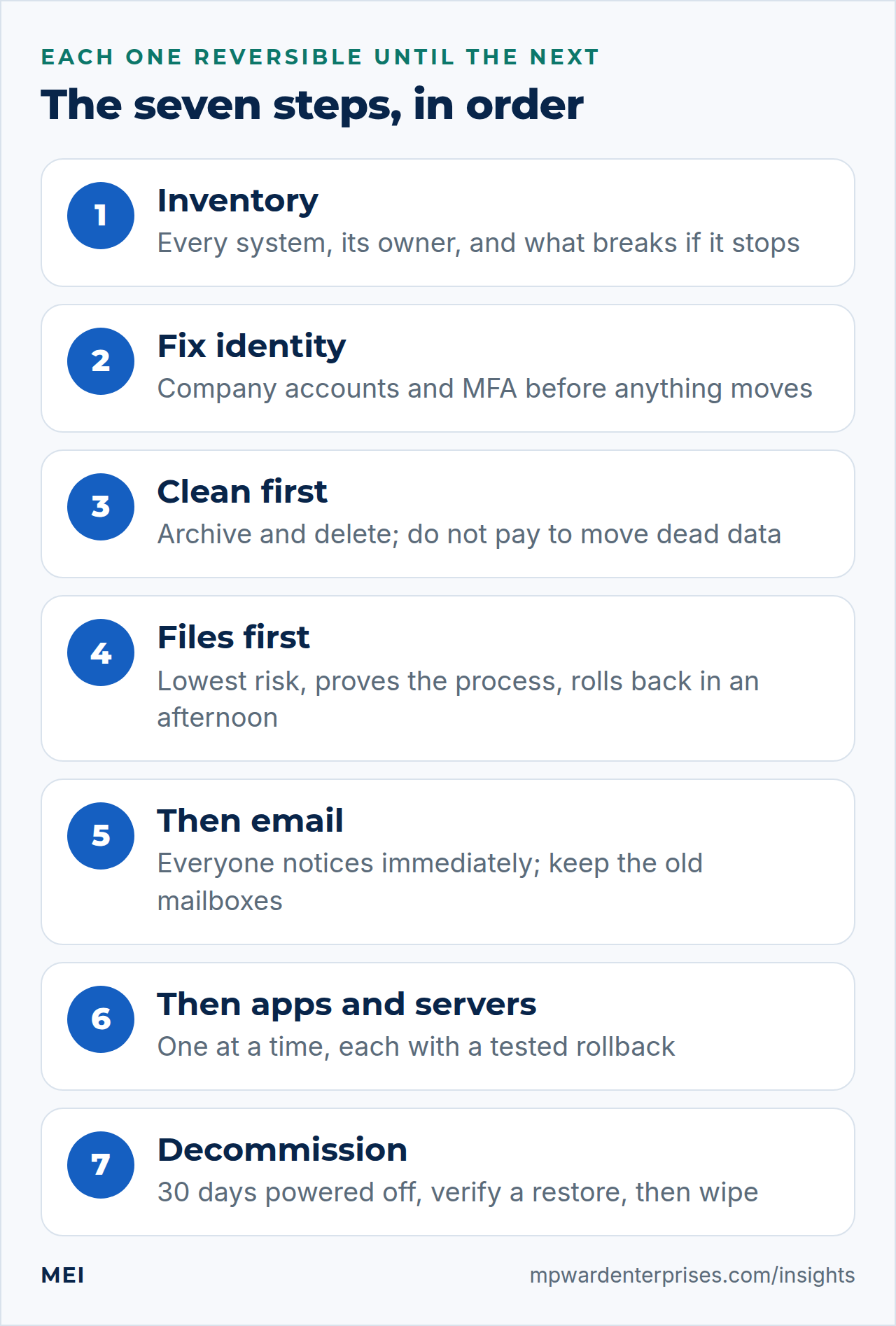
Order matters more than tooling in any cloud migration. Each step below is reversible until the one after it, which is the whole point.
- Inventory what you actually run. Every system, who owns it, what data it holds, and what breaks if it stops for a day. Most owners discover two or three systems nobody had mentioned. This is also the step that tells you what not to move.
- Fix identity first. Company accounts, multi-factor authentication, and one place where joiners and leavers are managed. A migration plan built on shared logins just moves the problem somewhere more expensive.
- Clean before you move. Archive dead data, delete duplicates, retire the systems nobody uses. Moving twelve years of unsorted files costs real money in both migration time and monthly storage.
- Move the lowest-risk thing first. Usually file storage. It proves the process, the permissions model and the sync behaviour with something you can roll back in an afternoon.
- Move email and collaboration. Higher risk because everyone notices immediately. Do it on a Friday, keep the old mailboxes read-only for a month, and tell people what to expect before, not after.
- Move applications and servers. One at a time, each with a tested rollback and a named cutover window. This is where a small business cloud migration most often stalls, so budget more time than feels necessary.
- Decommission deliberately. Keep the old system powered off but intact for at least 30 days, verify restores from the new backups, then wipe and dispose. Skipping the verification is how businesses discover their cloud migration never included backups at all.
What should probably stay where it is
Not everything belongs in the cloud, and a provider who tells you otherwise is selling, not advising. Three categories are worth resisting.
- Large working files over a slow connection. Video editors, CAD users and photographers with gigabyte files feel every millisecond. If your upload is thin, local storage with cloud backup beats cloud storage with local frustration.
- Equipment-tied software. Anything speaking to a machine on your premises — tills, cameras, access control, production kit — usually wants to stay beside it.
- Systems you are about to replace anyway. Migrating a product you plan to retire in a year is paying twice. Move the replacement instead.
A hybrid answer is normal and not a failure. Most small businesses end up with email and files in the cloud and one or two things still on site, which is a perfectly good outcome. The questions worth asking before either choice are in self hosted vs cloud.
Costing a cloud migration honestly
The number that catches people out is not the cloud migration fee. It is the monthly bill that replaces a server you had already paid for, and which rises quietly as storage grows.
| Cost | Typical for a 10-person business | Watch for |
|---|---|---|
| Licences per user | $6 to $25 per user per month | Tier creep — one needed feature moves everyone up a tier |
| Storage | Often included, then $5 to $25 per TB per month | Nobody deletes anything, ever |
| Migration project | $1,500 to $8,000 one-off | Unclean data doubles the hours |
| Egress and transfer | Usually small, occasionally not | Leaving later can cost more than arriving |
| Backup of cloud data | $2 to $8 per user per month | Your provider replicates; that is not a backup |
That last row is the one most often missed. A cloud provider protects against their hardware failing. It does not protect you from someone deleting a folder, or from ransomware encrypting files that then sync happily to every device. The 3-2-1 backup rule still applies after a cloud migration — arguably more so.
Keeping the business running during the migration
A good migration plan is boring by design. The pattern that works for a small business cloud migration is run-both-then-switch: stand the new system up alongside the old, sync, run them in parallel briefly, cut over at a quiet hour, and keep the old one warm.
Three practical rules make that survivable. Pick a window when the business is genuinely quiet, not merely when it is convenient for whoever is doing the work. Tell staff a day ahead what will look different and who to call. And define, before you start, what "go back" means and who is allowed to say it.
What a cloud migration changes about security
Cloud migration for small business does not remove your security obligations; it moves them. The provider secures the platform. You remain responsible for who has access, how they prove it, and what they can take with them.
In practice that means the controls in CISA's Cyber Essentials become more important, not less: multi-factor authentication on every account, admin accounts separated from daily-use accounts, and a leaver process that actually revokes access. NIST's digital identity guidance is also worth knowing because it reversed a lot of old advice — length beats forced complexity, and routine mandatory password rotation is no longer recommended.
The other change is visibility. On a server in your office you could see what was happening. In the cloud you need to turn logging on deliberately and look at it. That is covered more fully in our small business cybersecurity checklist.
Six signs your migration plan is in trouble
A migration plan rarely fails loudly. These are the quiet signals that a small business cloud migration is heading for a bad weekend.
- No inventory. If nobody can list the systems, the plan is a guess.
- Everything moves at once. Big-bang migrations are how small businesses end up with a week of downtime.
- No rollback for any step. "We'll fix forward" is a sentence people say before a long night.
- The old system is wiped immediately. Thirty days of patience costs nothing.
- Nobody has priced the monthly bill. The project cost is the small number.
- Backups were assumed. Ask explicitly what is backed up, where, and when a restore was last tested.
The week before cutover
Most of the pain in a cloud migration arrives in the last seventy-two hours, and almost all of it is avoidable with a short checklist run the week before. This is the list we work through with clients.
- Confirm the rollback. Write down, in one sentence, how to put each system back and who may authorise it. A migration plan without this is a one-way door.
- Take a known-good backup of the source. Not the sync, not the replica — a restorable copy taken before anything changes, and tested.
- Check the connection. Measure the actual upload speed at the time of day the migration will run, not the number on the invoice.
- Freeze changes. No new users, no permission edits, no software updates on either side during the window.
- Name the two people. One who runs the cutover and one who decides whether to continue. They should not be the same person at three in the morning.
- Write the message to staff. What changes, when, what to do if something looks wrong, and who to contact. Send it a day ahead.
None of that is technical, which is the point. The technical part of a small business cloud migration is usually the part that goes to plan; the coordination is what slips. A migration plan that fits on one page and names people rather than tools is worth more than a detailed runbook nobody reads.
Finishing a cloud migration properly
A cloud migration for small business is finished when you can show four things: a restore actually performed from the new backups, a documented list of who has administrative access, a monthly cost that matches the estimate, and a decommissioning record for the old equipment. Without those, the project has stopped rather than completed.
It is also the natural moment to review the rest of the estate while everything is documented — which is what our Business Tech Rescue Audit does, and what the small business tech stack article lays out layer by layer. If the destination is partly your own infrastructure rather than a public provider, that is infrastructure and private cloud work, and the trade-offs differ again.
Frequently asked questions
What should a small business move to the cloud first?
File storage, almost always. It is the lowest-risk system to move, it proves your permissions model and sync behaviour, and it can be rolled back in an afternoon if something is wrong. Email second, because everyone notices the moment it misbehaves. Applications and servers last, one at a time. The step before all of them is identity: company accounts and multi-factor authentication.
How much does cloud migration cost for a small business?
For a ten-person business, expect $1,500 to $8,000 as a one-off project depending on how clean the data is, then an ongoing bill of roughly $6 to $25 per user per month for licences, plus storage, plus $2 to $8 per user per month if you back up the cloud data properly. The monthly figure matters more than the project fee, because it replaces a server you had already bought.
What should NOT be moved to the cloud?
Large working files used over a slow connection (video, CAD, photography), software tied to equipment on your premises such as tills, cameras or access control, and anything you plan to replace within a year. A hybrid result — email and files in the cloud, one or two systems still on site — is a normal and perfectly good outcome, not a failed migration.
Do I still need backups after moving to the cloud?
Yes, and arguably more. Cloud providers replicate your data to protect against their own hardware failing. That does nothing about a folder someone deletes, a mailbox a departing employee empties, or ransomware encrypting files that then sync cheerfully to every device and every copy. The 3-2-1 rule still applies: three copies, two media, one off-site and outside the sync.
How long does a small business cloud migration take?
Files take one to two weeks including the clean-up, email a weekend plus a month of parallel running, and each application anywhere from a day to several weeks depending on how much it has been customised. A ten-person business doing all three typically spends six to ten weeks end to end, most of which is waiting and verifying rather than active work.
How do I know the migration is actually finished?
Four pieces of evidence: a restore you have actually performed from the new backups, a written list of who holds administrative access, a monthly bill that matches the estimate, and a decommissioning record for the old equipment. Without those, the project has stopped rather than completed — and the gap usually shows up months later as a failed restore.
Sources and further reading
- NIST SP 800-145: The NIST Definition of Cloud Computing — the five essential characteristics, including measured service — the one that makes the bill move
- CISA: Cyber Essentials — the baseline controls that matter more after a migration, not less: accounts, MFA, and a leaver process
- NIST SP 800-63B: Digital Identity Guidelines — why length beats forced complexity and why routine mandatory password rotation is no longer recommended