
Docker vs virtual machines is a question about how much you want to isolate, and what you are willing to maintain. A virtual machine pretends to be a whole computer. A container shares the host's kernel and packages only an application and its dependencies. For a small business, the honest answer is that you probably want both, in different places — and possibly neither, if one server runs one site.
This guide explains the real difference in plain terms, what each is genuinely good at, the security distinction that matters, and the four situations where the choice is obvious. It is written for owners and small technical teams, not platform engineers.
Docker vs virtual machines: the actual difference
A virtual machine runs its own operating system on virtualised hardware. Boot it and you get a complete computer — kernel, init system, the lot — isolated from its neighbours by the hypervisor. That isolation is strong, and the cost is that every machine carries a full operating system with it.
A container shares the host's kernel. It packages an application with its libraries and configuration, and nothing else. Starting one is close to instant, images are measured in tens or hundreds of megabytes rather than gigabytes, and you can run many on hardware that would struggle with a handful of virtual machines.
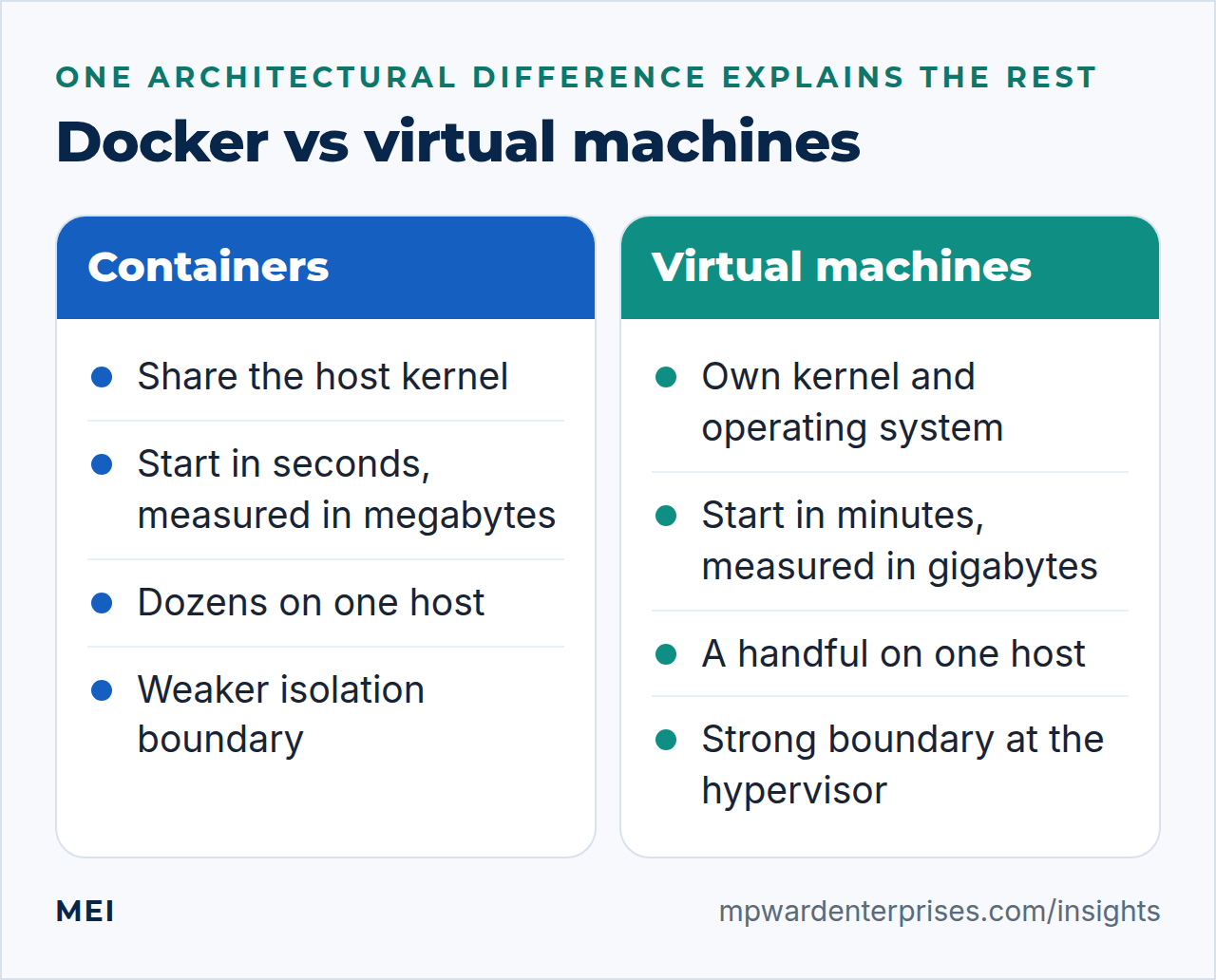
That single architectural difference explains everything else in the Docker vs virtual machines comparison: the speed, the density, the portability and the weaker isolation boundary all follow from whether the kernel is shared.
| Containers | Virtual machines | |
|---|---|---|
| Start time | Seconds | Tens of seconds to minutes |
| Size | Tens to hundreds of MB | Gigabytes |
| Density on one host | Dozens | A handful |
| Isolation | Shared kernel — weaker boundary | Separate kernel — strong boundary |
| Run a different OS | No (same kernel family) | Yes |
| Best at | Packaging and shipping applications | Separating tenants and workloads |
What containers are genuinely good at
- Making "works on my machine" true everywhere. The image carries the dependencies, so development, staging and production run the same thing.
- Running awkward software without polluting the host. An application needing an old library version lives in its own image rather than fighting your server's packages.
- Repeatable deployment. The build is described in a file you can read, review and keep in version control.
- Density. Several small services on one modest server, each with its own dependencies.
- Clean rollback. Run the previous image. The old one has not been mutated by an upgrade.
That last point is the underrated one. Much of the operational value is not the container at runtime but the fact that the build is reproducible and the previous version still exists exactly as it was.
What virtual machines are genuinely good at
- Real isolation between tenants. If two workloads must not be able to reach each other even if one is compromised, separate virtual machines are the stronger boundary.
- Running a different operating system. Windows beside Linux, or an older release for one stubborn application.
- Whole-machine snapshots. Snapshot before an upgrade, roll the entire system back if it goes wrong.
- Long-lived, stateful systems. A database that has run for years is usually happier on a machine than in a container someone might redeploy.
- Conventional operations. Backups, monitoring and patching work exactly as your team already knows.
The security difference worth understanding
This is where the Docker vs virtual machines comparison matters most, and where marketing is least helpful. Containers share the host kernel. A vulnerability in that kernel is a vulnerability that affects every container on the host, and a container escape puts the attacker on the host itself.
Virtual machines isolate at the hypervisor, a much smaller and more defended interface. Escapes exist, but they are rarer and harder.
The practical rule for a small business: use containers to separate your own applications from each other, and virtual machines to separate workloads with genuinely different trust levels — a customer-facing service from an internal system holding customer records, for example. Do not rely on containers alone as a security boundary between things that must never meet.
Either way, the baseline controls matter more than the choice. Patch the host, run containers as a non-root user, keep images current, and do not bake credentials into images. Those habits do more for your security than the architecture does, and they sit inside the wider list in our Linux server hardening checklist.
Four situations where the answer is obvious
| Situation | Use | Why |
|---|---|---|
| One server, one WordPress site | Neither | Containers add a layer with no benefit at this size |
| Several small apps on one box | Containers | Dependencies stay separate; density is good |
| Hosting separate clients' data | Virtual machines | You want a real boundary between tenants |
| Developers deploying frequently | Containers | Reproducible builds and instant rollback |
The first row deserves emphasis because it is the most common small business case. If you run a single site on a single server, containerising it adds a layer to learn, maintain and debug in exchange for benefits that mostly accrue at larger scale or faster release cadence.
Using both, which is what most people do
In practice the two are not competitors. The common arrangement is virtual machines providing the isolation boundary, with containers running the applications inside them.
A small business might run one virtual machine for public-facing services and another for internal systems, each running several containers. That gives a real boundary where it matters and packaging convenience where it helps, without pretending either tool does the other's job.
The same logic applies at the hosting level. A virtual private server is already a virtual machine; running containers inside it is normal and sensible. The hosting trade-offs underneath are covered in VPS vs shared hosting, and the broader ownership question in self hosted vs cloud.
The costs nobody mentions
Containers are often presented as free efficiency. They are not, and the costs are operational rather than financial.
- Someone must own the images. A base image left unrebuilt for a year contains a year of unpatched libraries, and nothing warns you.
- Persistent data needs deliberate handling. Containers are disposable; your database is not. Volumes and backups must be designed, not assumed.
- Logs move. Familiar log locations are inside the container. Plan where they go before an incident, not during one.
- Debugging changes shape. A minimal image has none of the tools you would normally reach for.
- It is another thing to patch. The host, the runtime and every image.
None of that is a reason to avoid containers. It is a reason to adopt them because you want a specific benefit, rather than because they are current.
Where your data actually lives
The question that catches small businesses out is not performance or security. It is state: what happens to the database when the thing running it is replaced.
A well-behaved container is disposable by design. You are meant to be able to destroy and recreate it without losing anything, which is precisely what makes deployment and rollback pleasant. That property only holds if everything worth keeping lives outside it — in a mounted volume, a managed database, or object storage. Get this wrong and the first upgrade deletes production data, which is a short and memorable lesson.
So decide three things before anything important runs this way. Where does persistent data live, and is that location backed up independently of the thing writing to it? How do you restore it onto a freshly created instance, and have you tried? And who, specifically, would do that at eight on a Saturday morning?
Those questions are not new and they are not unique to any particular technology. They are the same questions that apply to a plain server, which is rather the point: the tooling changes the packaging, not the responsibility. A business that cannot answer them today will not be able to answer them faster after adding a layer. Answer them first, then choose whatever runs your applications — and keep the backup and restore discipline unchanged either way.
How to decide
Three questions settle it for most small businesses. Do you deploy often enough that reproducible builds and instant rollback would save real time? Do you run several applications whose dependencies conflict? And do you have, or will you have, someone who will keep images rebuilt and patched?
Two or three yeses point to containers. Mostly noes point to a plain server, kept well. And wherever two workloads must not be able to reach each other, put a virtual machine between them regardless of the answers.
If you would rather have that assessed against what you actually run, that is part of our infrastructure and private cloud work, and a Business Tech Rescue Audit will tell you whether your current setup is adding complexity you are not getting value from.
Frequently asked questions
What is the difference between Docker and a virtual machine?
A virtual machine runs its own complete operating system on virtualised hardware, isolated by the hypervisor. A container shares the host's kernel and packages only an application with its libraries and configuration. That single difference explains the rest: containers start in seconds and are measured in megabytes, virtual machines start in minutes and are measured in gigabytes, and the isolation boundary is much stronger in a virtual machine.
Are containers less secure than virtual machines?
The isolation boundary is weaker, yes. Containers share the host kernel, so a kernel vulnerability affects every container on that host and an escape puts the attacker on the host itself. Virtual machines isolate at the hypervisor, a smaller and more defended interface. Use containers to separate your own applications from each other, and virtual machines between workloads with genuinely different trust levels.
Should a small business use Docker?
Three questions decide it. Do you deploy often enough that reproducible builds and instant rollback would save real time? Do you run several applications whose dependencies conflict? And will someone keep base images rebuilt and patched? Two or three yeses point to containers. If you run one site on one server, the honest answer is usually neither — containerising adds a layer without a matching benefit at that size.
Can I run Docker inside a virtual machine?
Yes, and that is the normal arrangement rather than an unusual one. A virtual private server is already a virtual machine, and running containers inside it is standard practice. Most businesses end up using both deliberately: virtual machines providing the isolation boundary between different trust levels, with containers packaging the applications running inside each one.
What are the hidden costs of using containers?
They are operational rather than financial. Someone must own the images, because a base image left unrebuilt for a year contains a year of unpatched libraries and nothing warns you. Persistent data needs volumes and backups designed deliberately, since containers are disposable and your database is not. Logs move from familiar locations, debugging tools are absent from minimal images, and you now patch the host, the runtime and every image.
Do containers make my website faster?
Not in themselves. A container runs application code at essentially native speed, but so does the same code on the server directly. What containers improve is deployment, consistency and rollback, not request handling. If your site is slow, the causes are almost always caching, database queries, memory configuration or hosting — none of which a container changes.
Sources and further reading
- Docker: Docker overview — the official description of the container model and how it relates to the host
- Ubuntu Server documentation — virtualisation and container support on a typical Linux host
- NIST SP 800-145: The NIST Definition of Cloud Computing — resource pooling and the tenancy model that the isolation argument rests on