
Proxy protocol HAProxy nginx configuration is how you let nginx see each visitor's real address when HAProxy forwards encrypted traffic it cannot read. This guide sets it up in eight tested steps on Ubuntu 24.04 LTS or 26.04 LTS, so pick yours with the switch below. Allow about an hour. You need HAProxy 2.83.2 on one server, nginx on another, a user who can run sudo on both, and basic comfort with configuration files.
Every command was run twice in disposable labs, once on Ubuntu 24.04 (HAProxy 2.8.16 and nginx 1.24.0) and once on Ubuntu 26.04 (HAProxy 3.2.9 and nginx 1.28.3), never on a live server. Where the two releases differ, the page shows only the one you picked. We also reproduced the failures that cost real sites hours: dropped connections, 400 errors, a green health check over a broken site, a forged address that nginx believed, and fail2ban naming the proxy.
Addresses such as 10.0.0.1 and 198.51.100.7 are documentation placeholders, so swap in your own.
Choose your Ubuntu version
This guide covers both releases. Commands, file paths and version numbers change with your choice; everything else is the same.
JavaScript is off, so both versions are shown below and each block says which release it is for.
Before you start: what you need and your way back
You need two machines on a private network: the proxy, which runs HAProxy (here 10.0.0.1), and the web server, which runs nginx (here 10.0.0.20). If you have not built the proxy yet, our guide to HAProxy SNI routing produces the layout used here, and this guide goes deeper on the part it only introduces. Three habits keep the change safe.
- Keep a second SSH session open to both servers, and run
sudo nginx -tandsudo haproxy -c -f /etc/haproxy/haproxy.cfgbefore every reload. - Back up both configurations with the commands below, so the way back is two file copies and two reloads.
- Pick your moment. Step 4 switches over with a gap of seconds, or with none.
# on the proxy
sudo cp -a /etc/haproxy/haproxy.cfg /root/haproxy.cfg.before-proxy-protocol
haproxy -v | head -n 1
# on the web server
sudo cp -a /etc/nginx /root/nginx.before-proxy-protocol
nginx -v
nginx -V 2>&1 | tr ' ' '\n' | grep realip
nginx has understood PROXY protocol version 2 since release 1.13.11, and Ubuntu 24.0426.04 ships 1.241.28. The last command shows that the real-IP module, which step 2 relies on, is built into Ubuntu's package. Install socat on the proxy too (sudo apt install socat) for step 7.
On Ubuntu 26.04, sudo is sudo-rs, a Rust rewrite, and the everyday tools used below (tr, head, tail and tee) are the Rust versions from the uutils project, while cp, rm, sed, awk and grep are still the GNU ones. We ran every command as an admin user, and each behaved as it does on 24.04, so nothing in this guide changes because of them. sudo --version and ls --version tell you which implementation you have.
Proxy protocol HAProxy nginx: why this way and not the other ways
Several designs let a web server learn the visitor's real address. They differ in what the proxy must be able to read and how much can go wrong.
| Option | In plain English | Our verdict |
|---|---|---|
| PROXY protocol (this guide) | The proxy puts a short note at the very start of each connection: "this one really came from 198.51.100.7". The web server reads it first | Our choice when HAProxy passes TLS through. It works for HTTPS and for any TCP service that can read the note. Both ends must be switched on, and only the proxy may connect |
An X-Forwarded-For header |
The proxy opens the request and writes the visitor's address into a header line | Right when HAProxy terminates TLS anyway. Impossible while the traffic is encrypted, and any client can send one too, so believe it only from your own proxy |
| Transparent proxying | The proxy connects to the web server while pretending to be the visitor | HAProxy's manual says the servers must route replies back through the proxy, and it warns about connection tracking. Skip it without a network engineer and a reason |
| Do nothing | Logs show the proxy's address for every visitor | Simplest, and it blinds rate limits, fail2ban, analytics and abuse reports. Step 8 measures the damage |
| No proxy at all | Point DNS straight at the web server | With one web server and no other reason for a proxy, this is simpler and leaves nothing to configure |
Picture each connection as a parcel. The PROXY protocol is a sticky note on the outside, written by the post room (HAProxy) and read at the destination desk (nginx) before the parcel is opened. A header is a note inside the parcel, which the post room can write only if it may open it. HTTPS parcels are sealed, so for passthrough an X-Forwarded-For header is simply not available.
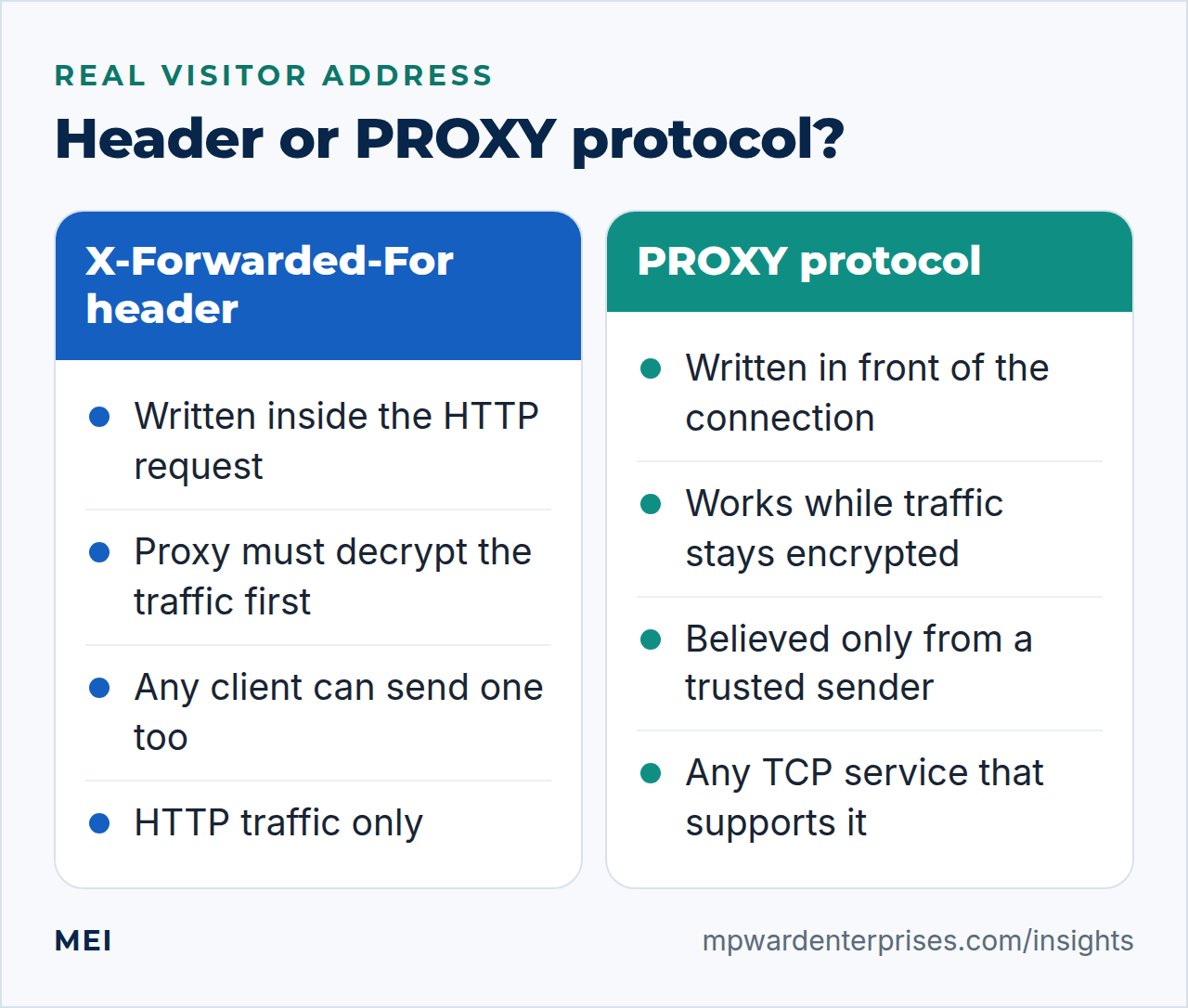
How the PROXY protocol works, in plain English
The PROXY protocol works like this: the proxy opens a connection to the web server and first sends one short block of bytes that states who the visitor is. The web server reads and removes it, then handles the rest as if nothing had happened. Version 1 of the header is a single line of text. This is the example from the specification:
PROXY TCP4 192.168.0.1 192.168.0.11 56324 443The four facts are the visitor's address and port, then the address and port the visitor connected to. Version 2 carries the same facts in a compact binary form that starts with a fixed twelve-byte signature, with room for optional extra fields. The specification is blunt about the receiving side: it must be configured to expect the header, must not guess whether one is present, and must not process the connection until a complete, valid header has arrived.
That last rule is why a plain request to a PROXY port is dropped. The specification also says that accepting the header only from known sources should be safe, and steps 5 and 6 keep that number at one. Three addresses are involved, and mixing them up causes most of the trouble:
| Variable | What it holds | Use it for |
|---|---|---|
$remote_addr |
The address nginx believes: the one in the header when the sender is trusted, otherwise the sender's own address | Logs, rate limits, PHP, fail2ban: everything |
$realip_remote_addr |
The address that actually connected, which is the proxy | Debugging, and rules about the proxy itself |
$proxy_protocol_addr |
The address the header claims, from anyone who is allowed to connect | Debugging only. Never trust it on its own |
Step 1: See what nginx logs today
Record the problem first, so that you can watch it disappear. From a machine outside your network (a laptop on a phone hotspot is ideal), request your home page, then read the newest line of nginx's access log on the web server.
# from a machine outside your network
curl -s -o /dev/null -w '%{http_code}\n' https://example.com/
# on the web server
sudo tail -n 1 /var/log/nginx/example.com.access.log
The first field of the log line is the address nginx believes the visitor has. In our lab it was the proxy's address, 10.0.0.1, and it would be the same for every visitor on earth. The log, PHP, rate limits and fail2ban all get that same answer. The next steps fix it at the source, and the same log check proves the result at the end.
Step 2: Make nginx expect the header and trust only the proxy
Three changes on the web server. First, add proxy_protocol to every listen line for ports 80 and 443, so nginx knows each connection on those ports starts with the header. Second, tell the real-IP module which sender it may believe. Third, add a log format that shows all three addresses from the table above. Run sudoedit /etc/nginx/conf.d/00-proxied-log.conf and add:
# /etc/nginx/conf.d/00-proxied-log.conf
log_format proxied '$remote_addr - $remote_user [$time_local] "$request" $status $body_bytes_sent '
                   '"$http_referer" "$http_user_agent" peer=$realip_remote_addr claimed=$proxy_protocol_addr';
Then sudoedit /etc/nginx/conf.d/10-real-ip.conf. This file decides whom nginx believes, so it names exactly one address. nginx's documentation describes set_real_ip_from as the trusted addresses known to send correct replacement addresses, and notes that real_ip_header proxy_protocol works only once the listen parameter is set.
# /etc/nginx/conf.d/10-real-ip.conf
# Trust the PROXY header from the proxy's private address, and from nobody else
set_real_ip_from 10.0.0.1;
real_ip_header proxy_protocol;
Now edit the site file, usually /etc/nginx/sites-available/example.com.conf. Add proxy_protocol to each listen line, switch the access log to the new format and add the temporary test page, which reveals the proxy's private address to anyone who asks, so step 8 removes it. Keep your own fastcgi_pass line and the rest of your blocks, such as the Certbot challenge location; this is a small example.
# /etc/nginx/sites-available/example.com.conf
server {
    listen 80 proxy_protocol;
    server_name example.com www.example.com;
    access_log /var/log/nginx/example.com.access.log proxied;
    error_log  /var/log/nginx/example.com.error.log;

    # temporary test page: delete it when you are done
    location = /whoami { default_type text/plain; return 200 "client=$remote_addr peer=$realip_remote_addr claimed=$proxy_protocol_addr\n"; }
    location / { return 301 https://$host$request_uri; }
}

server {
    listen 443 ssl proxy_protocol;
    server_name example.com www.example.com;
    ssl_certificate     /etc/letsencrypt/live/example.com/fullchain.pem;
    ssl_certificate_key /etc/letsencrypt/live/example.com/privkey.pem;
    access_log /var/log/nginx/example.com.access.log proxied;
    error_log  /var/log/nginx/example.com.error.log;

    root /var/www/example.com/public;
    # temporary test page: delete it when you are done
    location = /whoami { default_type text/plain; return 200 "client=$remote_addr peer=$realip_remote_addr claimed=$proxy_protocol_addr\n"; }
    location / { try_files $uri $uri/ =404; }
    location ~ \.php$ {
        include snippets/fastcgi-php.conf;
        fastcgi_pass unix:/run/php/php8.38.5-fpm.sock;
    }
}
If your port-443 listen line already has http2 on it, keep it and add the new word after it: listen 443 ssl http2 proxy_protocol;. nginx 1.24 does not know the separate http2 on; line and stops with unknown directive "http2".
If your port-443 listen line already has http2 on it, take that word off the line and add http2 on; as a separate line in the same server block. The old form still works on nginx 1.28, but nginx -t and every reload then print the "listen ... http2" directive is deprecated. We tested both forms through HAProxy and with a PROXY header sent by curl, and both negotiated HTTP/2.
Check the syntax, but do not reload yet. The proxy is not sending the header, so a reload now would drop every visitor.
# on the web server
sudo nginx -t
Watch out: proxy_protocol belongs to the port, not to the server block
We gave one site's listen line the parameter and left a second site's lines plain. Both sites then insisted on the header: through HAProxy they worked, and a direct plain request to either was dropped. nginx's documentation says the parameter applies to all connections accepted on the port. So add it to every listen line on those ports, including [::] lines and your catch-all default server, and keep the real-IP lines at the http level, as above, so that every site gets them.
Why this way?
One shared file keeps the proxy's address in one place, so a new site cannot forget it. We trust one address, not a network range, because step 5 shows a forged header being believed from a trusted range.
Step 3: Make HAProxy send the header
On the proxy, add send-proxy-v2 to the server line of each backend that points at this web server. The rest of your file stays as it is. If you built your proxy with our SNI routing guide, you already have lines like these, without the new word.
# /etc/haproxy/haproxy.cfg (the two backend sections that point at this web server)
backend be_web_http
    mode tcp
    server web1 10.0.0.20:80 send-proxy-v2 check

backend be_web_tls
    mode tcp
    server web1 10.0.0.20:443 send-proxy-v2 check
send-proxy-v2 makes HAProxy begin every connection to that server with a version 2 header. check keeps the health probe, which step 7 returns to. Check the syntax, and again do not reload yet.
# on the proxy
sudo haproxy -c -f /etc/haproxy/haproxy.cfg
On HAProxy 3.2 a passing haproxy -c prints nothing and exits with status 0, so silence means the file is valid. Add -V to see the line "Configuration file is valid". The && chains in this guide only look at the exit status, so they keep working.
Why this way?
HAProxy offers send-proxy for version 1, the text line shown earlier, and send-proxy-v2 for the binary version. We use version 2 because a confused receiver cannot mistake it for HTTP text, it has room for optional extra fields and nginx has read it since 1.13.11. Both carry the visitor's address. HAProxy's manual warns that the version 2 setting must not be used with a server that does not understand it, so an old receiver needs send-proxy.
Step 4: Switch over and test
Both ends now have a new PROXY protocol configuration waiting. Reload the web server first, test it directly while pretending to be HAProxy, then reload the proxy. Visitors see errors between the two reloads, so do these commands in one sitting.
# on the web server
sudo nginx -t && sudo systemctl reload nginx
Wait a second, then test nginx directly from the proxy. The option --haproxy-protocol makes curl send a version 1 header before the request, and --haproxy-clientip sets the address it claims. Both come with the curl 8.5.08.18.0 of Ubuntu 24.0426.04; the curl manual dates the second to version 8.2.0.
# on the proxy
curl -s --haproxy-protocol --haproxy-clientip 203.0.113.50 \
  --resolve example.com:80:10.0.0.20 http://example.com/whoami
The test page answers with the three addresses. The test came from the trusted proxy address, so the claim was believed:
client=203.0.113.50 peer=10.0.0.1 claimed=203.0.113.50client is what nginx believes, peer is who connected and claimed is what the header said. Now reload HAProxy and test as a visitor. The second command runs from outside your network and should print that machine's own public address, not 10.0.0.1.
# on the proxy
sudo systemctl reload haproxy
# from a machine outside your network (wait a second after the reload)
curl -s https://example.com/whoami
In our labs, on both releases, a probe that requested the site every 0.2 seconds saw one failed request while the two reloads ran back to back, under half a second in total. Your gap lasts as long as you take between the commands. If something breaks, put the backups back, web server first:
# on the web server: the way back
sudo cp /root/nginx.before-proxy-protocol/sites-available/example.com.conf /etc/nginx/sites-available/example.com.conf
sudo rm /etc/nginx/conf.d/00-proxied-log.conf /etc/nginx/conf.d/10-real-ip.conf
sudo nginx -t && sudo systemctl reload nginx
# on the proxy: the way back
sudo cp /root/haproxy.cfg.before-proxy-protocol /etc/haproxy/haproxy.cfg
sudo haproxy -c -f /etc/haproxy/haproxy.cfg && sudo systemctl reload haproxy
If systemctl status haproxy ever shows Reload failed!, do not trust a second systemctl reload: on the HAProxy 3.2.9 package we tested, the master ignores it after a failed reload. The warning in step 10 of our HAProxy SNI routing guide shows the socket command that works.
Why this way?
Reloading the web server first lets you prove it works before any visitor depends on it, and the direct test sends the same kind of header HAProxy will send. The reverse order works too, but then you cannot test nginx until visitors are already hitting it.
Watch out: what a mismatch looks like
We also switched HAProxy first on purpose, so that it sent the header to an nginx that was not expecting it. Port 80 answered 400 Bad Request, and the access log recorded the request line as "\x00" (version 2) or "PROXY TCP4 ..." (version 1). HTTPS failed with wrong version number. Visitors see these errors for as long as the two ends disagree, which is why the steps above keep the gap short.
Watch out: a reload takes a moment
systemctl reload nginx returns at once, but the new workers start a fraction of a second later. Our first test, run within milliseconds of a reload, still saw the old behavior. Wait a second before you test, and if a result looks impossible, run sudo nginx -T | grep proxy_protocol to see what nginx actually loaded.
The variant with no gap at all
To avoid even a few failed requests, add PROXY listeners on new ports beside the old ones: listen 8080 proxy_protocol; in the port-80 block and listen 8443 ssl proxy_protocol; in the port-443 block. Reload nginx and test the new ports with the curl command above.
Then change the proxy's server lines to 10.0.0.20:8080 and 10.0.0.20:8443, reload HAProxy once, delete the old listen lines and reload nginx again. In our labs a probe every 0.2 seconds saw no failures at all, on both releases. The high ports can stay; open them in step 6's firewall rule.
Step 5: Test the failures on purpose
A PROXY protocol setup you have only seen working is one you do not understand yet. These tests talk to nginx directly, not through the proxy, so no visitor is affected. Start with the one every monitoring tool will eventually run into: a plain request to a PROXY protocol port.
# on the proxy, or any machine that can reach the web server: no PROXY header at all
curl -sS --resolve example.com:80:10.0.0.20 http://example.com/whoami
# on the web server
sudo grep -h 'broken header' /var/log/nginx/*error.log | tail -n 1
The request fails with an empty reply, nginx writes one line to an error log (the site's own, or the main one if the site has none), and nothing reaches the access log:
curl: (52) Empty reply from server
2026/10/09 02:15:23 [error] 5185#5185: *88 broken header: "GET /whoami HTTP/1.1" while reading PROXY protocol, client: 10.0.0.1, server: 0.0.0.0:80
The same request to port 443 failed with Recv failure: Connection reset by peer. Now the interesting test: a header from a machine that is not the proxy. Run this from any other machine that can reach the web server.
# from a machine that is NOT the proxy: claim to be 203.0.113.50
curl -s --haproxy-protocol --haproxy-clientip 203.0.113.50 \
  --resolve example.com:80:10.0.0.20 http://example.com/whoami
The page shows client=10.0.0.99 peer=10.0.0.99 claimed=203.0.113.50, where 10.0.0.99 stands for the address of the machine you ran it on. The forged claim is visible in claimed, but nginx ignored it. Run the step 4 test again against port 443 (--resolve example.com:443:10.0.0.20 and https://example.com/whoami) and it works too, because the header travels ahead of the TLS handshake.
To see the bytes, or when curl is not at hand, a few lines of Python do the same. Save this as pp-send.py. A version 2 header is the 12-byte signature, then 0x21 (version 2, PROXY command), 0x11 (IPv4 over TCP), the length, and the addresses and ports.
#!/usr/bin/env python3
"""Send a PROXY v2 header that claims a client address, then one HTTP request."""
import socket, struct, sys

host, port, claimed = sys.argv[1], int(sys.argv[2]), sys.argv[3]
body = socket.inet_aton(claimed) + socket.inet_aton(host) + struct.pack("!HH", 40000, port)
header = b"\r\n\r\n\x00\r\nQUIT\n" + bytes([0x21, 0x11]) + struct.pack("!H", len(body)) + body

with socket.create_connection((host, port), timeout=5) as s:
    s.sendall(header + b"GET /whoami HTTP/1.1\r\nHost: example.com\r\nConnection: close\r\n\r\n")
    print(s.recv(65536).decode(errors="replace"))
Run python3 pp-send.py 10.0.0.20 80 203.0.113.50 from the proxy and the last line of the output should be the same client=203.0.113.50 line.
Watch out: a trusted range is only as safe as every machine in it
Many guides write set_real_ip_from 10.0.0.0/24; or even 0.0.0.0/0; for convenience. We tried the first one. With the whole private network trusted, the forged request from 10.0.0.99 came back as client=203.0.113.50: nginx believed a machine that was not the proxy. Any server in that range, or an attacker who reaches one, could then choose the address in your logs and dodge your rate limits.
Logging $proxy_protocol_addr directly would have recorded the forged address too, because only $remote_addr passes the trust check. Name the proxy's single address.
Why this way?
Testing from the wrong side first costs nothing, and it shows you the failure messages before a real outage does. Having seen broken header once, you will recognize it in a real log.
Step 6: Close the door with a firewall
A proxy protocol HAProxy nginx pair is safest with two guards. Trust settings stop nginx from believing the wrong sender, and a firewall stops the wrong machines from connecting to the PROXY port at all. Allow ports 80 and 443 from the proxy only. Add the new rule first and delete the broad one second, so that you never cut the proxy off.
# on the web server
sudo ufw status numbered
sudo ufw allow from 10.0.0.1 to any port 80,443 proto tcp comment 'proxy to nginx'
sudo ufw delete allow 'Nginx Full'
sudo ufw status numbered
If you opened the ports some other way, delete whichever rule allows 80 or 443 from Anywhere, using the number from the first listing. Our guide to UFW on Ubuntu explains rule order, the rollback timer and Docker's habit of bypassing UFW, and its private-backend pattern is this same idea. Then repeat the forged request from a machine that is not the proxy:
# from a machine that is NOT the proxy
curl -sS --max-time 5 --resolve example.com:80:10.0.0.20 http://example.com/whoami
It should now fail with curl: (28) Connection timed out, because UFW drops the connection silently. The same request from the proxy still works. If the web server has a private address, you can add a second guard by listening on that address only, such as listen 10.0.0.20:443 ssl proxy_protocol;, so the port does not exist on any other interface.
Watch out: narrowing a listen address needs a restart
We changed listen 443 ssl proxy_protocol; to a specific address and ran systemctl reload nginx. The syntax check passed, but the reload failed with bind() to 10.0.0.20:443 failed (98: Address already in use) in the error log, and nginx kept the old listeners. A sudo systemctl restart nginx applied it. Plan a short restart for that change.
Why this way?
Two independent guards beat one. The firewall decides who may connect, and set_real_ip_from decides whom nginx believes. If one is misconfigured, the other still limits the damage, and the specification's own advice is to accept the header only from known sources.
Step 7: Keep health checks and local monitoring working
HAProxy probes each web server so that it can stop sending visitors to a dead one. A probe is a connection like any other, so a PROXY protocol listener demands the header from it too. The specification defines a LOCAL command for connections a proxy makes on its own, such as health checks. We recorded the first bytes of each probe with a throwaway listener, on both HAProxy versions, with the same result.
A plain check on a send-proxy-v2 server sent the 16-byte version 2 header with command LOCAL and closed. With option httpchk it sent the same header and then the HTTP request. With check port 8000, a different port, it sent the request alone, and check port 8000 check-send-proxy brought the header back. nginx accepted the LOCAL header without complaint.
Watch out: common advice about check-send-proxy is too broad
Some guides say every health check needs check-send-proxy. HAProxy's manual and our captures say otherwise: the header is added by default when the server line has send-proxy-v2, unless the check uses its own port or addr. Only then add check-send-proxy.
Watch out: a green dashboard can hide a broken site
We removed send-proxy-v2 from the proxy while nginx still expected the header. A plain TCP check kept both servers UP (status L4OK, because connecting is all it tests) while every visitor got an error. With option httpchk the same mistake turned the port-80 server DOWN within seconds. A check that uses the protocol finds a mismatch that a connect-only check cannot.
So give each backend a check that does real work: an HTTP check against a tiny page for port 80, and a TLS check that completes the handshake for port 443 (verify none is acceptable here, because the check only needs to know the server answers). Replace the two backends in /etc/haproxy/haproxy.cfg:
# /etc/haproxy/haproxy.cfg (the two backend sections, now with real checks)
backend be_web_http
    mode tcp
    option httpchk
    http-check send meth GET uri /healthz ver HTTP/1.1 hdr Host example.com
    server web1 10.0.0.20:80 send-proxy-v2 check

backend be_web_tls
    mode tcp
    server web1 10.0.0.20:443 send-proxy-v2 check check-ssl verify none
nginx needs a page for the HTTP check. Add this line inside the port-80 server block. It sets access_log off, because otherwise every probe would add a log line, one every two seconds by default:
location = /healthz { access_log off; default_type text/plain; return 200 "ok\n"; }Local tools on the web server cannot send a PROXY header either. Give them a plain listener that only the machine itself can reach, by adding this line to the port-443 server block:
listen 127.0.0.1:8081; # plain HTTP for local checks onlyWhy this way?
A health check is a promise to HAProxy about what a visitor will get. A check that only connects promises almost nothing, while one that uses the protocol notices a mismatch within seconds. The price is a little more configuration.
Reload both servers:
# on the web server
sudo nginx -t && sudo systemctl reload nginx
# on the proxy
sudo haproxy -c -f /etc/haproxy/haproxy.cfg && sudo systemctl reload haproxy
Give the new checks a few seconds, then read HAProxy's view. The awk command prints the proxy name, the server name, its status and the last check result:
# on the proxy, a few seconds later
echo "show stat" | sudo socat stdio /run/haproxy/admin.sock \
  | awk -F, 'NR>1 && $2=="web1" {print $1, $2, $18, $37}'
You should see be_web_http web1 UP L7OK and be_web_tls web1 UP L6OK, meaning an HTTP answer and a completed TLS handshake. Right after a reload the status shows a transitional value such as INI. Test the local listener from the web server:
# on the web server
curl -s -H 'Host: example.com' http://127.0.0.1:8081/whoami
The answer is client=127.0.0.1 peer=127.0.0.1 claimed=: the real-IP lines step aside because no header arrived on that listener, and other machines cannot reach it because it listens on the loopback address only. External uptime monitors need no change, since they reach the site through HAProxy like any visitor.
Step 8: Make logs, PHP, rate limits and fail2ban use the real address
Nothing else needs to know about the PROXY protocol, because nginx has settled who the visitor is and everything downstream follows $remote_addr. We compared a lab in which nginx accepted the header but the real-IP lines were missing with the configuration of this guide.
| Program | Header accepted, real-IP lines missing | This guide's configuration |
|---|---|---|
| nginx access log | 10.0.0.1 on every line | The visitor's address |
PHP REMOTE_ADDR (WordPress, Matomo) |
10.0.0.1 | 198.51.100.7, the visitor |
limit_req rate limit, burst of 2 |
Visitor A used the allowance, then visitor B's very first request was refused with 429 | Visitor A was refused after the burst; visitor B was served |
fail2ban filter nginx-limit-req |
Matched lines naming 10.0.0.1 | Matched lines naming 198.51.100.7 |
PHP is the quickest to see for yourself. The one-line script below prints the address that WordPress, Matomo and most plugins read. Create it, request it from outside your network and delete it:
# on the web server
echo '<?php echo $_SERVER["REMOTE_ADDR"], "\n";' | sudo tee /var/www/example.com/public/ip.php > /dev/null
# from a machine outside your network
curl -s https://example.com/ip.php
# on the web server
sudo rm /var/www/example.com/public/ip.php
The answer should be the outside machine's address. If you use the limits from our nginx rate limiting guide, they now count each visitor separately. For analytics, our Matomo guide makes the same point: let nginx decide who the visitor is and leave the application's own proxy-header settings off, so two layers cannot disagree.
The fail2ban row deserves a second look. When every visitor looks like the proxy, a filter that works perfectly names the proxy as the offender. fail2ban then either bans the one address every site depends on or, if the proxy is on its ignore list, bans nothing at all. We did not run a live jail. Instead, fail2ban-regex with --print-all-matched lists the matching log lines, and the address after client: is the one the filter would act on. Our fail2ban guide covers jails in full.
# on the web server
sudo fail2ban-regex --print-all-matched /var/log/nginx/example.com.error.log nginx-limit-req
As a safety net, add the proxy to fail2ban's ignore list in /etc/fail2ban/jail.local, or to the list you already have. The packaged jail.conf states that fail2ban will not ban a host that matches an address in it.
# /etc/fail2ban/jail.local
[DEFAULT]
ignoreip = 127.0.0.1/8 ::1 10.0.0.1
# on the web server
sudo systemctl reload fail2ban
sudo fail2ban-client get sshd ignoreipLast, remove the temporary pages. This deletes the /whoami lines and their comments from the site file, then reloads nginx:
# on the web server
sudo sed -i '/location = \/whoami/d; /temporary test page/d' /etc/nginx/sites-available/example.com.conf
sudo nginx -t && sudo systemctl reload nginx
Why this way?
Resolving the address once, in nginx, gives the log, PHP, the rate limiter and fail2ban the same answer, and nothing is configured twice. Real visitor addresses are personal data in many places, so keep logs only as long as you need them, as our logrotate guide shows.
Beyond web servers: the same header for mail and other TCP services
The header sits below HTTP, on the TCP connection, so it works for anything that speaks TCP, provided the receiving software understands it. nginx reads it in both its http and stream parts. Postfix has its own switch, smtpd_upstream_proxy_protocol = haproxy in /etc/postfix/main.cf, and its documentation supports version 2 from Postfix 3.5. We tested it through HAProxy on port 25, and the mail log named the visitor's address, not the proxy's.
Watch out: receivers differ in how they treat health checks
nginx accepted HAProxy's plain TCP check without complaint. Postfix 3.8.63.10.6 did not: with a plain check, an smtpd process exited with fatal: smtpd_peer_hostaddr_to_sockaddr and Postfix's master process throttled the service for a while. An SMTP-aware check, option smtpchk in the backend, avoided it and checked as L7OK. For any new kind of server, test the health check as well as the traffic. Our planned Postfix sending server guide returns to mail.
When a header is the right tool instead
If HAProxy decrypts the traffic itself, a header is simple and well supported. HAProxy's option forwardfor adds the visitor's address to an X-Forwarded-For header, and nginx reads it in place of the PROXY header. The certificate then lives on the proxy, so this is a bigger change than step 3.
# HAProxy, when it terminates TLS itself
frontend fe_https_term
    mode http
    bind :443 ssl crt /etc/haproxy/certs/example.com.pem
    option forwardfor
    default_backend be_web_plain

backend be_web_plain
    mode http
    server web1 10.0.0.20:8080 check
# on the web server, in a plain server block that only the proxy can reach
listen 8080;
set_real_ip_from 10.0.0.1;
real_ip_header X-Forwarded-For;We tested the trust rules. A visitor who sent a forged X-Forwarded-For: 192.0.2.66 through the proxy still came out as the real visitor, because nginx takes the last address in the header and HAProxy's entry is the last one. The same forged header sent straight to nginx from an untrusted machine was ignored, and from the trusted proxy address it was believed. MDN's page on the header agrees: only values added by a trusted proxy are fit for security decisions. The PROXY listener of the earlier steps ignored a client-supplied X-Forwarded-For altogether.
Check your work
- A request from outside your network shows that machine's own address in the access log and in PHP's
REMOTE_ADDR. - A plain request straight to port 80 or 443 on the web server fails, and
broken headerappears in the error log. - A forged header from a machine that is not the proxy changes nothing in
client, and the firewall stops that machine from connecting at all. - Both ends agree:
send-proxy-v2on every HAProxy server line for this web server, andproxy_protocolon everylistenline for ports 80 and 443. HAProxy reports every server UP with a real check (L7OKorL6OK). - The
/whoamipages andip.phpare gone.
Troubleshooting: what the symptoms mean
Most PROXY protocol problems fall into a handful of patterns, and the first column below is what you will actually see.
| What you see | Likely cause | What to do |
|---|---|---|
400 Bad Request on port 80, wrong version number on HTTPS, and access-log requests that look like "\x00" or "PROXY TCP4 ..." |
HAProxy sends the header but nginx's listen line has no proxy_protocol |
Add it to every listen line on that port (step 2) |
Empty reply from server on HTTP, Connection reset by peer on HTTPS, and broken header in the error log |
nginx expects the header and the sender sent none: the HAProxy server line lacks send-proxy-v2, or a tool connects straight to the PROXY port |
Add send-proxy-v2, or aim tools at HAProxy or the local listener (step 7) |
| HAProxy says UP but visitors get errors | A plain TCP check cannot see the mismatch | Use an HTTP or TLS check and compare both ends (step 7) |
Logs still show the proxy's address, while claimed= shows the visitor |
set_real_ip_from or real_ip_header is missing, or names the wrong address |
Fix 10-real-ip.conf; peer= shows what nginx thinks the proxy is |
| One site on the server works while another logs the proxy or fails | proxy_protocol applies to the port, and the real-IP lines exist in only one block |
Put the real-IP lines at http level and add the parameter to every listen line |
A server with check port or addr flaps DOWN |
That check goes to another port and carries no header | Add check-send-proxy to that server line |
Common mistakes
- Switching on only one end. Both
send-proxy-v2andproxy_protocolmust change in the same sitting. - Trusting a whole network, or
0.0.0.0/0, inset_real_ip_from. Name the proxy. - Logging or rate-limiting on
$proxy_protocol_addrinstead of$remote_addr. - Forgetting that
proxy_protocolmakes the whole port, and every site on it, expect the header. - Relying on a connect-only health check to prove that the PROXY settings agree.
- Leaving the PROXY port reachable from every machine on the network, or the internet.
- Leaving
/whoamiandip.phpin place: they reveal internal addresses.
Keep it healthy
When the proxy's address changes, update set_real_ip_from, the firewall rule and ignoreip together, and repeat the tests of steps 4 and 5. Copy new sites from a block that already has proxy_protocol, and give every new HAProxy backend send-proxy-v2. Once a month, list the lines that decide who speaks the PROXY protocol:
# on the web server: every listen line on ports 80 and 443 should say proxy_protocol
sudo nginx -T 2>/dev/null | grep -E '^\s*listen '
The loopback listener on port 8081 is the one deliberate exception. After major upgrades, repeat the plain-request test of step 5. Our server hardening guide and checklist list the other recurring jobs.
Getting help
If you would rather have someone design and test a proxy protocol HAProxy nginx setup with you, MEI's Infrastructure and Private Cloud service covers provisioning, proxies and private networks, migrations, monitoring and documentation, and starts at $2,500, scoped by systems and scale. The Network Architecture and Security service covers firewall and server hardening, secure remote access and monitoring, and starts at $1,500, scoped after an assessment. We focus on the highest-impact, most likely risks, and we do not promise perfect security.
Frequently asked questions
What is the PROXY protocol?
A small header that a proxy such as HAProxy writes at the very start of a TCP connection to say which client address and port it really came from. The receiving server reads it first. Because it works below HTTP, it also works for HTTPS that the proxy cannot read and for other TCP services.
What is the difference between PROXY protocol and X-Forwarded-For?
X-Forwarded-For is an HTTP header, so the proxy must be able to read the request, which rules out passthrough TLS, and any client can send one. The PROXY protocol is written in front of the connection, works for any TCP service and is believed only from a trusted sender.
Should I use send-proxy or send-proxy-v2 with nginx?
Use send-proxy-v2 unless the receiver is old. Version 1 is a line of text and version 2 is a compact binary form of the same facts. nginx has read version 2 since 1.13.11, so the nginx in both Ubuntu 24.04 (1.24) and Ubuntu 26.04 (1.28) accepts it. HAProxy's manual warns against the version 2 setting for a server that does not understand it.
How do I test PROXY protocol with curl?
Use --haproxy-protocol to make curl send a version 1 header first, and --haproxy-clientip to choose the address it claims (curl 8.2.0 or newer; Ubuntu 24.04 ships 8.5.0 and Ubuntu 26.04 ships 8.18.0). Aim it at the nginx port that expects the header and request a page that prints the client address.
Why does nginx return 400 or drop the connection after I add proxy_protocol?
Because the two ends disagree. If nginx expects the header and the sender sends none, nginx drops the connection and logs broken header. If HAProxy sends the header and nginx does not expect it, nginx answers 400 or the TLS handshake fails. Make both ends match.
Is it safe to trust the PROXY protocol header?
Only from the proxy. The header is a claim by whoever connects, so list the proxy's single address in set_real_ip_from and firewall the port. In our lab a forged header from another machine inside a trusted range was believed as the client address.
Sources and further reading
- The PROXY protocol specification (HAProxy) — header formats, the LOCAL command for health checks, receiver rules, accepting the header only from known sources
- nginx documentation: ngx_http_realip_module — set_real_ip_from, real_ip_header proxy_protocol, real_ip_recursive, $realip_remote_addr
- nginx documentation: ngx_http_core_module (listen and embedded variables) — the proxy_protocol parameter covers all connections on the port; version 2 since 1.13.11; $proxy_protocol_addr
- NGINX Docs: Accepting the PROXY protocol — listen with proxy_protocol in http and stream, real-IP setup, nginx sending the header upstream
- HAProxy 2.8 Configuration Manual — send-proxy, send-proxy-v2, check-send-proxy defaults, accept-proxy, transparent proxy (usesrc)
- HAProxy 3.2 Configuration Manual — on the 26.04 release: send-proxy, send-proxy-v2 (not for servers that do not understand it), check-send-proxy and when health checks carry the header, and the transparent proxy (usesrc) caveats
- curl manual: command line options — --haproxy-protocol, and --haproxy-clientip added in curl 8.2.0
- MDN: X-Forwarded-For — address order, spoofing risk, and using only values added by trusted proxies
- Postfix configuration parameters: smtpd_upstream_proxy_protocol — the haproxy setting for smtpd, version 2 supported from Postfix 3.5