AI for small business owners works best as a set of narrow helpers, not a replacement for people: drafting, summarizing, sorting, answering routine questions and spotting patterns, with a person checking the result. The nine uses below are practical today, each with what to watch for. Follow one rule throughout: you remain responsible for what the AI produces, and for the customer data you give it.
Most coverage of AI is either breathless or alarmed, and neither helps an owner with a full inbox. The US Census Bureau's survey data show that only about 17 to 20 percent of American firms reported using AI in early 2026, so starting carefully is not starting late. This guide shows where AI earns its keep, where it does not, how to protect your data, and how to run a 30-day trial that tells you whether a tool is worth paying for.
Where AI for small business stands in 2026
The Census Bureau's Business Trends and Outlook Survey, collected from December 2025 to May 2026, found that overall AI use by firms hovered between 17 and 20 percent, with 20 to 23 percent expecting to use it within six months. Larger firms lead: 37 percent of firms with 250 or more employees reported using AI, and 32 percent of those with 100 to 249. For firms with four or fewer employees, less than 20 percent did.
Estimates differ with the survey period and the wording of the question. The SBA Office of Advocacy, also drawing on that survey, reported that 7.6 percent of businesses used AI between September 2024 and August 2025, so treat any single figure as a snapshot. Two lessons follow. First, you are not behind: most small businesses are still experimenting. Second, the gains from AI for small business come from specific tasks, not from "adopting AI".
The owners who benefit are the ones who pick a repetitive job, try a tool on it, measure the result and keep or drop it.
Three questions to ask before using AI for small business tasks
- Is the task repetitive and low-risk?Drafting a routine email is a good fit for using AI. Deciding who to hire is not.
- Can a person check the output quickly?If checking takes as long as doing, you have saved nothing, and if no one checks, you have taken on a risk.
- What data does it touch?Public information is easy. Customer personal data, health or financial records, contracts and credentials need a business-grade tool, clear terms or, often, to be left out entirely.
The answers sort every use into three tiers. This table is the simplest data policy you can adopt today.
| Tier | Examples | Rule |
|---|---|---|
| Green: public or low-risk | Brainstorming, marketing drafts from public information, rewording your own text | Any approved tool; a person reviews before publishing |
| Yellow: internal business information | Meeting notes, process documents, internal spreadsheets without personal data | Business plan of an approved tool, with its data terms reviewed |
| Red: sensitive | Customer personal data, health and financial records, passwords and keys, unreleased financials | Do not paste into general tools; use only a vendor with the required agreements, or keep it out |
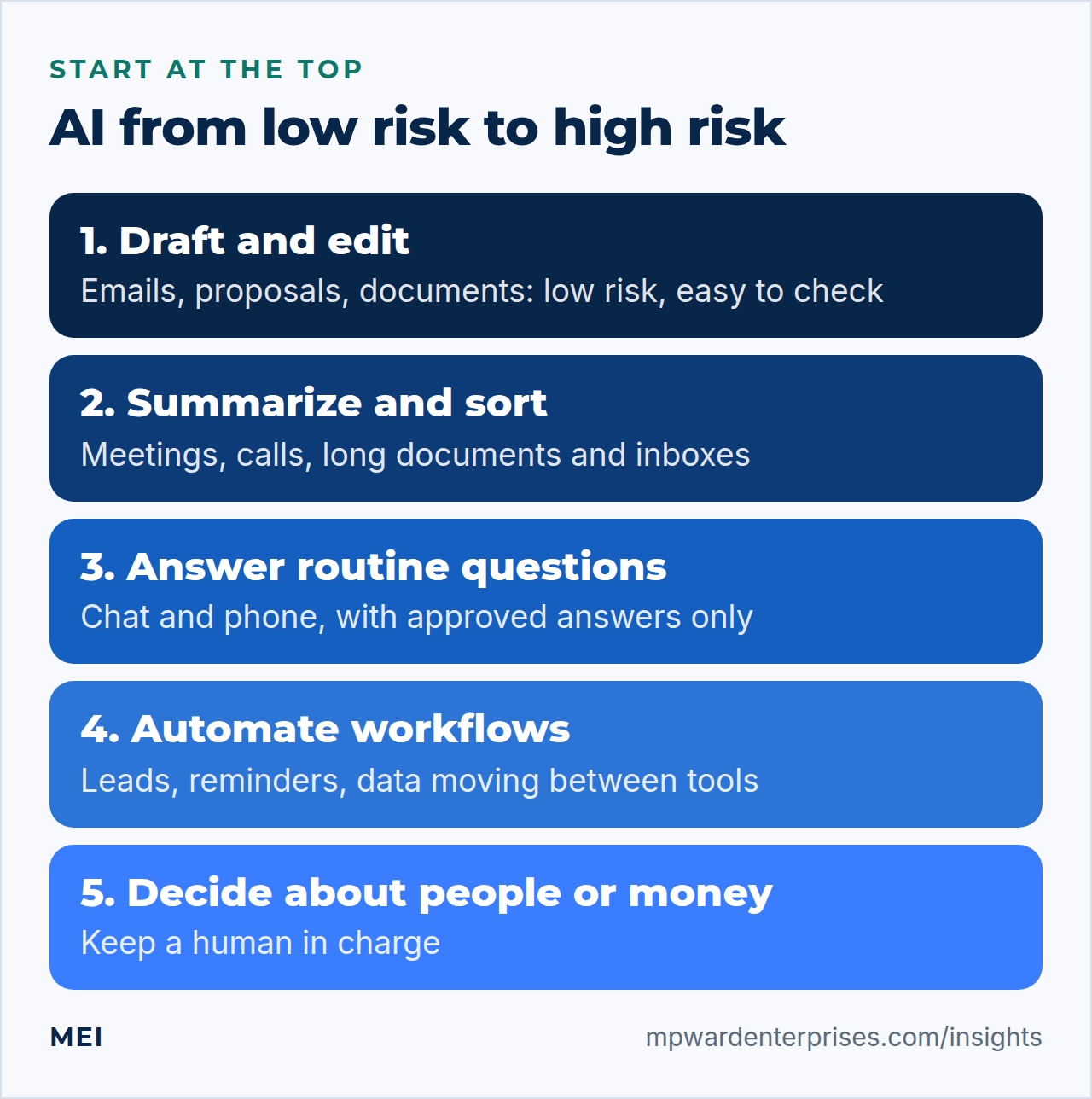
9 practical uses of AI for small business owners
1. Draft and edit emails, proposals and documents
The most common and least risky use: turn rough notes into a clear email, tighten a proposal, or rewrite a document for a different audience. Give the tool your key points and the tone you want, then edit the result so that it sounds like you and says only what is true. Watch out for: invented details, such as a promise, a date or a price that you never made.
2. Summarize meetings, calls and long documents
Transcription and summary tools turn an hour of discussion into decisions and action items. They also condense contracts, reports and long email threads. Watch out for: missed nuance and recording consent. Tell participants when a call is recorded or transcribed; our guide to the AI receptionist for small business explains the consent rules.
3. Produce first drafts of marketing content
AI is good at the blank page: social posts, product descriptions, newsletter outlines and FAQ drafts. Use it for a first pass, then add what only you know: real examples, your prices, your local detail. Watch out for: generic text that sounds like everyone else, and factual errors. Publish nothing you have not read and verified.
4. Answer routine customer questions on your website
A chat assistant trained on your services, hours and policies can answer common questions at any hour and capture the lead when the visitor wants a person. Watch out for: wrong answers. A British Columbia tribunal ruled in 2024 that Air Canada was responsible for wrong information its chatbot gave a customer, whether the information came from a static page or a chatbot. Give it approved answers only and an easy way to reach a person.
5. Triage and follow up leads
AI can read an incoming inquiry, label what it is, route it to the right person and draft a reply for you to approve. Combined with timers and reminders, it keeps leads from going cold; see automated lead follow up for five workflows and the compliance rules for email and text. Watch out for: sending messages without consent or without a stop rule.
6. Cover the phone after hours
A voice assistant can answer calls you miss, capture the reason for the call and book appointments. It suits routine calls and fails on emergencies and upset customers, so write escalation rules before you switch it on. Watch out for: recording laws, outbound-call consent rules and hidden fees, all covered in the guide linked above.
7. Analyze spreadsheets and reports
Ask an assistant to explain a sales trend, flag unusual expenses, build a formula or suggest a chart. It can save hours on spreadsheet work you do monthly. Watch out for: confident arithmetic errors. Spot-check totals against the source, and keep customer personal data out of the upload unless the tool is approved for it.
8. Write procedures, checklists and training materials
Talk through how you do a job, or paste your rough notes, and have the tool structure them into a step-by-step procedure with a checklist. Documented procedures make handovers, new hires and the business continuity plan easier. Watch out for: steps that sound plausible but are not how the work is actually done. Have someone who does the job walk through it.
9. Automate the repetitive admin between your tools
Copying data from a form into a spreadsheet, creating an invoice from an accepted quote, sending reminders, moving files: automation tools connect your software, and AI can handle the fuzzy parts, such as reading an email and deciding which category it belongs to. Our guide to API integration for small business explains how the connections work. Watch out for: automations that fail silently. Add alerts and a weekly look at the logs.
How to choose an AI tool: eight questions
The market changes monthly, so choose by questions, not by brand. Small business owners should ask these of any tool before it touches real work.
- What exact job will it do, and how will we know it did it well?
- Does it offer a business plan with administrator controls, and can we turn off sharing and model training for our data?
- Where is our data stored, for how long, and who at the vendor can see it?
- Will the vendor sign the agreements our industry requires, if any?
- Can we export our data and settings if we leave?
- Does it connect to the tools we already use, or will people copy and paste?
- What does it cost at our real volume, including overages, extra seats and add-ons?
- What does it do when it is unsure, and how does it hand over to a person?
What small business owners should not hand to AI
- Decisions about people. Hiring, firing, pay and credit decisions carry legal exposure and the risk of bias. Use AI to organize information, not to decide.
- Professional advice. Legal, medical, tax and financial guidance for your customers or yourself needs a qualified person.
- Sensitive conversations. Complaints, bad news and negotiations need judgment and empathy.
- Unchecked facts. In Mata v. Avianca (2023), a federal court in New York imposed a $5,000 penalty on two lawyers and their firm for filing a brief that cited non-existent cases and fake quotations created by ChatGPT, and for standing by them after the court questioned them. The message applies to everyone: using AI does not remove your duty to verify.
- Security decisions. Do not let a tool decide who gets access, or approve payments, without human sign-off.
Keep your data safe: a one-page AI policy for small business
You do not need a legal department to set rules. NIST's AI Risk Management Framework, which is voluntary, organizes AI risk work into four functions: govern, map, measure and manage. A small business can follow the same pattern in one page.
- Govern: name one owner for AI decisions and list the approved tools. Nothing outside the list handles company or customer data.
- Map: write down each use, the data it touches and its tier (green, yellow or red).
- Measure: review a sample of outputs each week for errors, and track time saved.
- Manage: fix or retire tools that fail, and update the policy when you add a use.
Add a few plain rules: never paste passwords, keys or customer personal data into a tool that is not approved for it; read the vendor's terms on whether your inputs are used to train models, how long data is kept and who can see it; keep a human review step before anything customer-facing goes out; and tell customers when they are talking to an automated assistant. Our small business cybersecurity checklist covers the account protections that go with it.
A 30-day trial: is AI for small business worth it?
- Days 1 to 3: pick one use.Choose a repetitive task that you do weekly, with low risk and an easy check. Write down how long it takes now.
- Days 4 to 10: pilot it.Use one approved tool, with one owner, on real work. Keep a note of every error and every edit.
- Days 11 to 20: refine.Improve the instructions and the examples you give the tool, and add the checks that caught mistakes.
- Days 21 to 30: decide.Compare time saved against cost, effort and errors. Keep it, change it or drop it, and record the decision.
Resist the urge to buy several tools at once. Tool sprawl is the same problem in AI as in the rest of your small business tech stack: every extra tool adds a login to secure, a bill to track and data to protect.
Mistakes small business owners make with AI
- Starting with the tool, not the task. Name the job first. A tool with no job becomes a subscription nobody uses.
- Skipping the check. Unreviewed output is where errors and invented facts reach customers. Make review part of the workflow, not an afterthought.
- Putting sensitive data in the wrong place. Personal data, credentials and confidential documents belong only in tools approved for them.
- Letting personal accounts creep in. If staff use their own free accounts for company work, you cannot control where the data goes. Provide an approved option instead.
- Measuring nothing. Without a before-and-after number, you cannot tell a real gain from a good feeling.
- Automating a broken process. If the process is confused, AI will produce confused results faster. Fix the process first.
Getting help
MEI approaches AI for small business the same way this guide does: not to add AI everywhere, but to remove repetitive work, respond faster, organize information and make your existing systems work together. Our AI & Business Automation service starts at $1,500, with software and model costs disclosed separately. We map the current process, identify the repetitive decisions and handoffs, choose the smallest reliable automation, protect sensitive information, keep a human review step where judgment matters, and measure time saved, leads captured or response time improved.
If you are not sure where to start, the Business Tech Rescue Audit starts at $497 and finds the automation opportunities alongside the risks. For the cost of ongoing technical help, see our guide to small business IT support cost.
Frequently asked questions
How can AI help a small business?
AI helps most with narrow, repetitive jobs: drafting and editing emails and documents, summarizing meetings and long files, producing first drafts of marketing content, answering routine customer questions, triaging leads, analyzing spreadsheets, writing procedures and automating admin between tools. It works best with a person checking the result.
Is AI safe to use with business and customer data?
It depends on the tool, the plan and the data. Keep passwords, customer personal data, health and financial records out of general-purpose tools. Use business plans with administrator controls, read the vendor's terms on training, retention and access, and sign any agreements your industry requires. Sorting data into green, yellow and red tiers makes the rules simple.
What AI tools should small business owners start with?
Start with the assistant built into the email and document suite you already pay for, plus at most one general assistant on a business plan. Pick one repetitive job, trial it for 30 days and measure the result before adding anything. Choose tools by the questions in this guide, not by brand, because the market changes quickly.
Will AI replace my employees?
For most small businesses, AI takes over pieces of tasks rather than whole jobs, such as first drafts, summaries and routine replies. Roles that depend on judgment, relationships and exceptions remain with people. The practical question is which tasks free your team for higher-value work, and how to check the AI's output.
How much does AI for a small business cost?
It ranges from free or low monthly subscriptions for general assistants to custom automation projects. Count the subscription, any per-use charges, the setup and the time spent reviewing output. MEI's AI & Business Automation service starts at $1,500, with software and model costs disclosed separately.
How do I avoid mistakes when using AI?
Give it a narrow job and clear instructions, require a human review before anything goes to a customer, verify facts and numbers against sources, keep sensitive data out of unapproved tools, and keep a log of errors you catch. Courts and tribunals have held businesses responsible for AI output, so the responsibility stays with you.
Sources and further reading
- US Census Bureau: Large Firms With at Least 20 Employees Biggest AI Users — AI use by firm size from the Business Trends and Outlook Survey, December 2025 to May 2026
- NIST: AI Risk Management Framework — the voluntary framework and its four functions: govern, map, measure and manage
- McCarthy Tétrault: Moffatt v. Air Canada: A Misrepresentation by an AI Chatbot — a company is responsible for what its chatbot tells customers (2024 BCCRT 149)
- Mata v. Avianca, Inc., 678 F. Supp. 3d 443 (S.D.N.Y. 2023) — the opinion imposing a $5,000 penalty over non-existent cases created by ChatGPT
- SBA Office of Advocacy: Frequently Asked Questions About Small Business (February 2026) — AI use among businesses between September 2024 and August 2025, from the same survey