
Documenting business processes sounds like something larger companies do with consultants and flowcharts. In a small business it is simpler and more urgent: writing down how the recurring work is actually done, so it survives holidays, illness and people leaving. Most of the value arrives from the first six documents, and each one takes about fifteen minutes.
This guide covers which processes to write first, a format that people actually use, how to capture them without setting aside a week, and how to stop the documents going stale — which is the failure mode that makes owners conclude it was a waste of time.
What this is actually for
Three things, in order of how much they matter to a small business.
Continuity. When the person who does the invoicing is away, someone else can do it. That is the difference between an inconvenience and a stopped week, and it is the reason continuity planning treats undocumented knowledge as a risk in the same category as a failed server.
Consistency. The job gets done the same way whoever does it, which is what customers actually experience as reliability.
Improvement. You cannot improve a process you cannot see. Writing it down regularly reveals steps that exist only because someone once did it that way — and removing those is usually the first return on the effort.
The fourth benefit is slower but larger: a business that runs on documented processes is worth more to a buyer and easier to hand on, which is the foundation of succession planning.
Documenting business processes: which to write first
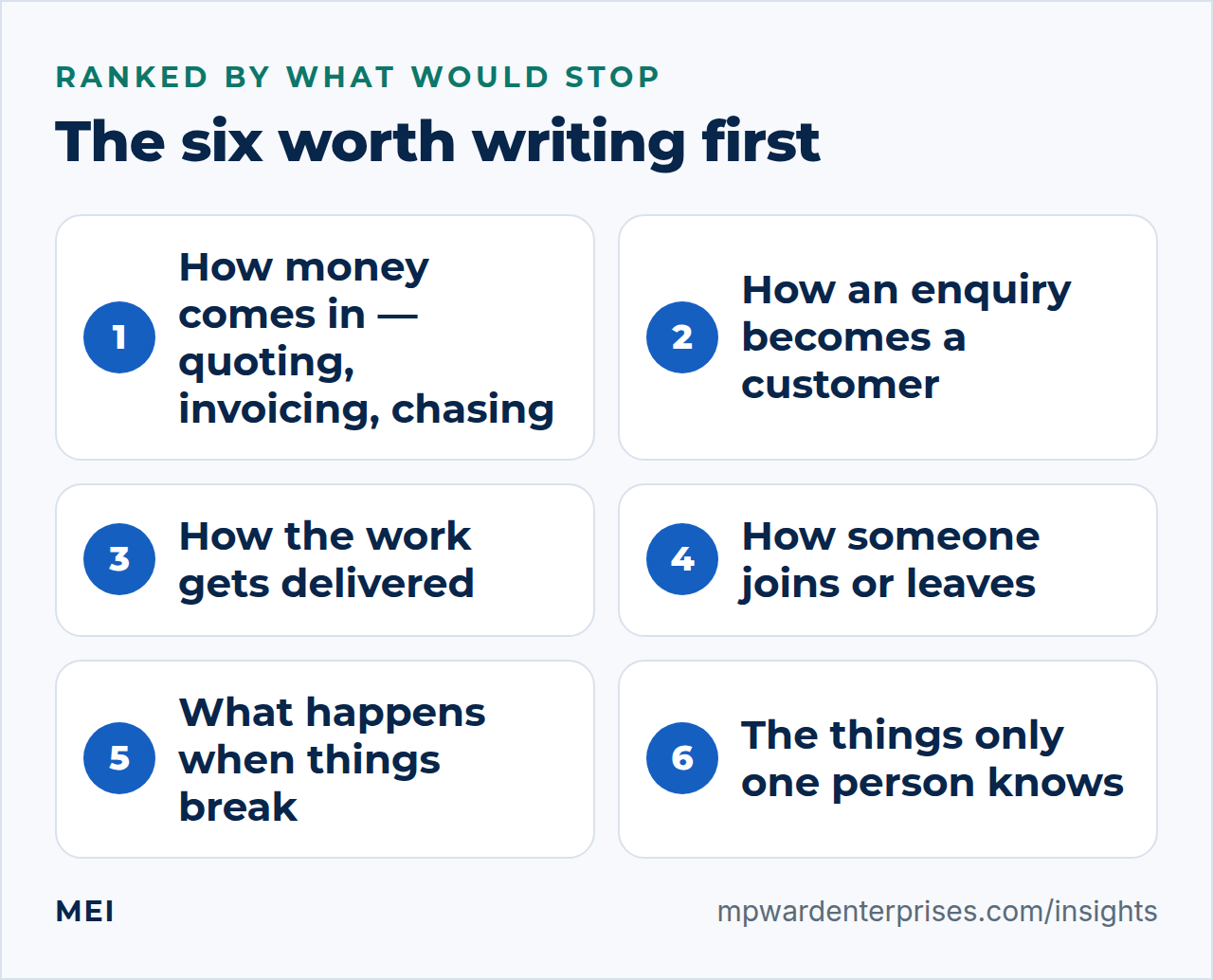
Do not try to document everything. Six documents cover most of the real risk in a small business.
- How money comes in. Quoting, invoicing, chasing payment. The process whose interruption is felt fastest.
- How an enquiry becomes a customer. What happens from first contact to agreed work.
- How the work gets delivered. Your core operational process, in outline rather than detail.
- How someone joins or leaves. Accounts created, access granted, and crucially everything revoked on the way out.
- What happens when things break. Who to call, in what order, for the three most likely failures.
- The things only one person knows. Whatever that list is in your business — it is the highest-risk document and usually the last one written.
Rank candidates by one question: if this person were unavailable for two weeks with no warning, what would stop? Write those down first and the rest can wait indefinitely.
A format people actually use
Elaborate documentation does not get read or maintained. The format that works in a small business is short and consistent — one page per process, six headings.
| Heading | Content |
|---|---|
| What this is for | One sentence, so a reader knows if they are in the right place |
| When it happens | The trigger — weekly, on an order, at month end |
| What you need | Logins, templates, information, who to ask |
| The steps | Numbered, plain language, enough that a competent stranger could follow |
| What usually goes wrong | The two or three known traps — the most valuable section |
| Owner and last reviewed | A name and a date, so staleness is visible |
The "what usually goes wrong" section is the one that distinguishes a useful document from a procedure nobody reads. It captures the knowledge that normally exists only as experience, and it is what makes the difference on the day someone unfamiliar has to follow it.
Capturing them without losing a week
The mistake is scheduling a documentation project. It gets deferred, and when it does happen the result is written from memory, which is less accurate than people expect.
Document in the moment instead. The next time you do a recurring task, record it as you go — numbered notes, a few screenshots, or narrate it into your phone and tidy the transcript afterwards. Fifteen minutes alongside work you were doing anyway, with no separate time required.
Better still, have the person who does the task write it rather than the owner. They know the actual steps including the workarounds, the document is more accurate, and the act of writing it transfers ownership of the process to them. It also removes the most common objection, which is that the owner does not have time.
Three documents a month, written this way, gets a small business to meaningful coverage within a year without any project ever appearing on a plan.
Stopping them going stale
This is where documenting business processes usually fails. The documents are written, the process changes six months later, nobody updates them, and within two years the documentation is actively misleading — which is worse than none, because someone will follow it.
Four habits prevent that, and none requires a review cycle nobody will honour.
- Update when you use it. The person following the document fixes what is wrong as they go. This is the only mechanism that reliably works.
- Put a name and a date on every one. Visible staleness prompts action; invisible staleness does not.
- Keep them where the work happens — the shared drive people already open, not a separate system someone has to remember.
- Delete processes you no longer follow. A short set of accurate documents beats a comprehensive set of fiction.
What writing them down reveals
The documents themselves are often less valuable than what the exercise exposes. Expect at least two of these.
Steps nobody can justify — an approval that is never refused, a report nobody reads, a form filled in for a system that was replaced. Two people doing overlapping work, each assuming the other's version is the official one. A process that only works because one person remembers an undocumented exception. And work that is entirely mechanical, which is now a candidate for removal rather than documentation.
That last one matters commercially. Once a process is written down, you can see whether it should exist at all, and whether software could do it — which is exactly the starting point for business process automation. Automating an undocumented process means encoding its flaws; documenting first is what makes automation worth doing.
What to write them in
Almost anything, and the choice matters far less than consistency. A shared folder of documents, a wiki, or your existing collaboration tool are all fine. Three requirements only: everyone can find it, everyone can edit it, and it is backed up.
Resist buying a dedicated process-management platform at small-business scale. It adds a system to learn and maintain, and the failure mode of documentation is never the software — it is that nobody writes or updates the content. A tool will not fix that, and occasionally makes it worse by adding friction.
Whatever you choose, make sure it is covered by your backups and that more than one person has administrative access. Documentation that only the owner can reach solves none of the continuity problem it was written for, which is covered more fully in our business continuity plan guide.
Starting this week
Pick the process whose interruption would hurt fastest — usually invoicing or enquiry handling. The next time it runs, have whoever does it write it down as they work, using the six headings above. One page, fifteen minutes.
Then do one more next week. Documenting business processes works when it is a habit attached to the work rather than a project attached to a calendar, and six documents in six weeks removes most of the single-person risk in a small business.
It also makes everything else easier: delegation stops requiring an explanation, new staff become productive faster, and the business becomes something that can run without you — which is the point. If the next step is removing the work entirely, a Business Tech Rescue Audit will show where that is possible.
Frequently asked questions
Which business processes should a small business document first?
Six cover most of the real risk: how money comes in (quoting, invoicing, chasing), how an enquiry becomes a customer, how the work is delivered, how someone joins or leaves including revoking access, what happens when things break, and whatever only one person currently knows. Rank candidates by a single question — if this person were unavailable for two weeks with no warning, what would stop?
What should a process document contain?
One page, six headings: what this is for (a sentence), when it happens (the trigger), what you need (logins, templates, who to ask), the steps in plain numbered language, what usually goes wrong, and an owner with a last-reviewed date. The "what usually goes wrong" section is the most valuable, because it captures the experience that normally exists only in someone's head.
How do I document processes without losing a week to it?
Do not schedule a documentation project — it gets deferred, and when it happens the result is written from memory and less accurate than people expect. Instead, record a recurring task the next time you do it: numbered notes, a few screenshots, or narrate it into your phone and tidy the transcript. Three documents a month gets a small business to meaningful coverage within a year with no project ever appearing on a plan.
How do I stop process documentation going out of date?
Four habits. Update the document while using it — the person following it fixes what is wrong as they go, which is the only mechanism that reliably works. Put a name and a date on every one so staleness is visible. Keep them where the work already happens rather than in a separate system. And delete processes you no longer follow: a short set of accurate documents beats a comprehensive set of fiction.
What software should I use to document processes?
Almost anything, and consistency matters far more than the choice — a shared folder, a wiki, or your existing collaboration tool are all fine. Three requirements: everyone can find it, everyone can edit it, and it is backed up. Resist a dedicated process-management platform at small-business scale, because the failure mode is never the software, it is that nobody writes or updates the content.
Should I document a process before automating it?
Yes, always. Automating an undocumented process encodes its flaws and makes them faster and more consistent. Writing it down first reliably reveals steps nobody can justify — an approval that is never refused, a report nobody reads, a form for a system that was replaced. Quite often the step you were about to automate turns out to be unnecessary, which is the cheapest possible outcome.
Sources and further reading
- Ready.gov: Business — continuity planning, where undocumented knowledge is treated as a risk alongside physical ones
- U.S. Small Business Administration: Business Guide — operational management context for deciding which processes carry the most risk
- NIST: Cybersecurity Framework — the joiner and leaver access process that belongs among the first documents written