
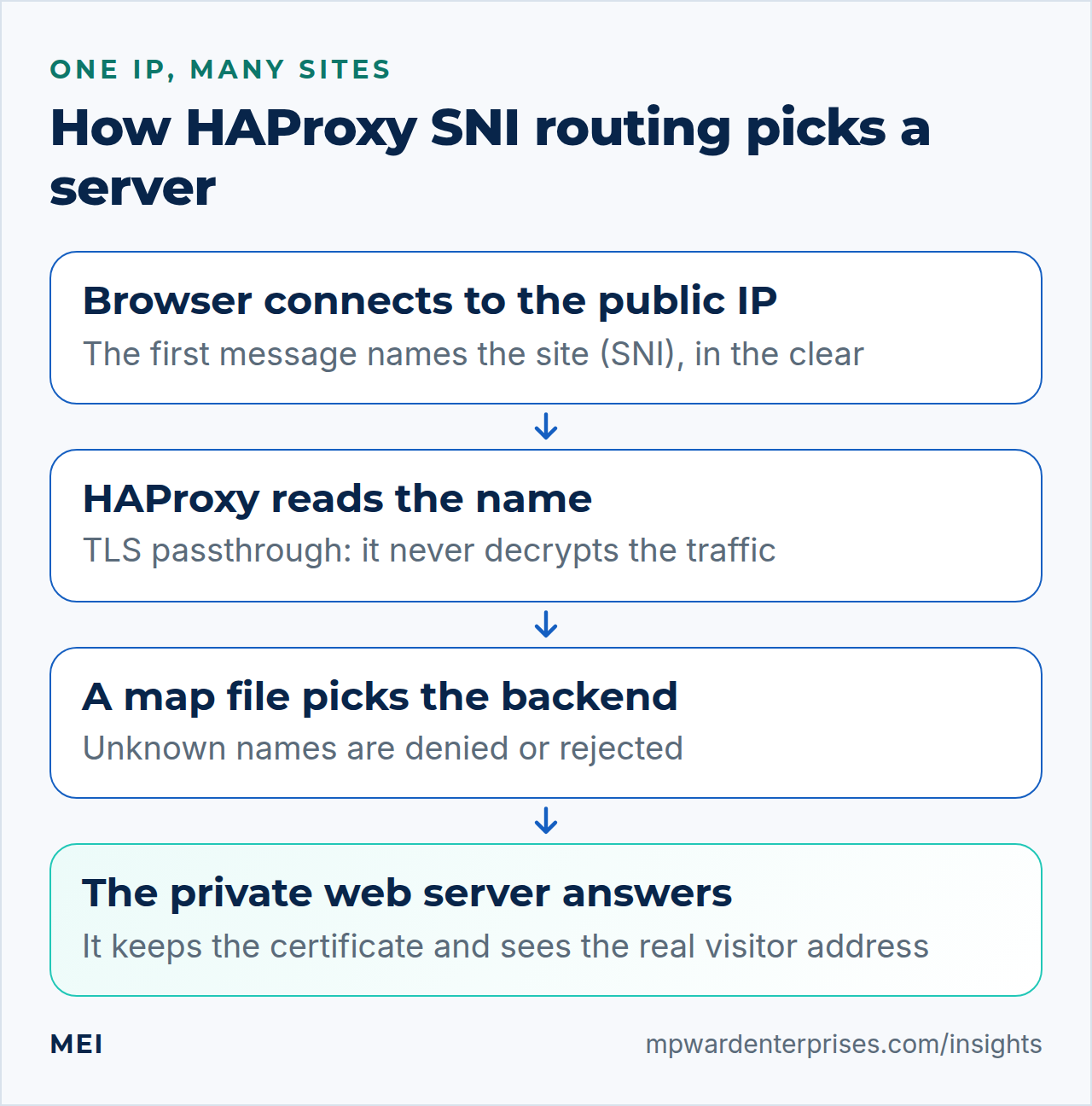
HAProxy SNI routing lets one public IP address serve many websites: the proxy reads the site name a browser announces before encryption starts, then passes the still-encrypted connection to the right private server. This guide builds a complete setup with exact files, commands that prove it works and the reasons behind each choice. It covers Ubuntu 24.04 LTS and 26.04 LTS, so pick yours with the switch below. Plan on about two hours, and be comfortable with SSH, DNS records and editing configuration files.
Every file and command below was run twice in disposable labs, once on Ubuntu 24.04 (HAProxy 2.8 and nginx 1.24) and once on Ubuntu 26.04 (HAProxy 3.2 and nginx 1.28), never on a live server. Each lab had one proxy, two nginx web servers with self-signed certificates and a visitor to test from. Where the two releases differ, the page shows only the one you picked.
A lab cannot reach a real certificate authority or public DNS, so those parts are described rather than shown. The main risk is that the proxy is the front door for every site, so a careless edit takes all of them offline. Step 10 shows how to avoid that.
Choose your Ubuntu version
This guide covers both releases. Commands, file paths and version numbers change with your choice; everything else is the same.
JavaScript is off, so both versions are shown below and each block says which release it is for.
Before you start: what you need and your safety net
Moving live sites behind a new proxy rewards preparation more than typing speed. Have these five things ready.
- A proxy server on Ubuntu 24.04 LTS or 26.04 LTS with a public IP address and nothing else listening on ports 80 or 443. Here its public address is
203.0.113.10and its private one is10.0.0.1. - Private web servers the proxy can reach over a private network or an encrypted tunnel, such as the one in our WireGuard server guide. Ours are
10.0.0.20and10.0.0.21, each running nginx. - Control of DNS, so each site name can point at the proxy. When moving live sites, lower the record's TTL a day ahead.
- A way back in: your provider's web console and a snapshot of each server, as in our Ubuntu hardening guide.
- A firewall plan: the proxy accepts ports 80 and 443 from anyone, each web server only from the proxy. Our UFW firewall guide shows how.
On Ubuntu 26.04, sudo is sudo-rs, a Rust rewrite, and the everyday tools used below (sort, cut, head, tail, tee, mkdir and date) are the Rust versions from the uutils project, while cp, mv, awk and grep are still the GNU ones. We ran every command as an admin user, and each behaved as it does on 24.04, so nothing in this guide changes because of them. sudo --version and ls --version tell you which implementation you have.
Change DNS last. Test the whole path with curl --resolve (step 7) while the old setup still serves visitors, then switch the records.
What SNI is, in plain English
When a browser opens a secure connection, its first message says which site it wants. That name travels in the clear, because the server needs it to choose the right certificate before encryption can begin. It is called Server Name Indication, or SNI, and RFC 6066 defines it so that many sites can share one network address.
Think of the name on the outside of an envelope. A mail carrier can read it and deliver the envelope to the right apartment without opening it. HAProxy plays the carrier: it reads the name, picks a private server and hands over the sealed connection. The certificate and its private key stay on the web server, the only place that can open it.
SNI is a hint, not proof
The name is whatever the client chooses to send. HAProxy's manual says it is not reliable enough to allow or deny access on its own, and with Encrypted Client Hello the proxy sees only a decoy outer name. Use SNI to route traffic, never to decide who is allowed to do what.
One limit to know now: this only works for connections that start encrypting immediately, such as HTTPS on port 443. Services that start in plain text and upgrade later (STARTTLS, as on mail ports 25 and 587) show no name in their first bytes.
HAProxy SNI routing: why this way and not the other ways
There are two basic designs, and they differ in one thing: who decrypts the traffic. This guide uses TLS passthrough. The table shows what that choice buys and what it costs.
| Question | TLS passthrough (this guide) | Termination at the proxy |
|---|---|---|
| Who decrypts the traffic? | The web server | The proxy |
| Where do certificates and keys live? | On each web server, renewed there as usual | On the proxy, renewed in one place |
| What can the proxy see? | The site name, timing and byte counts | Everything: URLs, cookies, form contents |
| What can it do with a request? | Pick a server by name, nothing more | Route by path, cache, filter, rewrite headers |
| How does the web server learn the visitor's address? | PROXY protocol, which works for any TCP service | PROXY protocol or an X-Forwarded-For header |
Choose termination when you want routing by URL path, caching, a web application firewall or one place for certificates. You then accept that the proxy holds every private key and sees every request, which makes it the most sensitive machine you own. Many estates mix both. This table compares the wider field.
| Option | In plain English | Our verdict |
|---|---|---|
| HAProxy with TLS passthrough (this guide) | Reads the site name and forwards the encrypted traffic | Our default for a few to a few dozen sites on separate servers. Keys stay on the web servers and a new site is two lines. No path routing or edge caching |
| HAProxy that ends TLS itself | Decrypts, then talks to the web servers in plain text or re-encrypts | Choose it for path routing, caching or request filtering at the edge, and protect the proxy as the key store it has become |
nginx stream with ssl_preread |
The same name-reading trick, done by nginx | Fine if nginx is already your edge and you have few sites; we tested it and it routes by name. Active health checks are a paid NGINX Plus feature, while HAProxy includes them |
| Traefik or Caddy | Proxies that fetch and renew certificates for you | Convenient with containers. They normally end TLS themselves; Traefik can also pass TLS through by name with a TCP router |
| Cloudflare or a similar CDN | A third party answers visitors and forwards to you | Hides your server and absorbs attacks, but it is not passthrough: the provider keeps one connection with the visitor and another with you |
| A cloud load balancer | The same job as a managed service | Sensible when your servers already live in that cloud. Check whether the product routes by name without decrypting; they differ |
| One public IP per site | Every site gets its own address | The simplest design. It costs an address per site, but it is fine for two or three sites |
If you are still deciding whether to run a proxy yourself, our guides to self-hosted vs cloud and VPS vs shared hosting cover that question.
Step 1: Install HAProxy and check the version
HAProxy is one package. We also install socat, a small tool for talking to HAProxy's admin socket later. Do this on the proxy server only.
sudo apt update
sudo apt install -y haproxy socat
haproxy -v | head -1
Ubuntu 24.0426.04 ships the HAProxy 2.83.2 long-term-support branch, so the last command should print HAProxy version 2.83.2. and a patch number. The packaged configuration defines no listeners, so the service runs but listens on nothing yet.
Why this way?
We use Ubuntu's own package rather than a newer build from a third-party repository. Security fixes then arrive with your normal updates (see automatic updates on Ubuntu), and a package from elsewhere can be left without updates after Ubuntu itself is upgraded. The 2.83.2 branch has every feature this guide uses.
Step 2: Set the defaults and sane timeouts
Open /etc/haproxy/haproxy.cfg. Keep the global section Ubuntu ships: it sets up logging, a restricted working directory (a chroot), an admin socket at /run/haproxy/admin.sock that only root and the haproxy group can open, and an unprivileged haproxy user. Its TLS cipher lines only matter when HAProxy decrypts traffic, which it will not do here. Replace the defaults section with this.
defaults
    log     global
    option  dontlognull
    timeout connect    5s
    timeout client     1m
    timeout server     1m
    timeout tunnel     1h
timeout client-fin 30s| Setting | What it limits |
|---|---|
timeout connect 5s |
Time allowed to open a connection to a web server. A private network answers in milliseconds, so a slow answer is worth failing fast on |
timeout client and timeout server |
How long either side may stay silent. Long enough for slow mobile networks, short enough to free dead connections |
timeout tunnel 1h |
In TCP mode, the silence allowed once routing is decided. It replaces the two above for that connection, so WebSockets and idle keep-alive connections survive |
timeout client-fin 30s |
How long to wait for a visitor who half-closed a connection and vanished. HAProxy's manual recommends it alongside a tunnel timeout |
option dontlognull |
No log lines for connections that sent nothing, such as scanners |
Why this way?
Ubuntu's shipped defaults use 5, 50 and 50 seconds with no tunnel timeout, which cuts an idle secure connection at 50 seconds. We measured the mechanism with scaled-down values: with client and server timeouts of 3 seconds and a tunnel timeout of 12, an idle TLS connection lasted 12.0 seconds; without the tunnel timeout it ended at 3.0. We also leave mode out of defaults and set it in each section, so a TCP frontend can never silently inherit HTTP behavior.
Step 3: Route port 80 by Host header, with a deny-by-default backend
Port 80 carries plain HTTP, so HAProxy can read the Host header and route on it. Create the frontend, a backend whose only job is to refuse anything unknown, and the first map file, which holds one line per site.
frontend fe_http
    mode http
    bind :80
    option httplog
    timeout http-request 10s
    use_backend %[req.hdr(host),host_only,map(/etc/haproxy/maps/http.map,be_http_deny)]
    default_backend be_http_deny

backend be_http_deny
    mode http
    http-request deny deny_status 403
sudo mkdir -p /etc/haproxy/maps
sudo tee /etc/haproxy/maps/http.map > /dev/null <<'EOF'
# hostname backend
example.com be_web1_http
www.example.com be_web1_http
app.example.com be_web2_http
EOFRead the use_backend line from the inside out. req.hdr(host) is the Host header. host_only removes a port if the client sent one and lowercases the name. map(file,default) looks the name up and returns the backend on that line, or be_http_deny if the name is not listed. The map is a whitelist you control: the visitor only supplies a key, so nobody can steer a request to a backend you did not list.
Use an exact map, not map_dom or map_end
Many guides suggest map_dom or map_end so one line covers every subdomain. We tested both with a single example.com line. map_dom also sent example.com.evil.net to that site, and it takes the first matching line in file order, so a general line above app.example.com hid the specific one. map_end sent notexample.com to it. HAProxy's manual warns that domain matching for routing can easily be fooled by a look-alike name. An exact map needs one line per name, which is also easier to audit.
Why this way?
Deny by default means a misspelled or forgotten name never falls through to somebody else's site, and a scanner that connects to the bare IP gets a refusal instead of a page. A map file also keeps the routing data apart from the logic: the frontend never changes, and a mistake is a bad line rather than a broken program. The alternative, one acl and one use_backend line per site, reads well for five sites and gets tedious at twenty.
Step 4: Route port 443 by SNI without decrypting anything
This is the heart of HAProxy SNI routing. The frontend runs in TCP mode, waits for the visitor's first message, reads the requested name from it and looks the name up in a second map file.
frontend fe_tls
    mode tcp
    bind :443
    option tcplog
    tcp-request inspect-delay 5s
    tcp-request content accept if { req.ssl_hello_type 1 }
    use_backend %[req.ssl_sni,lower,map(/etc/haproxy/maps/sni.map,be_tls_reject)]
    default_backend be_tls_reject

backend be_tls_reject
    mode tcp
    tcp-request content reject
sudo tee /etc/haproxy/maps/sni.map > /dev/null <<'EOF'
# TLS server name backend
example.com be_web1_tls
www.example.com be_web1_tls
app.example.com be_web2_tls
EOF| Line | What it does |
|---|---|
mode tcp |
Treats the connection as a stream of bytes. HAProxy never tries to decrypt it |
tcp-request inspect-delay 5s |
The longest HAProxy will wait for the visitor's first message |
tcp-request content accept if { req.ssl_hello_type 1 } |
As soon as a complete TLS ClientHello (type 1) has arrived, stop waiting and route |
req.ssl_sni,lower and map(...) |
Take the requested name, lowercase it, and look it up in sni.map. Unlisted names, or no name at all, go to the reject backend |
tcp-request content reject |
Closes the connection without a reply, so nothing reaches any site |
In the lab a normal connection was routed in a few milliseconds. A client that connected and said nothing was cut off after exactly 5.0 seconds, and a plain HTTP request sent to port 443 was refused at once. The delay is a ceiling, not a wait: a hello can arrive in more than one network packet, and the delay gives HAProxy time to see all of it.
On Ubuntu 26.04 that case is the everyday one. OpenSSL 3.5 offers a hybrid post-quantum key exchange by default (our lab negotiated X25519MLKEM768), which grew the first message of openssl s_client from 317 bytes on 24.04 to about 1.5 KB. That no longer fits in one 1,500-byte packet. HAProxy 3.2 waited for the rest and routed correctly, even when we delivered a captured hello in two pieces two seconds apart, so leave the delay at a few seconds.
Why this way?
With passthrough, HAProxy never holds a certificate and its own TLS settings play no part: the visitor negotiates encryption directly with the web server. The price is that HAProxy sees only the name, so it cannot route by URL path. Older guides write req_ssl_hello_type and req_ssl_sni; HAProxy 2.83.2 still accepts those, but its manual marks them deprecated in favor of the dotted forms used here.
Step 5: Add the backends, health checks and the PROXY protocol
Each web server needs two small backends, one per port, because the ports use different modes. The names must match the ones in your map files. Here is web1; add the same two sections for web2 with its address, 10.0.0.21.
backend be_web1_http
    mode http
    server web1 10.0.0.20:80 send-proxy-v2 check

backend be_web1_tls
    mode tcp
    server web1 10.0.0.20:443 send-proxy-v2 check
check makes HAProxy probe the server. By default it connects every 2 seconds, marks the server DOWN after 3 failures in a row and UP again after 2 successes, so a dead web server is noticed in about six seconds. send-proxy-v2 makes HAProxy send a small header at the start of each connection that says which visitor address it really belongs to. Because HAProxy cannot read the encrypted traffic, this header is the usual way for the web server to learn who is calling. The PROXY protocol guide covers it in depth.
Two health-check traps
First, an HTTP check must accept redirects. Your port-80 server probably answers 301 to send visitors to HTTPS. option httpchk accepts any 2xx or 3xx by default, but adding http-check expect status 200 made HAProxy mark the server DOWN (L7STS 301 in the lab) and answer 503 to every port-80 request for that site, including certificate validation, while HTTPS kept working. If you narrow the check, use http-check expect status 200-399.
Second, the PROXY header. Some guides say every check needs check-send-proxy. HAProxy's manual and our nginx logs say the check sends the header by itself when the server line has send-proxy-v2, unless the check uses its own port or addr. Only then add check-send-proxy: in the lab an HTTP check with port 80 and no check-send-proxy marked the server DOWN while nginx logged broken header for each probe.
Step 6: Make the web servers accept the PROXY header
On each web server, nginx must expect the header on the same ports. Add proxy_protocol to the listen lines, trust the proxy's private address and nobody else, and take the visitor's address from the header. Port 80 can go in first; add the port-443 block once a certificate exists (step 9).
server {
    listen 80 proxy_protocol;
    server_name example.com www.example.com;
    set_real_ip_from 10.0.0.1;        # the proxy's private address, and only that
    real_ip_header proxy_protocol;
    location ^~ /.well-known/acme-challenge/ { root /var/www/acme; try_files $uri =404; }
    location / { return 301 https://$host$request_uri; }
}

server {
    listen 443 ssl proxy_protocol;
    server_name example.com www.example.com;
    set_real_ip_from 10.0.0.1;
    real_ip_header proxy_protocol;
    ssl_certificate     /etc/letsencrypt/live/example.com/fullchain.pem;
    ssl_certificate_key /etc/letsencrypt/live/example.com/privkey.pem;
    root /var/www/example.com;

    # temporary test page for step 7; delete it afterwards
    location = /whoami { default_type text/plain; return 200 "backend=web1 sni=$ssl_server_name client=$remote_addr via=$realip_remote_addr\n"; }
}
proxy_protocol on a listen line means every connection to that port must start with the header, so a visitor who connects directly gets nothing. In the lab a plain request failed with an empty reply and nginx logged broken header. Both ends must change together: when we enabled the nginx side first, TLS connections failed and port 80 returned 502 until send-proxy-v2 was switched on at the proxy.
Why this way?
The header is a claim made by whoever connects, so it must be trusted only from the proxy. In the lab a forged header claiming 192.0.2.66 was not used as the client address when it came from another machine, but was believed when it came from the proxy's own address. That is why set_real_ip_from names a single address, and why the web servers' firewall should accept ports 80 and 443 only from the proxy.
Step 7: Test it like a visitor
Run these from a machine outside your servers. curl --resolve pretends a name points at an address you choose, so you can test before any DNS change. The -k flag skips certificate checking and is only needed while certificates are self-signed.
curl -sk --resolve example.com:443:203.0.113.10 https://example.com/whoami
curl -sk --resolve app.example.com:443:203.0.113.10 https://app.example.com/whoami
Each answer names the web server that replied, the name nginx received and the visitor's address. This is what the lab printed, where 198.51.100.7 was the test machine.
backend=web1 sni=example.com client=198.51.100.7 via=10.0.0.1
backend=web2 sni=app.example.com client=198.51.100.7 via=10.0.0.1
client is the real visitor and via is the proxy that delivered the connection. If client shows the proxy's address instead, the header is not arriving or set_real_ip_from is wrong. Next, ask for certificates the way a browser would, by announcing a name with openssl s_client, and try a name you never mapped.
openssl s_client -connect 203.0.113.10:443 -servername app.example.com </dev/null 2>/dev/null | openssl x509 -noout -subject
openssl s_client -connect 203.0.113.10:443 -servername unknown.example.org </dev/null
The first prints subject=CN = app.example.comsubject=CN=app.example.com, the certificate the second web server holds for its own name, which proves the traffic went to the right place. The second shows deny by default: the proxy closed the connection before any handshake bytes came back ("no peer certificate available"), and curl ends with exit status 35. Finally, test port 80 and read HAProxy's log.
curl -s -o /dev/null -w '%{http_code}\n' -H 'Host: example.com' http://203.0.113.10/
curl -s -o /dev/null -w '%{http_code}\n' -H 'Host: unknown.example.org' http://203.0.113.10/
sudo tail -n 4 /var/log/haproxy.log
The first prints 301, the redirect nginx sends. The second prints 403 from the deny backend. The log records the routing decision for every connection: fe_tls be_web2_tls/web2 for a known name, and be_tls_reject/<NOSRV> with the termination code PR for a rejected one.
That file exists when rsyslog is installed. The ubuntu-minimal package recommends it, and the HAProxy package adds the rule that writes /var/log/haproxy.log. On a minimal image without rsyslog, the same lines go to the system journal, so run sudo journalctl -t haproxy -n 4 --no-pager instead. We tested both arrangements, and the HAProxy part of each line is the same.
Step 8: Add a site with one line in each map file
Suppose shop.example.com should be served by the second web server. Once DNS and the web server's own configuration are ready, the proxy needs one line in each map file, a syntax check and a reload. Copy the maps first so you can undo it.
sudo cp -a /etc/haproxy/maps /root/haproxy-maps.$(date +%Y%m%d-%H%M%S)
echo 'shop.example.com   be_web2_http' | sudo tee -a /etc/haproxy/maps/http.map
echo 'shop.example.com   be_web2_tls'  | sudo tee -a /etc/haproxy/maps/sni.map
sudo haproxy -c -f /etc/haproxy/haproxy.cfg && sudo systemctl reload haproxy
In the lab the new name went from 403 on port 80 and a refused TLS connection to a working site, with the visitor's address intact. Every name needs its own line, including the bare domain and www. If the check fails or a site misbehaves, copy the saved files back into /etc/haproxy/maps/ and reload again.
On HAProxy 3.2 a passing haproxy -c prints nothing at all and exits with status 0, which is why the && still works. Add -V (as in haproxy -c -V -f /etc/haproxy/haproxy.cfg) to see the line "Configuration file is valid". A failing check still prints its errors and exits with status 1.
haproxy -c does not catch a misspelled backend name
The backend name is looked up while traffic flows, so haproxy -c cannot check it. We added a line pointing at a backend that did not exist: the check passed and the site quietly returned 403. A missing map file or a syntax error is caught; a typo in the second column is not. This loop lists any name your maps use that the configuration does not define, and prints nothing when all is well.
awk '!/^#/ && NF>=2 {print $2}' /etc/haproxy/maps/*.map | sort -u | while read -r b; do
  grep -q "^backend $b\$" /etc/haproxy/haproxy.cfg || echo "missing backend: $b"
done
Why this way?
HAProxy can also add map entries on the fly through its admin socket (add map). We verified it works without a reload, but those entries vanish at the next reload unless you also write them to the file. For a small estate, edit the file and reload.
Step 9: Get certificates through the proxy: the route must exist first
Certificate authorities such as Let's Encrypt prove you control a name by fetching a token file from http://yourname/.well-known/acme-challenge/ on port 80, possibly several times from different places. That request reaches the proxy first. With no route for the name, the proxy answers 403 and validation fails before your web server is ever asked.
So the order matters. Point DNS at the proxy, add the name to http.map only, reload, and check the answer before running Certbot on the web server (our Certbot guide covers that tool). Add the sni.map line last, once the web server has its certificate.
curl -i http://shop.example.com/.well-known/acme-challenge/probe| Answer on port 80 | What it means | What to do |
|---|---|---|
| 403 Forbidden | The name is not in http.map, or the line has a typo |
Fix the map and reload |
| 503 Service Unavailable | The name is mapped, but HAProxy sees no healthy server | Check nginx, and check the health check is not too strict (step 5) |
| 404 Not Found | The route works: the web server answered and simply has no such token file | This is the answer you want. Run Certbot |
| 200 OK | The route and web root are right; this is what the certificate authority will see | Proceed |
The lab produced 403, 404, 200 and 503 in exactly those situations, using curl and a token file we created ourselves. A real certificate request needs the public internet, so that part is not lab-tested. Serve the challenge path directly on port 80, as in step 6, rather than redirecting it.
Step 10: Change the live configuration safely
Editing /etc/haproxy/haproxy.cfg in place is how one typo becomes an outage for every site. Use the same five moves every time: work on a copy, check the copy, back up the live file, swap the copy in with one rename, then reload and roll back if that fails. This small script does all five.
#!/bin/bash
# usage: haproxy-apply /etc/haproxy/haproxy.cfg.candidate
set -euo pipefail
CFG=/etc/haproxy/haproxy.cfg
CAND=${1:?path to the candidate config}
STAMP=$(date +%Y%m%d-%H%M%S)

haproxy -c -f "$CAND"                                # 1. validate before touching anything
cp -p "$CFG" "$CFG.bak-$STAMP"                       # 2. timestamped backup
cp -p "$CAND" "$CFG.new" && mv "$CFG.new" "$CFG"     # 3. atomic swap (a rename inside one directory)
if ! systemctl reload haproxy; then                  # 4. reload; the unit re-checks the file first
    cp -p "$CFG.bak-$STAMP" "$CFG"                   # 5. roll back to the known-good copy
    systemctl reload haproxy
    echo "reload failed; rolled back to $CFG.bak-$STAMP" >&2
    exit 1
fi
echo "applied; previous config saved as $CFG.bak-$STAMP"
#!/bin/bash
# usage: haproxy-apply /etc/haproxy/haproxy.cfg.candidate
set -euo pipefail
CFG=/etc/haproxy/haproxy.cfg
CAND=${1:?path to the candidate config}
STAMP=$(date +%Y%m%d-%H%M%S)
reload_haproxy() { # reload through the master socket; "Success=1" means the new worker is running
local out
out=$(echo reload | socat -t 30 stdio /run/haproxy-master.sock)
printf '%s\n' "$out" | grep -q '^Success=1'
}
haproxy -c -f "$CAND" # 1. validate before touching anything
cp -p "$CFG" "$CFG.bak-$STAMP" # 2. timestamped backup
cp -p "$CAND" "$CFG.new" && mv "$CFG.new" "$CFG" # 3. atomic swap (a rename inside one directory)
if ! reload_haproxy; then # 4. reload and wait for the verdict
cp -p "$CFG.bak-$STAMP" "$CFG" # 5. roll back to the known-good copy
reload_haproxy || echo "the rollback reload failed too: see systemctl status haproxy" >&2
echo "reload failed; rolled back to $CFG.bak-$STAMP" >&2
exit 1
fi
echo "applied; previous config saved as $CFG.bak-$STAMP"Save it as /usr/local/sbin/haproxy-apply and make it executable. To change the configuration, copy the live file to haproxy.cfg.candidate, edit the copy and run sudo haproxy-apply /etc/haproxy/haproxy.cfg.candidate. In the lab a candidate with a syntax error stopped at step 1 and changed nothing.
A candidate that was valid but could not take effect needed the extra check below.A candidate that was valid but could not take effect, a frontend bound to an address the machine does not own, made the reload fail at step 4, and the script rolled back by itself.
A successful reload is not proof
haproxy -c checks syntax, not whether the new process can start. We added a frontend bound to an address the machine does not own. The check passed, the reload command reported success, and the new process failed to start while the old one kept serving. The master's status told the truth: its reload count was followed by [failed: 1].
After every reload, wait a few seconds, run echo "show proc" | sudo socat stdio /run/haproxy-master.sock, look for [failed: 0] and a worker with a small uptime, then test your sites. (The counter returns to 0 after the next good reload.) If it reports a failure, copy back the backup the script printed and reload again. (Systemd could not run inside the lab, so we ran the commands from Ubuntu's service file by hand.)
A successful reload is not proof
haproxy -c checks syntax, not whether the new process can start. We added a frontend bound to an address the machine does not own. The check passed, and a plain systemctl reload haproxy reported success, but the new process failed to start while the old one kept serving. Three places tell the truth. systemctl status haproxy shows Status: "Reload failed!", journalctl -u haproxy shows the cannot bind socket alert, and echo "show proc" | sudo socat stdio /run/haproxy-master.sock shows [failed: 1], an empty # workers list and the surviving process under # old workers.
Then comes the trap. On the HAProxy 3.2.9 package that Ubuntu 26.04 shipped when we tested it, the master process ignores systemctl reload after a failed reload, so putting the old file back and reloading looks like it worked and changes nothing.
Ask the master socket instead: echo reload | sudo socat -t 30 stdio /run/haproxy-master.sock waits for the result, prints Success=1 (or Success=0 with the error messages) and cleared the failed state in our lab. That is why the script reloads through the socket. A restart also recovers, but it cuts open connections. A newer package may behave differently, so repeat this test once on a spare machine after an HAProxy update.
Why this way?
A candidate file means your half-finished edit is never live. The check stops a typo before it matters, the backup gives you a one-command way back, and a rename is atomic, so HAProxy never reads a half-written file. A reload starts a new process that takes over the ports while the old one finishes its current connections, which is why we reload and never restart. The alternatives are editing by hand and hoping, or managing the file with a tool such as Ansible, which should follow the same pattern underneath.
Check your work
These checks take five minutes and are worth repeating after every change. The first two confirm the configuration and the servers; the loop tests every name in your map on the proxy itself.
sudo haproxy -c -f /etc/haproxy/haproxy.cfg
echo "show stat" | sudo socat stdio /run/haproxy/admin.sock | cut -d, -f1,2,18 | grep -v -E 'FRONTEND|BACKEND|^$|^#'
while read -r name backend; do
  case $name in ''|\#*) continue;; esac
  printf '%-22s ' "$name"
  curl -sk -m 5 -o /dev/null -w '%{http_code}\n' --resolve "$name:443:127.0.0.1" "https://$name/"
done < /etc/haproxy/maps/sni.map
The first command prints Configuration file is validnothing when the file is valid (add -V to see that message). The second command prints one line per server, such as be_web1_tls,web1,UP, and everything should say UP. The loop prints a status code for each site, usually 200, or 000 for a name whose TLS connection failed. Run the missing-backend loop from step 8 as well.
Common mistakes
- Using
map_domormap_endfor routing, which can match names you never listed. - Forgetting the
wwwor bare-domain line. Exact maps have no wildcards. - Turning on
send-proxy-v2at the proxy withoutproxy_protocolon nginx, or the reverse. Change both together. - Letting anyone but the proxy reach the web servers' ports 80 and 443, which defeats the trusted-address rule.
- An HTTP health check that expects exactly 200 when port 80 redirects.
- Editing the live file in place, and trusting a reload message without checking
show procand the sites. - Requesting a certificate before the name is mapped on port 80.
- Expecting the proxy to cache, filter or log URLs. In passthrough mode it cannot see them, and it carries TCP only, so UDP traffic such as HTTP/3 is not forwarded.
Keep it healthy: a monthly 15-minute routine
- Install pending updates and confirm
haproxy -vstill reports the 2.83.2 branch. - Run
sudo certbot renew --dry-runon each web server and check each certificate's expiry date. - Count rejected connections with
sudo grep -c be_tls_reject /var/log/haproxy.log. A sudden jump can mean a mistyped name or a scan. Ubuntu rotates that log for you. Without rsyslog, count in the journal instead:sudo journalctl -t haproxy --no-pager | grep -c be_tls_reject. Our logrotate guide covers the journal's size limits. - Delete map lines for sites you no longer host, then run the missing-backend loop.
- Include
/etc/haproxyin your backups and test a restore, as in the 3-2-1 backup rule.
Getting help
A proxy in front of every site is a good place to ask for a second pair of eyes. MEI's Network Architecture & Security service starts at $1,500, scoped after an assessment, and covers firewall and network hardening, secure remote access and monitoring. Our Infrastructure & Private Cloud service starts at $2,500, scoped by systems and scale, and covers provisioning, Linux administration, migrations, monitoring and documentation. We focus on the highest-impact, most likely risks and do not promise perfect security.
For the wider picture, read the Linux server hardening checklist, or start with a Business Tech Rescue Audit from $497.
Frequently asked questions
What is HAProxy SNI routing?
It is a way to share one public IP address between many HTTPS sites. HAProxy reads the Server Name Indication, the site name a browser sends at the start of a secure connection, looks it up in a map file and forwards the still-encrypted connection to the matching private server. The certificates stay on the web servers.
Can HAProxy route HTTPS traffic without decrypting it?
Yes. In TCP mode HAProxy waits for the TLS ClientHello, reads the name with req.ssl_sni and picks a backend with use_backend. It never decrypts anything, so it needs no certificate. The trade-off is that it sees only the site name, not URLs or cookies, so it cannot route by path or cache pages.
Should I use TLS passthrough or terminate TLS at HAProxy?
Use passthrough when each web server should keep its own certificates and keys and you only need to route by site name. Terminate at the proxy when you want path routing, caching, a web application firewall or one place for certificates, and accept that the proxy then holds every private key and sees all traffic.
Why use map files instead of rules in the HAProxy config?
A map file holds one line per site, so adding a site means adding a line to two files and reloading, without touching the logic. Use an exact map, not map_dom or map_end: in our tests those also matched look-alike names such as example.com.evil.net and notexample.com.
Why does Certbot fail behind HAProxy?
Usually because the proxy has no route for the name on port 80. The certificate authority fetches a token file over HTTP, and an unmapped name gets a 403 from the deny backend, or a 503 if the web server is marked down. Map the name on port 80 first, confirm a 404 for the challenge path, then run Certbot.
How do I add a site to HAProxy without downtime?
Add one line to each map file, run haproxy -c to check the configuration, then run systemctl reload haproxy. A reload starts a new process and lets the old one finish its current connections. Afterwards confirm with show proc that the reload did not fail, and test the new name.
Sources and further reading
- HAProxy 2.8 configuration manual — req.ssl_sni and req.ssl_hello_type (and the deprecated old names), the reliability and Encrypted Client Hello caveats, tcp-request inspect-delay, dynamic use_backend names, the warning about domain matching, check-send-proxy, timeout tunnel and client-fin, and host_only
- HAProxy 3.2 configuration manual — on the 26.04 release: the dotted sample fetches (the old names are marked deprecated), the reliability and Encrypted Client Hello caveats, dynamic use_backend names, the domain-matching warning, check-send-proxy, timeout tunnel and client-fin, and host_only
- The PROXY protocol, versions 1 and 2 (HAProxy) — what the header carries and why receivers must accept it only from trusted proxies
- RFC 6066: TLS extension definitions — Server Name Indication and why it exists
- nginx: ngx_stream_ssl_preread_module — reading the SNI name without terminating TLS in nginx
- nginx: ngx_http_core_module (listen) — the proxy_protocol parameter of listen and the $proxy_protocol_addr variable
- Let's Encrypt: challenge types — HTTP-01 validation happens on port 80 from several vantage points
- Traefik: TCP TLS configuration — HostSNI rules and tls passthrough for TCP routers
- Cloudflare: SSL/TLS encryption modes — the two separate connections of a proxied site: visitor to Cloudflare, Cloudflare to origin