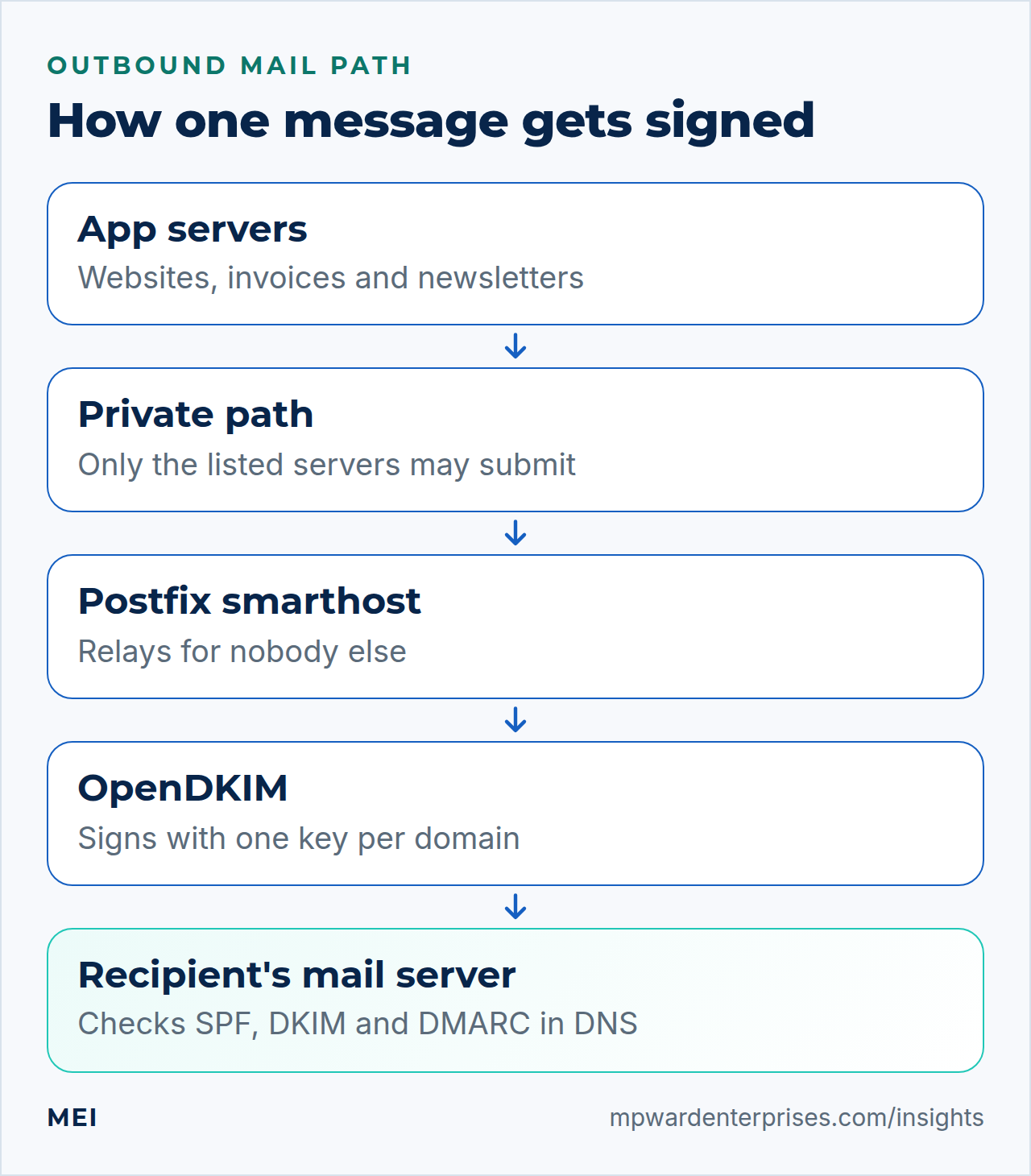
A Postfix OpenDKIM sending server is one small, outbound-only mail server that your websites, invoicing tools and newsletters all send through, so every message leaves from one address with your own DKIM signature. This guide builds it on Ubuntu 24.04 LTS or 26.04 LTS in nine steps (pick yours with the switch below) and says when not to. Allow about three hours, plus days for reverse DNS. You need two Ubuntu servers, a domain you can edit, sudo, and comfort with a Linux shell and DNS records.
Every command was run twice in disposable labs of three machines each, once on Ubuntu 24.04 (Postfix 3.8.6) and once on Ubuntu 26.04 (Postfix 3.10.6), with OpenDKIM 2.11.0 on both, never on a live server. The labs have no internet, so a stand-in DNS server answered for the records; real providers, inboxes and reverse DNS were not tested. We also reproduced the mistakes that cost days. Where the two releases differ, the page shows only the one you picked.
Addresses such as 203.0.113.25 are placeholders.
Choose your Ubuntu version
This guide covers both releases. Commands, file paths and version numbers change with your choice; everything else is the same.
JavaScript is off, so both versions are shown below and each block says which release it is for.
Before you start
Mail is the one service where a correct server can still fail, because other people's servers decide whether to trust yours. Settle these points first.
- Two roles. The smarthost is the Ubuntu 24.04 LTS or 26.04 LTS server that sends. The app servers run your websites and tools, and only they may hand it mail.
- A private path. A WireGuard tunnel (see our WireGuard guide) or fixed public addresses allowed through the UFW firewall. The lab used a private network.
- A clean public address. Outbound port 25 must be open (some providers block it until you ask), you must be able to set its reverse DNS, and a blocklist checker should find nothing. Give it no other job, such as the edge proxy in our HAProxy guide.
- A hardened server: hardening Ubuntu Server, SSH hardening and fail2ban first.
- DNS access, two mailboxes at other providers (tests; bounces and reports), and a second SSH session while you edit.
On Ubuntu 26.04, sudo is sudo-rs, a Rust rewrite, and the everyday tools used below (ls, install, tee, head, tail, cut, tr and timeout) are the Rust versions from the uutils project, while cp, sed, awk and grep are still the GNU ones. We ran every command as an admin user and each behaved as it does on 24.04, so nothing in this guide changes because of them. sudo --version and ls --version tell you which implementation you have.
Write the plan down first. These placeholders are used throughout.
| Item | Placeholder | Notes |
|---|---|---|
| Smarthost name | mail-out.example.com |
Same as its reverse DNS name |
| Public sending address | 203.0.113.25 |
The only address mail leaves from |
| Smarthost private address | 10.0.0.1 |
Where the app servers connect |
| App servers | 10.0.0.20, 10.0.0.21 |
The only machines allowed to submit |
| Sending subdomain | send.example.com |
Used by From, the bounce address and DKIM d= |
| Bounce address | [email address] |
Failure notices return here |
| Selector | s2026a |
Year plus a letter |
To roll back, point the app servers at their old mail settings, or run sudo systemctl stop postfix on the smarthost: the app servers hold their mail and retry.
Why a Postfix OpenDKIM smarthost and not the other ways
Small businesses usually choose among four approaches. They differ in who controls the sending address, who carries the reputation and who gets the call when mail stops.
| Option | In plain English | Our verdict |
|---|---|---|
| Your own smarthost (this guide) | One small server every application sends through; it signs and delivers from one address you control | Worth it with several servers, a wish for one place for keys, logs and rules, and someone to watch it. The server is cheap; your attention is the cost. You get control, not reputation, which is earned by what you send and needs the slow start in step 9 |
| A transactional email service (Amazon SES, Postmark and Mailgun are examples) | You hand mail to a provider by API or SMTP, and they deliver it | The best default for most small businesses: nothing to patch, bounces usually handled, an established reputation. You pay per message, share that reputation, follow their rules, and still publish SPF, DKIM and DMARC records |
| Your mailbox provider's SMTP (Microsoft 365, Google Workspace, your host's mail) | Applications log in like a person | Fine for a contact form or a few invoices a day. Limits and terms are written for people, and one expired password stops everything |
| Each website sends for itself | PHP mail() or a local mail program on every web server |
The weakest choice: a separate address, reverse DNS and reputation per server, usually unsigned, no central log. The usual cause of forms that never arrive |
Think of a building's mail room: one locked door, one stamp and one logbook are easy to watch, and five offices posting letters their own ways are not. But a mail room needs a clerk. If nobody will own this server, choose the second or third option.
Do not build this if you send a few messages a day from one application, if your provider will not open port 25 or set reverse DNS, if nobody will watch the queue, the DNS and the reports, or if you need a guarantee of inbox placement. No setup or vendor can give one, and no server rescues a poor list.
Step 1: Install the packages and close the door
On the smarthost, install Postfix and OpenDKIM. The two debconf lines answer the installer's questions. Ubuntu 24.0426.04 provides Postfix 3.8.63.10.6 and OpenDKIM 2.11.0, and both start at once.
echo "postfix postfix/main_mailer_type select Internet Site" | sudo debconf-set-selections
echo "postfix postfix/mailname string mail-out.example.com" | sudo debconf-set-selections
sudo DEBIAN_FRONTEND=noninteractive apt install -y postfix opendkim opendkim-tools
Postfix now listens on every interface, so close the door first: one firewall rule per app server, aimed at the smarthost's private address. This assumes UFW is on with incoming traffic denied by default, as in our UFW guide.
sudo ufw allow from 10.0.0.20 to 10.0.0.1 port 25 proto tcp comment 'app1 mail submission'
sudo ufw allow from 10.0.0.21 to 10.0.0.1 port 25 proto tcp comment 'app2 mail submission'
sudo ufw status numbered
Rule added
Rule added
Status: active
To Action From
-- ------ ----
[ 1] 10.0.0.1 25/tcp ALLOW IN 10.0.0.20 # app1 mail submission
[ 2] 10.0.0.1 25/tcp ALLOW IN 10.0.0.21 # app2 mail submissionTest from an app server, then from some other machine on the same network. The first should see Postfix's greeting; the second should get no answer at all.
timeout 5 bash -c 'exec 3<>/dev/tcp/10.0.0.1/25 && head -n 1 <&3' || echo "no answer: blocked"# From an app server:
220 mail-out.example.com ESMTP Postfix (Ubuntu)
# From the other machine:
no answer: blockedWhy this way?
A mail server cannot judge a stranger's envelope, so it should never open the door to one. We prefer a tunnel because the mail never crosses the public internet. Public addresses work too, but the mail travels in plain text unless you add certificate-checked TLS. A login (SMTP authentication) per app is the alternative; it suits many tenants and costs more to manage. Either way, the smarthost must never become an open relay.
Step 2: Configure Postfix as an outbound-only smarthost
Postfix keeps its settings in /etc/postfix/main.cf, and postconf -e edits that file safely. Back it up first. These settings make the Postfix OpenDKIM smarthost send only, listen only privately, relay only for the app servers (so it is never an open relay) and introduce itself by the right name.
sudo cp -a /etc/postfix /etc/postfix.orig
sudo postconf -e \
  'myhostname = mail-out.example.com' \
  'mydestination =' \
  'inet_interfaces = 127.0.0.1, 10.0.0.1' \
  'inet_protocols = ipv4' \
  'mynetworks = 127.0.0.0/8, 10.0.0.20/32, 10.0.0.21/32' \
  'smtpd_relay_restrictions = permit_mynetworks, reject_unauth_destination' \
  'smtp_bind_address = 203.0.113.25' \
  'smtp_helo_name = mail-out.example.com' \
  'smtp_tls_security_level = may' \
  'smtp_tls_loglevel = 1' \
  'smtpd_tls_security_level = none'
sudo postfix check && sudo systemctl restart postfix
postfix check prints nothing when it finds no problem (on 26.04 it may first print lines such as updating /etc/hosts => /var/spool/postfix//etc/hosts, which only report that Postfix copied a changed system file), and sudo postconf -n lists every setting you changed. The important check is where Postfix listens:
ss -ltn | grep ':25 'LISTEN 0 100 127.0.0.1:25 0.0.0.0:*
LISTEN 0 100 10.0.0.1:25 0.0.0.0:*| Setting | In plain English |
|---|---|
mydestination = |
Empty: no mailboxes here. Everything is sent onward |
inet_interfaces |
Listen on loopback and the private address only |
inet_protocols = ipv4 |
IPv4 only; IPv6 would need its own reverse DNS and SPF record |
mynetworks |
Who counts as ours: loopback and the app servers, one address each |
smtp_bind_address, smtp_helo_name |
Always send from the public address, and greet receivers by the name its reverse DNS carries. Without the pin, our lab receiver saw mail arrive from the private address, and SPF would fail |
Why this way?
Three locks keep the smarthost from becoming an open relay: the firewall, the listening address and Postfix's own rule. mynetworks names each app server as one address, because a tidy 10.0.0.0/24 quietly lets every machine on that network send as you, even a compromised laptop. reject_unauth_destination refuses permanently (554); Postfix's default defer_unauth_destination makes it temporary (454), so senders retry.
Why this way?
Outbound, we use opportunistic TLS (may): encrypt when the receiver offers it, send in the clear when not, because forcing encryption would make mail to many receivers wait and bounce. It does not check certificates, so it stops passive eavesdroppers, not interception; an unverifiable certificate logged Untrusted TLS connection established and the mail still went. On the private hop we offer no TLS: the tunnel encrypts it, and a self-signed STARTTLS offer made curl fail (status 60).
Watch out: Postfix must start after the tunnel
If inet_interfaces names the tunnel's address and Postfix starts first, it refuses to start. systemctl status postfix can still say active, because that unit is a wrapper; the real instance is postfix@-. We reproduced it: nothing listened on port 25 and the journal said fatal: parameter inet_interfaces: no local interface found for and the address. This drop-in makes Postfix wait for a WireGuard tunnel named wg0, and it worked with a real wg-quick@wg0. Changing inet_interfaces needs a restart, not a reload.
sudo mkdir -p /etc/systemd/system/postfix@-.service.d
printf '[Unit]\nAfter=[email address]\nWants=[email address]\n' \
  | sudo tee /etc/systemd/system/postfix@-.service.d/wait-for-tunnel.conf
sudo systemctl daemon-reload
Watch out: Postfix must start after the tunnel
If inet_interfaces names the tunnel's address and Postfix starts first, it refuses to start. We reproduced it: nothing listened on port 25, systemctl status postfix showed failed, and the journal said fatal: parameter inet_interfaces: no local interface found for and the address. This drop-in makes Postfix wait for a WireGuard tunnel named wg0, and it worked with a real wg-quick@wg0. On 26.04 Postfix runs as the plain postfix.service, so the drop-in goes there; one written for postfix@-, the 24.04 name, changed nothing in our test.
Changing inet_interfaces needs a restart, not a reload.
sudo mkdir -p /etc/systemd/system/postfix.service.d
printf '[Unit]\nAfter=[email address]\nWants=[email address]\n' \
  | sudo tee /etc/systemd/system/postfix.service.d/wait-for-tunnel.conf
sudo systemctl daemon-reload
Step 3: Create one DKIM key per sending domain
OpenDKIM signs with a private key that never leaves the smarthost; the matching public key goes into DNS. Make one DKIM key for each domain you send from, here send.example.com. The same block creates /etc/opendkim for the tables, and each DKIM key gets a directory of its own.
sudo mkdir -p /etc/opendkim
sudo install -d -o opendkim -g opendkim -m 700 /etc/dkimkeys/send.example.com
sudo opendkim-genkey -b 2048 -d send.example.com -s s2026a -D /etc/dkimkeys/send.example.com
sudo chown opendkim:opendkim /etc/dkimkeys/send.example.com/s2026a.private /etc/dkimkeys/send.example.com/s2026a.txt
sudo chmod 600 /etc/dkimkeys/send.example.com/s2026a.private
sudo ls -l /etc/dkimkeys/send.example.com
total 8
-rw------- 1 opendkim opendkim 1704 Oct 9 03:54 s2026a.private
-rw------- 1 opendkim opendkim 510 Oct 9 03:54 s2026a.txtTwo details matter. First, -b 2048. Upstream's manual says the tool defaults to a 1024-bit DKIM key, while Ubuntu's build is patched to 2048, so saying it yourself gives the same key on any build. RFC 6376 sets 1024 as the floor for signers and says verifiers must handle keys up to 2048 bits but only may handle larger ones, so 2048 is the largest size every receiver must accept. Second, the selector s2026a (year plus a letter) is a label that lets two keys exist at once, which makes later key changes painless.
OpenDKIM reads three small tables. Create each with sudoedit, comment line included. The key table says where each key lives, the signing table says which From addresses get which key, and the trusted hosts file lists the machines whose mail is signed.
# /etc/opendkim/key.table: key name, then domain:selector:private key file
s2026a._domainkey.send.example.com send.example.com:s2026a:/etc/dkimkeys/send.example.com/s2026a.private
# /etc/opendkim/signing.table: which From addresses get which key
*@send.example.com s2026a._domainkey.send.example.com# /etc/opendkim/trusted.hosts: the machines whose mail is signed, one address per line
127.0.0.1
10.0.0.20
10.0.0.21Why this way?
Tables let you add a second domain with one line in each file, and one DKIM key per domain limits the damage if a DKIM key leaks. The trusted hosts file is OpenDKIM's InternalHosts list. A common mistake in copied configurations is a whole network here; step 7 shows what that does. List addresses, not names, and only the machines that submit mail.
Watch out: the key must belong to opendkim
Run with sudo, opendkim-genkey leaves root-owned files, and OpenDKIM runs as opendkim. In the lab the log said can't load key from ... Permission denied, and Postfix answered every message with 451 4.7.1 Service unavailable. With mode 644 it said key data is not secure: ... can be read or written by other users, because RequireSafeKeys is on by default. Keep the DKIM key at mode 600, owned by opendkim.
Step 4: Configure OpenDKIM and connect it to Postfix
OpenDKIM plugs into Postfix as a milter, a filter Postfix consults before it accepts a message, and the two talk through a socket, a file on the same machine. Back up the packaged configuration, then create the socket's directory. It sits inside Postfix's own directory tree, which Postfix can always reach; the warning below shows how Postfix is told the path.
sudo cp /etc/opendkim.conf /etc/opendkim.conf.orig
sudo install -d -o opendkim -g postfix -m 750 /var/spool/postfix/opendkim
Replace the contents of /etc/opendkim.conf with the file below. Edit this file, not /etc/default/opendkim: on Ubuntu 24.04 and 26.04 the service ignores that one.
# /etc/opendkim.conf: sign outgoing mail, never verify
Syslog                  yes
SyslogSuccess           yes
LogWhy                  yes
Mode                    s
Canonicalization        relaxed/relaxed
OversignHeaders         From
UserID                  opendkim:postfix
UMask                   007
PidFile                 /run/opendkim/opendkim.pid
Socket                  local:/var/spool/postfix/opendkim/opendkim.sock
KeyTable                /etc/opendkim/key.table
SigningTable            refile:/etc/opendkim/signing.table
InternalHosts           /etc/opendkim/trusted.hosts
In plain English: Mode s signs without verifying, because everything this smarthost relays comes from your own machines. relaxed/relaxed ignores harmless whitespace changes along the way, so a gateway re-wrapping a line does not break the signature. UserID opendkim:postfix and UMask 007 give the socket to group postfix alone. SyslogSuccess and LogWhy log each signature, and the reason for any message left unsigned.
Now tell Postfix about the milter, check the OpenDKIM file's syntax (it caught a misspelled setting and a missing table file in our tests) and restart both services:
sudo postconf -e \
  'smtpd_milters = unix:/opendkim/opendkim.sock' \
  'non_smtpd_milters = $smtpd_milters' \
  'milter_default_action = tempfail'
sudo opendkim -n && echo "opendkim configuration OK"
sudo systemctl restart opendkim postfix
sudo ls -l /var/spool/postfix/opendkim
sudo postconf -e \
'smtpd_milters = unix:/var/spool/postfix/opendkim/opendkim.sock' \
'non_smtpd_milters = $smtpd_milters' \
'milter_default_action = tempfail'
sudo opendkim -n && echo "opendkim configuration OK"
sudo systemctl restart opendkim postfix
sudo ls -l /var/spool/postfix/opendkimopendkim configuration OK
total 0
srwxrwx--- 1 opendkim postfix 0 Oct 9 03:54 opendkim.sockWatch out: Postfix lives in a jail
On Ubuntu, Postfix's SMTP server and cleanup service are chrooted: they see /var/spool/postfix as the whole filesystem. The packaged socket path, /run/opendkim/opendkim.sock, does not exist in there. We left it and every message failed with warning: connect to Milter service unix:/run/opendkim/opendkim.sock: No such file or directory and 451 4.7.1 Service unavailable. Postfix's milter guide says an absolute path is read relative to the queue directory, hence unix:/opendkim/opendkim.sock above.
If the socket exists but the group is wrong, the warning ends in Permission denied.
Watch out: the socket path depends on whether Postfix is chrooted
Ubuntu 26.04 no longer runs Postfix chrooted by default; its release notes say so. The path is therefore read as written, and the 24.04 form unix:/opendkim/opendkim.sock points at nothing. We tried it, and every message failed with warning: connect to Milter service unix:/opendkim/opendkim.sock: No such file or directory and 451 4.7.1 Service unavailable. The full path above fixed it. The socket in /run/opendkim that the package configures also failed, with Permission denied, because that folder belongs to opendkim alone.
If the socket exists but its group is wrong, the warning ends in Permission denied too.
A server upgraded from an older release may keep a master.cf that still chroots. Check yours with postconf -M smtp/inet: the fifth column is the chroot flag, and on y you need the 24.04 form of the path.
Why this way?
A socket limited to one group beats a TCP port any local program can reach, though a loopback port (inet:8891@127.0.0.1 in OpenDKIM, inet:127.0.0.1:8891 in Postfix) also worked. The popular recipe adds postfix to the opendkim group, with two traps we measured: a running Postfix keeps its old groups until restarted, and a group with several members makes OpenDKIM refuse a group-readable key. Group postfix for OpenDKIM avoids both.
non_smtpd_milters signs mail created on the smarthost itself, which otherwise left unsigned, and tempfail makes Postfix wait while OpenDKIM is down; accept would send unsigned mail that fails DMARC.
Step 5: Publish the DNS records
Receivers learn about your smarthost from DNS. A message passes DMARC when SPF or DKIM passes and the domain that passed matches the visible From domain. Our guides to SPF, DKIM and DMARC and the DMARC rollout explain the records; here is the set to publish. The DKIM key value is in s2026a.txt, which the tool splits into several quoted strings; paste them as one value without the quotes.
| Name | Type | Value |
|---|---|---|
send.example.com |
TXT | v=spf1 ip4:203.0.113.25 -all |
mail-out.example.com |
TXT | v=spf1 a -all |
mail-out.example.com |
A | 203.0.113.25 |
25.113.0.203.in-addr.arpa |
PTR | mail-out.example.com. |
s2026a._domainkey.send.example.com |
TXT | v=DKIM1; h=sha256; k=rsa; p=<public-key-base64> |
_dmarc.send.example.com |
TXT | v=DMARC1; p=none; adkim=s; aspf=s; rua=mailto:[email address] |
send.example.com |
MX | 10 mailbox.example.com. |
A few notes. The second SPF record covers the greeting name, which RFC 7208 has receivers use for empty-sender bounces, and your provider sets the PTR. A TXT string holds at most 255 characters, so a 2048-bit DKIM key is stored as several; RFC 6376 says receivers join them with nothing in between. The MX record matters because failure notices go to the bounce address. And p=none asks receivers to report but not to act.
The DMARC record sits on the subdomain on purpose. RFC 7489 says a receiver that finds none for the From domain falls back to the organizational domain's record, so a strict policy on example.com would apply here before you have proven anything. We hold p=none until reports show clean passes for about two weeks, then step to quarantine and reject.
Why this way?
Strict alignment (adkim=s, aspf=s) is easy because one name appears three times: the visible From, the bounce address and the signature. RFC 7489 says relaxed mode needs only matching organizational domains, which also accepts a sibling name; strict demands an exact match. If a legitimate app cannot match yet, relax adkim first.
Watch out: reverse DNS takes the longest
Whoever owns the address block sets its PTR record, usually your hosting provider through a ticket, and it can take days, so ask on day one. In our experience several large receivers distrust mail from an address whose reverse DNS is missing or does not lead back to it, and some compare it with the greeting name, so make the PTR, the A record and smtp_helo_name identical. We could not test a real provider's reverse DNS in the lab.
Check what the world sees from a machine outside your network:
dig +short TXT send.example.com
dig +short TXT _dmarc.send.example.com
dig +short MX send.example.com
dig +short A mail-out.example.com
dig +short -x 203.0.113.25
Then ask OpenDKIM to compare the published key with the private key. key OK is the verdict; key not secure only means the record is not protected by DNSSEC, which is normal. In the lab a stand-in DNS server supplied the records.
sudo opendkim-testkey -d send.example.com -s s2026a -k /etc/dkimkeys/send.example.com/s2026a.private -vvv
echo "exit status: $?"
opendkim-testkey: using default configfile /etc/opendkim.conf
opendkim-testkey: key loaded from /etc/dkimkeys/send.example.com/s2026a.private
opendkim-testkey: checking key 's2026a._domainkey.send.example.com'
opendkim-testkey: key not secure
opendkim-testkey: key OK
exit status: 0We broke it on purpose: a different DKIM key in DNS gives keys do not match (status 65), and a missing record or misspelled selector gives record not found (status 69). Receivers can keep an old record until its time to live runs out; in the lab a message still failed for up to a minute after the fix.
Step 6: Send a test from an app server
On each app server, make Postfix a null client: it accepts mail only from the machine itself, keeps no mailboxes and hands everything to the smarthost. If the smarthost is down, the app server queues the mail and retries. Applications talk to localhost on port 25.
sudo postconf -e \
  'myhostname = app1.example.com' \
  'inet_interfaces = loopback-only' \
  'mydestination =' \
  'relayhost = [10.0.0.1]:25'
sudo systemctl restart postfix
An application that speaks SMTP itself, such as a WordPress mail plugin, can use 10.0.0.1 on port 25 with no login, if its From address and Return-Path are on send.example.com; see WordPress forms that never send. Now send a test to a mailbox you control, with the From header and envelope sender set separately:
printf 'From: Example Shop <[email address]>\nTo: [email address]\nSubject: Smarthost test\n\nHello from app1.\n' \
  | sendmail -i -f [email address] [email address]
Why this way?
A local null client queues mail and retries when the smarthost is down, so an outage costs delay, not lost mail. Pointing every app straight at the smarthost works, but each app must then handle failures itself.
On the smarthost, the journal shows each signature as it is added:
sudo journalctl -t opendkim --since "5 minutes ago" --no-pager | grep 'field added'Oct 09 03:54:30 relay opendkim[1988]: 431A71C6016E: DKIM-Signature field added (s=s2026a, d=send.example.com)In the receiving mailbox, open the full headers (Gmail calls it Show original). Return-Path should be the bounce address, Authentication-Results should say dkim=pass for header.d=send.example.com, and DKIM-Signature should carry d=send.example.com; s=s2026a. In the lab the receiving server ran a verifying OpenDKIM, which fetched the DKIM key from DNS; the top of the message read as follows, long values shortened:
Return-Path: <[email address]>
Authentication-Results: rcpt.example.net;
	dkim=pass (2048-bit key; unprotected) header.d=send.example.com header.i=@send.example.com header.a=rsa-sha256 header.s=s2026a header.b=QwFFwWGc;
	dkim-atps=neutral
DKIM-Signature: v=1; a=rsa-sha256; c=relaxed/relaxed; d=send.example.com;
	s=s2026a; t=1791518070;
	bh=0Aq0X7HCwb2O[...];
	h=From:To:Subject:Date:From;
	b=QwFFwWGc1qdVyb8+Cd+S[...]
You can also verify a saved message with no mail server involved. Save it as test.eml and run opendkim-testmsg, which checks it against the DKIM key in DNS and prints nothing when the signature verifies. Change one word of the body and it complains:
opendkim-testmsg < test.eml
echo "exit status: $?"
sed 's/Hello from app1/Hello from app2/' test.eml | opendkim-testmsg
echo "exit status: $?"
exit status: 0
opendkim-testmsg: dkim_eom(): Bad signature
exit status: 70A message with no signature gives dkim_chunk(): No signature and the same status 70, so only a silent run with status 0 is a success.
Step 7: Try to break your Postfix OpenDKIM setup
A server that works is half the job; the other half is proving it refuses what it should. Do this before the first real message leaves.
Is it an open relay?
Probe from a machine that is not on the list, here 10.0.0.30. The firewall stops it first, which tests only one lock. To test Postfix's own rule, open the firewall for the probe machine temporarily, then ask the smarthost to deliver to a stranger's domain:
sudo ufw allow from 10.0.0.30 to 10.0.0.1 port 25 proto tcp comment 'TEMPORARY relay test'printf 'From: [email address]\r\nTo: [email address]\r\nSubject: relay test\r\n\r\nIf you can read this, the relay is open.\r\n' \
| curl -sv --max-time 15 --mail-from [email address] --mail-rcpt [email address] -T - smtp://10.0.0.1:25 2>&1 \
| grep -E '^< (250 2\.[0-9]\.[0-9]|[45][0-9]{2})|timed out'< 250 2.1.0 Ok
< 554 5.7.1 <[email address]>: Relay access deniedPostfix accepts the sender, then refuses the recipient: 554 5.7.1 ... Relay access denied. A 250 after the recipient line means an open relay: stop and fix it first. Then close the temporary hole:
sudo ufw delete allow from 10.0.0.30 to 10.0.0.1 port 25 proto tcpTwo lists, one rule
A Postfix OpenDKIM setup keeps two separate lists. The trusted hosts file answers one question: whose mail does OpenDKIM sign? mynetworks answers another: whose mail does Postfix relay? From the probe machine we sent a forged message claiming [email address], to a mailbox we control, under four combinations:
What mynetworks covers |
What the trusted hosts file covers | The forged message |
|---|---|---|
| The whole network | The whole network | Accepted, signed, and the receiver reported dkim=pass |
| The whole network | The app servers only | Accepted and delivered unsigned |
| The app servers only | The whole network | Refused: 554 5.7.1 <[email address]>: Relay access denied |
| The app servers only | The app servers only | Refused: 554 5.7.1 <[email address]>: Relay access denied |
The first row is the dangerous one: with both lists covering the whole network, a stranger sent mail as send.example.com and the receiver reported dkim=pass, a forgery with a valid signature. The second row is the opposite mistake, a real sender left out: mail leaves unsigned and the log says not internal.
Rows three and four look safe only because Postfix refused first. A server that also accepts mail for itself takes mail for its own recipients from anyone. In the lab we added a local recipient and sent the same forgery from outside mynetworks; with a wide trusted list, the stored message carried a valid DKIM-Signature. Keep both lists to the submitting servers, one address each.
When OpenDKIM is down
Stop OpenDKIM with sudo systemctl stop opendkim and send a message from the app server. Postfix should hold the mail, not send it unsigned. In the lab the smarthost answered 451 4.7.1 Service unavailable - try again later, and mailq on the app server showed the message waiting with that reason. After sudo systemctl start opendkim, we ran sudo postqueue -f on the app server, because after a failure its Postfix waits several minutes, and the mail went out signed.
The reverse case is quieter. Mail whose From domain has no signing table entry leaves unsigned, with no error to the sender; the only trace is the log line no signing table match. Decide on purpose what you want for such mail. A Postfix header check can reject it, which this guide does not cover.
Step 8: Read the Postfix OpenDKIM logs and bounces
On Ubuntu 24.04 and 26.04, Postfix and OpenDKIM log to the system journal. Every message gets a queue ID that appears in each program's lines, so you can follow one message from arrival to delivery:
id=$(sudo journalctl -t opendkim --since today --no-pager | grep 'field added' | tail -n 1 | awk '{print $6}' | tr -d ':')
sudo journalctl --since today --no-pager | grep "$id" | grep -E 'client=|field added|status=|removed' | cut -c1-250
Oct 09 03:55:28 relay postfix/smtpd[2462]: D5AB11C60183: client=unknown[10.0.0.20]
Oct 09 03:55:28 relay opendkim[2476]: D5AB11C60183: DKIM-Signature field added (s=s2026a, d=send.example.com)
Oct 09 03:55:28 relay postfix/smtp[2484]: D5AB11C60183: to=<[email address]>, relay=rcpt.example.net[10.0.0.30]:25, delay=0.05, delays=0.02/0.02/0.01/0.01, dsn=2.0.0, status=sent (250 2.0.0 Ok: queued as E0D031C6017C)
Oct 09 03:55:28 relay postfix/qmgr[2419]: D5AB11C60183: removedThat is one message: accepted, signed, sent, removed. status=sent is the only success. deferred is a temporary refusal: Postfix keeps the message and retries for five days by default (maximal_queue_lifetime), then returns it. bounced is permanent. mailq lists waiting mail with the reason; in the lab, a receiver answered with a greylisting refusal, a common 4xx reply meaning "ask again later":
mailq-Queue ID- --Size-- ----Arrival Time---- -Sender/Recipient-------
3AD9D1C6017C 557 Fri Oct 9 03:55:37 [email address]
(host rcpt.example.net[10.0.0.30] said: 450 4.7.1 <[email address]>: Recipient address rejected: Greylisted, please try again later (in reply to RCPT TO command))
[email address]
-- 0 Kbytes in 1 Request.sudo postqueue -f retries queued mail now. A bounce is a failure notice, formally a delivery status notification. Postfix sends it to the envelope sender, which is why that address must exist. We mailed a recipient that does not exist, and the notice that reached [email address] contained these lines:
From: Mail Delivery System <[email address]>
Subject: Undelivered Mail Returned to Sender
To: [email address]
Final-Recipient: rfc822; [email address]
Action: failed
Status: 5.1.1
Diagnostic-Code: smtp; 550 5.1.1 <[email address]>: Recipient address
    rejected: User unknown in local recipient table
Action: failed with a 5 at the start of Status is permanent: remove that address and stop mailing it. A 4 is temporary. Someone, or a script, must read that mailbox. A sturdier idea, VERP, puts the recipient inside the bounce address so software can match each bounce to a person; this guide only names it. Postfix does not sign its own notices unless internal_mail_filter_classes = bounce is set, so receivers judge them by the greeting name's SPF record.
Why this way?
Following one queue ID across programs shows exactly where a message stopped, instead of guessing from the symptom. The journal needs no extra setup and keeps every program's lines together.
Step 9: Start slowly and keep the list clean
A new sending address has no history, and receivers are cautious with strangers. Start with mail you must send, such as receipts and password resets, and add the rest gradually; avoid a first-day burst. Postfix can enforce the pace: smtp_destination_rate_delay = 1s allows at most one delivery per second to one receiving domain (we measured three-second spacing with a three-second delay), and its manual says to pair it with smtp_destination_concurrency_failed_cohort_limit = 10.
Each week, watch bounces, complaints, DMARC reports and blocklists. Our stop-and-diagnose triggers are a hard-bounce rate above about 2%, a jump in complaints and any blocklist listing; they are our defaults, and nothing guarantees inbox placement.
List hygiene matters more than any setting. Send only to people who asked for the mail, honor unsubscribes the same day, remove addresses after a permanent bounce, and never buy a list. For marketing mail, read the sender requirements of the mailbox providers your customers use. Our guide to emails going to spam covers what happens when reputation slips.
Sending newsletters through this relay?
Bulk senders are expected to offer one-click unsubscribe, and RFC 8058 says the List-Unsubscribe and List-Unsubscribe-Post headers must both be covered by a valid DKIM signature. OpenDKIM's built-in list of signed headers includes the first but not the second, on Ubuntu 24.04 and 26.04 alike. If your newsletter software adds both headers, add the line SignHeaders *,+List-Unsubscribe-Post to /etc/opendkim.conf, restart OpenDKIM and send a test. In our lab the signature's h= list then named both headers, and a verifier accepted it. Our self hosted newsletter guide shows the whole path.
Why this way?
Receivers judge a new address by its behavior over time. A small, steady start gives them nothing alarming to remember, and gives you time to fix a DNS mistake before it touches the whole list.
Check your work
- The smarthost's door is shut.
ss -ltn | grep ':25 'shows only loopback and the private address, an unlisted machine gets no answer, and the step 7 probe ends in554 5.7.1 ... Relay access denied. - The DKIM key matches DNS.
opendkim-testkeyends withkey OK, and a real message at another provider showsdkim=passwithReturn-Path, From andd=all onsend.example.com. - The names agree, and bounces have a home. PTR, A record and greeting name match, SPF exists for both names, and someone reads the bounce mailbox.
Postfix OpenDKIM troubleshooting: what the symptoms mean
| What you see | Likely cause | What to do |
|---|---|---|
An app's mail is refused: 554 5.7.1 ... Relay access denied |
The open-relay guard is working, but the app server's address is not in mynetworks, or it connects from another address |
Read client= in the log, add that exact address, sudo postfix reload |
No DKIM-Signature; the log says not internal or no signing table match |
The client's address is missing from the trusted hosts file, or the From domain from the signing table | Fix the file, then sudo systemctl restart opendkim; send from the sending subdomain |
connect to Milter service ... ends in No such file or directory or Permission denied, then 451 4.7.1 |
The path does not suit Postfix's chroot setting, OpenDKIM is not running, or the socket's group is not one Postfix has | Use the path from step 4 for your release and UserID opendkim:postfix; check systemctl status opendkim; restart both |
can't load key ... Permission denied or key data is not secure |
The DKIM key is owned by root, or other users can read it | sudo chown opendkim:opendkim and sudo chmod 600 the key |
keys do not match, record not found or dkim=fail |
DNS holds a different DKIM key, an old one, a truncated paste, or nothing under that selector | Republish from s2026a.txt, re-run opendkim-testkey, allow for the old record's time to live |
Cannot start TLS: handshake failure, mail deferred |
The receiver's TLS is broken or incompatible | Wait: Postfix retries without TLS after the message has waited 5 minutes. Do not make TLS mandatory |
450 or 451 with "greylisted" or "try again later" |
The receiver is slowing unknown senders | Wait; Postfix retries. If it lasts days, check blocklists and authentication |
| Connections to other servers time out | Your provider blocks outbound port 25 | Ask the provider to lift it (not testable in the lab) |
Common Postfix OpenDKIM mistakes
- Trusting a whole network in
mynetworks, which risks an open relay, or in the trusted hosts file. - Skipping
-b 2048, since upstream defaults to a 1024-bit DKIM key, or leaving the socket under/run, where Postfix cannot reach it. - Letting an app choose its own envelope sender (such as
www-data@app1), so SPF checks the wrong domain. Check theReturn-Pathof a test from each app. - Enforcing DMARC early, forgetting the MX record, or never reading the bounce mailbox.
- Sending over IPv6 without a matching PTR and SPF record.
Keep your Postfix OpenDKIM setup healthy
Check the queue, the bounce mailbox and the DMARC reports weekly, patch with unattended upgrades, and keep /etc/dkimkeys and /etc/postfix in encrypted backups.
Change the DKIM key once a year, or at once if it may have leaked. RFC 6376 describes the method: publish the new public key, switch signing to it, and remove the old public key only after mail signed with it has had time to arrive.
sudo opendkim-genkey -b 2048 -d send.example.com -s s2026b -D /etc/dkimkeys/send.example.com
sudo chown opendkim:opendkim /etc/dkimkeys/send.example.com/s2026b.private /etc/dkimkeys/send.example.com/s2026b.txt
sudo chmod 600 /etc/dkimkeys/send.example.com/s2026b.private
Publish s2026b._domainkey.send.example.com from the new s2026b.txt, wait for it to appear, then switch signing over and check the key. Confirm s=s2026b on a test message, and delete the old record after a week.
sudo sed -i 's/s2026a/s2026b/g' /etc/opendkim/key.table /etc/opendkim/signing.table
sudo systemctl restart opendkim
sudo opendkim-testkey -d send.example.com -s s2026b -k /etc/dkimkeys/send.example.com/s2026b.private -vvv
Getting help
If you would rather have someone build, test and watch this Postfix OpenDKIM smarthost, MEI's Email Deliverability and Domain Authentication service covers SPF, DKIM and DMARC records, sending systems and delivery tests, and starts at $750. Infrastructure and Private Cloud covers provisioning, Linux administration, private networks and documentation, and starts at $2,500, scoped by systems and scale. We focus on the highest-impact, most likely risks, and we do not promise perfect security or inbox placement.
Frequently asked questions
How does a Postfix OpenDKIM setup sign mail?
Postfix hands each message to OpenDKIM through a local socket called a milter. OpenDKIM adds a DKIM-Signature header made with your private key, and receivers check it against the public key in your DNS. It shows the message came through a server holding your key and was not changed. It does not make the message wanted.
Should a small business run its own sending server?
Usually not. A transactional email service or your mailbox provider's SMTP is less work and often starts with a better reputation. Run your own smarthost when you control several servers, want one place for keys and logs, and someone will watch the queue and the DNS. You get control, not inbox placement.
How do I test whether Postfix is an open relay?
From a machine that is not on your allowed list, connect to port 25 and ask Postfix to deliver to a domain it does not serve. A server that is not an open relay refuses at the recipient step, for example with 554 5.7.1 Relay access denied. Open the firewall for the probe machine temporarily, so Postfix's own rule is tested.
Why does OpenDKIM say key data is not secure?
The RequireSafeKeys setting, on by default, refuses a DKIM key that other users could read or write. In our tests mode 644 triggered it, and so did a group-readable key whose group also contained the postfix user. Owner opendkim and mode 600 fixed both.
What size should a DKIM key be, and how often should I change it?
Use 2048-bit RSA. RFC 6376 makes 1024 the minimum for signers and 2048 the largest size every verifier must accept. Upstream's opendkim-genkey defaults to 1024 bits, while Ubuntu's build defaults to 2048, so pass -b 2048 yourself. Change the DKIM key yearly, or after a leak, by publishing a new selector and removing the old record only after mail signed with it has arrived.
Why does my signed mail still land in spam?
A signature proves who sent a message and that nobody changed it, not that anyone wants it. Receivers also weigh sending history, complaints, bounces, content and list quality. Check SPF, DKIM and DMARC alignment first, then the list and the volume. Nothing guarantees inbox placement.
Sources and further reading
- Postfix Milter Support (MILTER_README) — socket paths relative to the queue directory, non_smtpd_milters, milter_default_action
- Postfix configuration parameters (postconf 5) — mynetworks, relay restrictions, inet_interfaces, TLS levels, queue lifetime, rate delay
- OpenDKIM opendkim.conf(5) — InternalHosts, KeyTable, SigningTable refile, RequireSafeKeys, UserID
- OpenDKIM opendkim-genkey(8) — key generation options and upstream's 1024-bit default (Ubuntu's build changes it to 2048)
- RFC 6376: DKIM Signatures — selectors and key changes, key sizes, TXT string joining
- RFC 8058: Signaling One-Click Functionality for List Email Headers — sections 3.1 and 4: the List-Unsubscribe and List-Unsubscribe-Post headers must both be covered by a valid DKIM signature for one-click unsubscribe
- RFC 7489: DMARC — strict and relaxed alignment, subdomain policy discovery
- RFC 7208: SPF — the HELO identity and the empty-sender rule
- Ubuntu 26.04 LTS release notes: summary for LTS users — Postfix is no longer installed in a chroot by default on 26.04; sudo-rs and rust-coreutils are the defaults, with cp, mv and rm still from GNU
- Ubuntu 26.04 manpage: opendkim-genkey(8) — upstream's 1024-bit default and Debian's 2048-bit default, as built for 26.04