A self hosted newsletter puts your subscriber list, your editor and your sending under your control. This guide builds a Keila newsletter server, open source newsletter software that runs in Docker, on Ubuntu 24.04 LTS or 26.04 LTS (pick yours with the switch below). Hosting your own email newsletter has an easy half, the software, and a hard half, the sending, so much of the guide covers signing, aligning and watching your mail. Allow a full day, plus days for DNS and warm-up. You need sudo, a domain you can edit and Docker and DNS basics.
Every command was run in disposable labs, never on a live server. The Keila newsletter stack (Keila 0.30.3, PostgreSQL 18.6) ran under Docker 29.1.3 on an Ubuntu 24.04 host. The nginx proxy and the Postfix and OpenDKIM relay ran on Ubuntu 24.04 (nginx 1.24, Postfix 3.8) and Ubuntu 26.04 (nginx 1.28, Postfix 3.10). We could not test real inboxes, DNS, reverse DNS, IP reputation, port 25 blocks or Gmail and Yahoo enforcement.
Names such as example.com and 203.0.113.26 are placeholders.
Choose your Ubuntu version
This guide covers both releases. Commands, file paths and version numbers change with your choice; everything else is the same.
JavaScript is off, so both versions are shown below and each block says which release it is for.
Before you start your self hosted newsletter
Open source newsletter software costs nothing to download and something to run, so settle four points first.
- A server you can rebuild. Ubuntu 24.04 LTS or 26.04 LTS on 64-bit Intel or AMD hardware, because the official Keila image is built for that only. Harden it first (hardening Ubuntu Server, the UFW firewall) and take a snapshot.
- One web address, such as news.example.com. It appears in every link of every email, so choose it once.
- A sending path you will own, built as in our Postfix OpenDKIM guide on its own address. Ask for its reverse DNS now; it can take days.
- Someone who reads reports every week: bounces, complaints and DMARC. If nobody will, choose a hosted service.
To back out at any point, docker compose down (without -v) keeps the data.
Self hosted newsletter: why this way and not the other ways
The options differ in who carries the sending reputation, the bounce handling and the compliance tooling. That is what hosted services charge for.
| Option | In plain English | Our verdict |
|---|---|---|
| A hosted service (Mailchimp-style, or Keila Cloud, the project's own) | They run software, servers, deliverability and unsubscribes | Right for most small businesses. You pay per contact and your list lives in their system |
| Keila newsletter with Amazon SES | You host the app and data, a provider sends | The least work for a self hosted newsletter: Keila's SES sender receives bounce notices itself. It needs a provider (not tested here) |
| Keila newsletter with your own relay (this guide) | You host the app, the data and the sending | Most control and privacy. You own signing, reverse DNS, reputation and bounces |
| Other open source newsletter software | Tools such as listmonk or phpList are self-hosted too | Fair alternatives with the same duties. Compare their bounce handling over plain SMTP |
| Bulk mail from a mailbox account | A long BCC list from Microsoft 365 or Google Workspace | Never: no consent records or unsubscribes, and a risk to your staff email domain |
Hosting your own email newsletter saves per-contact fees and keeps subscriber data on your servers, but it moves deliverability and compliance onto you. The server is cheap; your attention is the cost. If nobody will read bounce and DMARC reports each week, take the hosted route or the SES route.
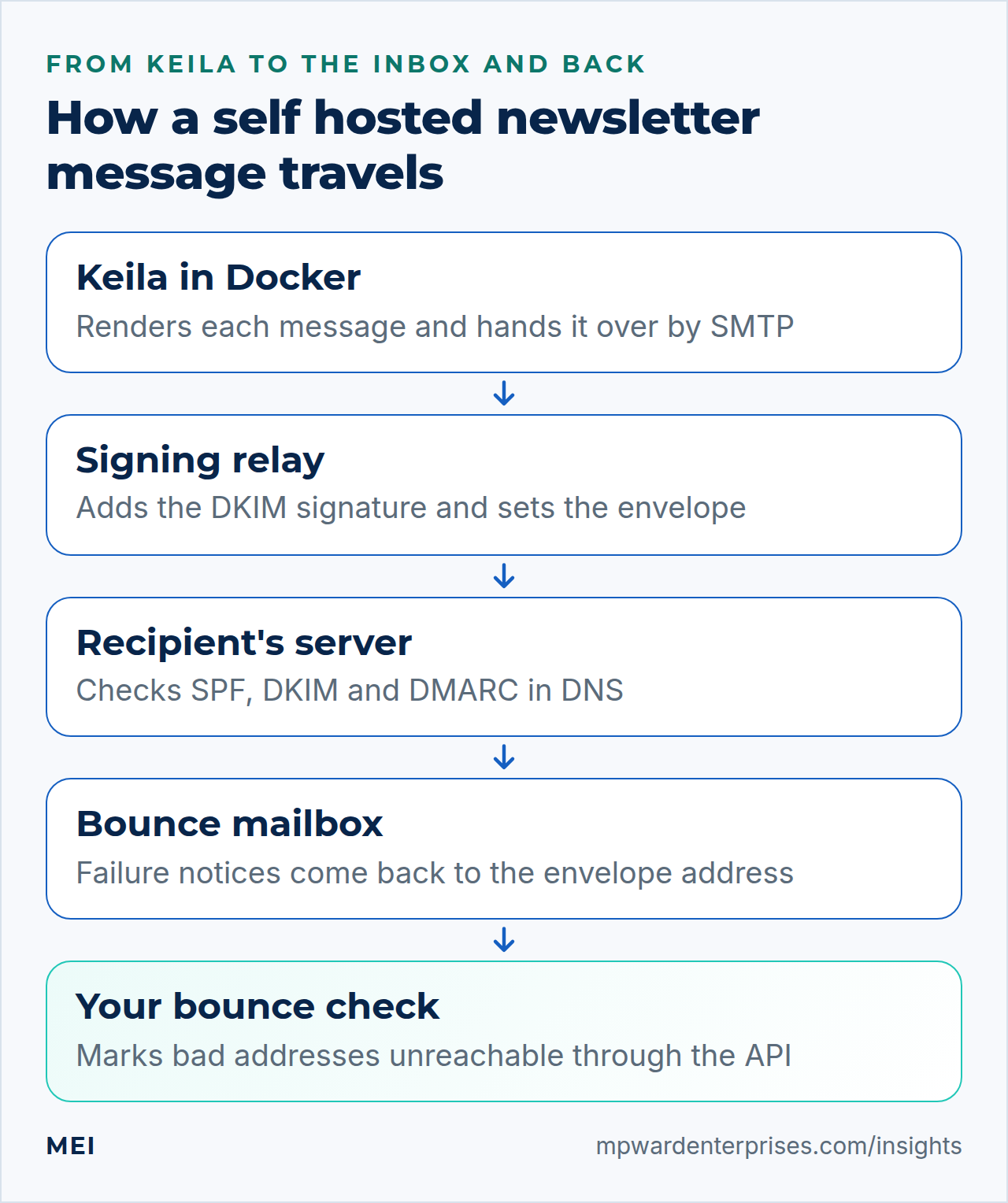
How a self hosted newsletter sends mail, in plain English
Think of your Keila newsletter as a print shop and the relay as the post office. Keila prepares each letter and drops it in a mail slot. The post office stamps it (the DKIM signature), writes the return address (the envelope sender) and carries it. A failed delivery comes back to that return address, where nobody in the print shop is looking. We read the Keila 0.30.3 source and measured each row in the lab:
| Job | What a Keila newsletter does | What you add |
|---|---|---|
| Sign mail with DKIM | Nothing; its SMTP sender adds no signature | OpenDKIM on the relay (step 6) |
| Choose the envelope sender | Uses the From address | Nothing, or a rewrite at the relay (step 6) |
| Retry a failed hand-over | No; the message is marked failed | A queue in front of the relay (step 6) |
| Learn about bounces and complaints | Only from Amazon SES notices | Your own bounce check (step 7) |
| One-click unsubscribe | Adds both headers, for https links only | Sign List-Unsubscribe-Post at the relay (step 6) |
| Confirm new subscribers | Double opt-in is off by default | Switch it on per form (step 8) |
Three names must agree for strict DMARC alignment: the domain in the From address, the domain of the envelope sender (the Return-Path) and the DKIM d= domain. Our guides to SPF, DKIM and DMARC and the DMARC rollout explain why. This Keila newsletter uses one name, news.example.com, for all three.
Step 1: Install Docker Engine and Compose for your self hosted newsletter
Your self hosted newsletter runs on Keila, open source newsletter software that ships as a Docker image. Ubuntu packages the engine as docker.io and the Compose plugin as docker-compose-v2; that is the route we validated.
sudo apt update
sudo apt install -y docker.io docker-compose-v2
sudo docker --version
sudo docker compose version
uname -m
The last command must print x86_64: Docker Hub listed only that architecture for the Keila image.
On Ubuntu 24.04 the archive also carries containerd 2.2.1 and runc 1.3.4, and still holds the old Python docker-compose 1.29.2, a different, hyphenated command. Do not install it. Our host printed:
Docker version 29.1.3, build 29.1.3-0ubuntu3~24.04.2
Docker Compose version 2.40.3+ds1-0ubuntu1~24.04.1
x86_64
On Ubuntu 26.04 we installed the same two packages in a lab container (containerd 2.2.2, runc 1.4.0; the old docker-compose package is gone) and the client printed the lines below. Our lab containers share their host's kernel (6.8; 26.04 ships 7.0), so the engine itself ran on a 24.04 host: the versions match, but treat the Docker steps as validated on 24.04.
On 26.04 the everyday tools here (ls, install, head, date) are Rust rewrites and sudo is sudo-rs; the shell steps gave the same results.
Docker version 29.1.3, build 29.1.3-0ubuntu4.1
Docker Compose version 2.40.3+ds1-0ubuntu1
x86_64
Why this way?
Docker also runs its own apt repository with newer builds. We chose Ubuntu's packages: one update channel, which unattended upgrades already covers. Never install both sets.
Watch out: the docker group is root
We add nobody to the docker group. Anyone who can talk to the engine can mount any folder into a container, so treat that group as root access.
Step 2: Create the folder, secrets and Compose file for your Keila newsletter
Everything for your Keila newsletter lives in /opt/keila, owned by your admin user. The subshell keeps the strict umask from leaking into your session, so only you can read the secrets file.
sudo install -d -o alex -g alex -m 0750 /opt/keila
cd /opt/keila
(
  umask 077
  {
    echo "DB_PASSWORD=$(openssl rand -hex 24)"
    echo "SECRET_KEY_BASE=$(openssl rand -base64 48)"
    echo "KEILA_USER=[email address]"
    echo "KEILA_PASSWORD=$(openssl rand -base64 18)"
    echo "URL_HOST=news.example.com"
    echo "MAILER_SMTP_HOST=mailpit"
    echo "MAILER_SMTP_PORT=1025"
    echo "MAILER_SMTP_FROM_EMAIL=[email address]"
  } > .env
)
ls -l .env
The listing must show -rw-------. Keila needs a SECRET_KEY_BASE of at least 64 characters (this gives exactly 64) and a first password of at least 10. The database password is hexadecimal because it sits inside a URL. The MAILER_ lines are for password-reset mail and point at a catcher you start in step 5.
Watch out: the secret is part of every link you send
Keila derives its link IDs and unsubscribe signatures from SECRET_KEY_BASE. We started a restored copy of the database with a different secret: an unsubscribe link from an earlier email answered HTTP 500, and with the same secret it worked. Never change the secret after your first campaign, and back up .env with the database.
Create the Compose file with your editor (nano compose.yaml) and paste this.
name: keila

x-logging: &logging
  driver: json-file
  options:
    max-size: "10m"
    max-file: "3"

services:
  db:
    image: postgres:18-trixie
    restart: unless-stopped
    logging: *logging
    environment:
      POSTGRES_USER: keila
      POSTGRES_DB: keila
      POSTGRES_PASSWORD: ${DB_PASSWORD}
    volumes:
      - db-data:/var/lib/postgresql
    networks:
      - backend
    healthcheck:
      test: ["CMD-SHELL", "pg_isready -U keila -d keila"]
      interval: 10s
      timeout: 5s
      retries: 5

  keila:
    image: pentacent/keila:0.30.3
    hostname: ${URL_HOST}
    user: "1001:0"
    restart: unless-stopped
    logging: *logging
    cap_drop:
      - ALL
    security_opt:
      - no-new-privileges:true
    depends_on:
      db:
        condition: service_healthy
    environment:
      DB_URL: postgres://keila:${DB_PASSWORD}@db/keila
      SECRET_KEY_BASE: ${SECRET_KEY_BASE}
      URL_HOST: ${URL_HOST}
      URL_SCHEMA: https
      DISABLE_REGISTRATION: "true"
      KEILA_USER: ${KEILA_USER}
      KEILA_PASSWORD: ${KEILA_PASSWORD}
      MAILER_SMTP_HOST: ${MAILER_SMTP_HOST}
      MAILER_SMTP_PORT: ${MAILER_SMTP_PORT}
      MAILER_SMTP_FROM_EMAIL: ${MAILER_SMTP_FROM_EMAIL}
      MAILER_SMTP_AUTH_METHOD: none
      MAILER_SMTP_TLS_MODE: none
      USER_CONTENT_DIR: /opt/app/uploads
    volumes:
      - uploads:/opt/app/uploads
    ports:
      - "127.0.0.1:4000:4000"
    networks:
      - default
      - backend

  mailpit:
    image: axllent/mailpit:v1.31.4
    profiles: ["test"]
    restart: unless-stopped
    logging: *logging
    ports:
      - "127.0.0.1:8025:8025"

volumes:
  db-data:
  uploads:

networks:
  backend:
    internal: true
Why this way?
Keila's own sample file is for local testing: an unpinned latest image, a database published on every address and a default password. Ours pins exact tags (PostgreSQL by major version and Debian release, so minor fixes arrive and a major jump never does), keeps the database on an internal network, binds Keila to loopback, runs it as the image's own user 1001 instead of root, and caps logs at three 10 MB files, because Docker's default never rotates. The two MAILER_SMTP_ switches suit a private relay and need Keila 0.30.3.
Watch out: the PostgreSQL 18 data folder moved
Older guides mount the volume at /var/lib/postgresql/data. With the 18 image that mount stays empty: in the lab the data went to an anonymous volume at /var/lib/postgresql and the image logged unused mount/volume. Backups of the named volume would be empty, and docker compose down -v would delete the real data.
Step 3: Start your Keila newsletter and check the doors
On the first start your Keila newsletter applies its migrations, creates the admin account and starts the web server. The log is the proof.
cd /opt/keila
sudo docker compose up -d
sudo docker compose ps
sudo docker compose logs keila | grep -E "Created root user|Access KeilaWeb"
curl -s -o /dev/null -w "%{http_code}\n" http://127.0.0.1:4000/auth/login
curl -s http://127.0.0.1:4000/auth/register | grep -o "Registration disabled"
ss -ltn | grep -E ':(4000|5432) '
keila-1 | 2026-10-09T16:50:36.598 [info] Created root user with [email address]
keila-1 | 2026-10-09T16:50:36.609 [info] Access KeilaWeb.Endpoint at https://news.example.com
200
Registration disabled
LISTEN 0 4096 127.0.0.1:4000 0.0.0.0:*The database should say healthy, and it shows 5432/tcp without an arrow: not published. A fresh install applied 59 migrations. The uploads volume starts root-owned, so give it to the app user once (the extra capability is needed because the one-off container inherits cap_drop):
sudo docker compose run --rm --no-deps --user root --cap-add CHOWN \
  --entrypoint chown keila -R 1001:0 /opt/app/uploads
Without it, image uploads fail with Permission denied. Do not browse port 4000 through an SSH tunnel: the editor's WebSocket checks your browser's address against URL_HOST and refuses a mismatch. Log in through nginx.
Watch out: two settings that fail quietly or loudly
A SECRET_KEY_BASE under 64 characters lets the container start, then every page answers HTTP 500 (secret_key_base to be at least 64 bytes in the log). A KEILA_PASSWORD under 10 characters on a new database is worse: Keila logs Failed to create root user, rolls the migrations back and exits. Fix it and run docker compose down first. The admin is created only on the first start, so later edits change nothing.
Step 4: Put nginx, TLS and the firewall in front of your Keila newsletter
Keila listens on 127.0.0.1:4000, which nobody outside the server can reach. nginx will publish your Keila newsletter: it ends TLS, forwards the WebSocket the editor needs, adds the cookie flags Keila lacks and slows down password guessing. Install it, open the web ports (see our UFW guide) and point news.example.com at the server in DNS.
sudo apt install -y nginx
sudo ufw allow "Nginx Full"
sudo install -d -m 0755 /var/www/letsencrypt
Get the certificate before you add the HTTPS block: use the webroot method in our certbot guide with /var/www/letsencrypt as the web root, so the files exist under /etc/letsencrypt/live/news.example.com/. Until they do, nginx -t fails and blocks every reload. Create three files with sudoedit. The first holds settings that must sit outside a server block.
sudoedit /etc/nginx/conf.d/keila.conf# Pass a WebSocket upgrade through, and close normal connections as usual
map $http_upgrade $keila_connection_upgrade {
default upgrade;
'' close;
}
# Count only sign-in requests: an empty key is never counted
map $request_uri $keila_login_key {
default "";
~^/auth/login $binary_remote_addr;
}
limit_req_zone $keila_login_key zone=keila_login:10m rate=10r/m;The second holds the one part that differs by release, the TLS listener and HTTP/2 switch, so an Ubuntu upgrade later means editing one small file.
sudoedit /etc/nginx/snippets/keila-listen.conflisten 443 ssl http2;
listen [::]:443 ssl http2;listen 443 ssl;
listen [::]:443 ssl;
http2 on;nginx 1.28 still accepts the older listen 443 ssl http2; form, but nginx -t then warns twice that it is deprecated.
The third is the site: one block that answers certificate renewals and redirects, and one that proxies to Keila.
sudoedit /etc/nginx/sites-available/news.example.com.confserver {
listen 80;
listen [::]:80;
server_name news.example.com;
# Certificate renewals arrive here over plain HTTP, so never redirect this path
location ^~ /.well-known/acme-challenge/ {
root /var/www/letsencrypt;
default_type "text/plain";
try_files $uri =404;
}
location / {
return 301 https://$host$request_uri;
}
}
server {
include snippets/keila-listen.conf;
server_name news.example.com;
ssl_certificate /etc/letsencrypt/live/news.example.com/fullchain.pem;
ssl_certificate_key /etc/letsencrypt/live/news.example.com/privkey.pem;
ssl_protocols TLSv1.2 TLSv1.3;
client_max_body_size 10m;
add_header Strict-Transport-Security "max-age=300" always;
location / {
# Keila has no sign-in lockout of its own: slow down guessing
limit_req zone=keila_login burst=5 nodelay;
limit_req_status 429;
proxy_pass http://127.0.0.1:4000;
proxy_http_version 1.1;
proxy_set_header Host $host;
proxy_set_header X-Forwarded-For $remote_addr;
proxy_set_header X-Forwarded-Proto $scheme;
proxy_set_header Upgrade $http_upgrade;
proxy_set_header Connection $keila_connection_upgrade;
proxy_cookie_flags ~ secure samesite=lax;
}
}A few lines carry lessons from our lab. Without the Upgrade and Connection headers the editor's WebSocket handshake got HTTP 400; with them, 101 Switching Protocols. Keila 0.30.3 ignores X-Forwarded-* and builds links from URL_HOST and URL_SCHEMA. Its session cookie is HttpOnly but not Secure, which proxy_cookie_flags fixes. And a 2 MB upload got HTTP 413 at nginx's 1 MB default. Six quick wrong-password attempts passed and the rest got HTTP 429, while other pages were never limited.
Enable the site, test and reload, then check three things. HTTPS answers with the cookie flags. The WebSocket handshake works; its Origin header matters, because Keila answered HTTP 403 to another host name, so URL_HOST must be the address your browser uses. And ss still shows Keila on loopback only.
sudo ln -s /etc/nginx/sites-available/news.example.com.conf /etc/nginx/sites-enabled/
sudo nginx -t && sudo systemctl reload nginx
curl -sI https://news.example.com/auth/login | grep -i -E "^HTTP|set-cookie|strict-transport"
curl -si --max-time 3 --http1.1 -H "Connection: Upgrade" -H "Upgrade: websocket" \
  -H "Sec-WebSocket-Version: 13" -H "Sec-WebSocket-Key: dGhlIHNhbXBsZSBub25jZQ==" \
  -H "Origin: https://news.example.com" \
  "https://news.example.com/live/websocket?vsn=2.0.0" | head -n 1
ss -ltn | grep ':4000 '
HTTP/2 200
set-cookie: _keila_key=<value>; path=/; HttpOnly; Secure; SameSite=Lax
strict-transport-security: max-age=300
HTTP/1.1 101 Switching Protocols
LISTEN 0 4096 127.0.0.1:4000 0.0.0.0:*Watch out: Docker's published ports skip UFW
Docker publishes a port by rewriting packets before UFW's rules see them, and its install page says published ports bypass ufw and firewalld. Our lab host had UFW on with default deny and no rule for the test ports. A container-published port answered another network with HTTP 200, a host-side listener beside it timed out, and the loopback-bound Keila port was unreachable. Test from a second machine, as our UFW guide shows.
These tests ran on this release's Docker packages and kernel 6.8.
Ubuntu 26.04 ships the same Docker version on kernel 7.0, which our labs could not run. Repeat the outside test on your 26.04 server.
Step 5: Test your Keila newsletter with a mail catcher
Before any real mail leaves your Keila newsletter, send to a mail catcher: an SMTP server that stores what it receives and delivers nothing. It listens on loopback only, so reach its web page through an SSH tunnel from your own computer.
cd /opt/keila
sudo docker compose --profile test up -d mailpit
ssh -L 8025:127.0.0.1:8025 alex@your-server-address
Leave the tunnel open, browse to http://127.0.0.1:8025, and work through these screens at https://news.example.com:
- Sign in with
KEILA_USERand theKEILA_PASSWORDfrom.env, change the password on the account page, then delete bothKEILA_lines from.envandcompose.yamland runsudo docker compose up -d. - Create a project, then Manage Senders and Create new Sender: a name, the From address
[email address], a From name, and under Reply-to settings[email address]. - Choose the SMTP tab: Server
mailpit, Authentication None, Connection security None, Port1025. The form starts on SSL/TLS and port 465, so change both. - Add two contacts that are your own addresses, create a campaign and send it.
In the catcher, check that List-Unsubscribe is an https link on news.example.com with List-Unsubscribe-Post: List-Unsubscribe=One-Click beside it; that the Message-ID ends in @news.example.com (thanks to the hostname: line; ours ended in the container ID without it); and that body links go through /c/... and a tiny image through /r/.... That is Keila's click and open tracking, and Enable click/open tracking in the campaign settings turns it off.
Watch out: no https, no one-click header
Without URL_SCHEMA: https the unsubscribe link became http://news.example.com:4000/unsubscribe/... and List-Unsubscribe-Post vanished, because Keila adds it only for https links. Gmail and Yahoo ask bulk senders for it. With it, a one-click POST marked our test contact unsubscribed, while a plain browser visit shows a confirmation page first. A catcher shows you this before a stranger does.
Step 6: Build the sending path for your self hosted newsletter
Keila only hands mail over. The relay of a self hosted newsletter must accept mail from the Keila server alone, sign it, and deliver it from an address with a clean history. Build it as in our Postfix OpenDKIM guide (Postfix 3.83.10 here) on a server used for the newsletter only: news-out.example.com, public address 203.0.113.26, private address 10.0.0.3. The Keila server's private address is 10.0.0.22. Then make four changes, which we replayed on both releases.
On 26.04 Postfix is no longer chrooted by default, so use the 26.04 form of that guide's milter step. The 24.04 socket path made every message fail with 451 in our replay.
# 1. Allow the Keila server (one address). Docker presents the host's address, so the relay sees 10.0.0.22
sudo postconf -e 'mynetworks = 127.0.0.0/8, 10.0.0.22/32'
echo 10.0.0.22 | sudo tee -a /etc/opendkim/trusted.hosts

# 2. A DKIM key and one line in each table for the newsletter name
sudo install -d -o opendkim -g opendkim -m 700 /etc/dkimkeys/news.example.com
sudo opendkim-genkey -b 2048 -d news.example.com -s s2026a -D /etc/dkimkeys/news.example.com
sudo chown opendkim:opendkim /etc/dkimkeys/news.example.com/s2026a.private /etc/dkimkeys/news.example.com/s2026a.txt
sudo chmod 600 /etc/dkimkeys/news.example.com/s2026a.private
echo 's2026a._domainkey.news.example.com news.example.com:s2026a:/etc/dkimkeys/news.example.com/s2026a.private' | sudo tee -a /etc/opendkim/key.table
echo '*@news.example.com s2026a._domainkey.news.example.com' | sudo tee -a /etc/opendkim/signing.table

# 3. Sign the one-click header too: OpenDKIM's default list omits it
echo 'SignHeaders             *,+List-Unsubscribe-Post' | sudo tee -a /etc/opendkim.conf

# 4. Optional: send bounces to their own mailbox, leaving the visible From alone
echo '/^newsletter@news\.example\.com$/ [email address]' | sudo tee /etc/postfix/newsletter_envelope
sudo postconf -e 'sender_canonical_classes = envelope_sender' 'sender_canonical_maps = regexp:/etc/postfix/newsletter_envelope'

sudo opendkim -n && sudo postfix check && sudo systemctl restart opendkim postfix
In Keila, edit the sender's SMTP settings: Server 10.0.0.3, Authentication None, Connection security None, Port 25. That suits a private path such as a WireGuard tunnel (see our WireGuard guide); a public relay needs a login and STARTTLS. Fill Rate limit per hour too: it paces the warm-up. Then publish the DNS records, which that guide explains one by one.
| Name | Type | Value |
|---|---|---|
news.example.com |
A, TXT, MX | 203.0.113.10; v=spf1 ip4:203.0.113.26 -all; 10 mailbox.example.com. (so failure notices arrive) |
s2026a._domainkey.news.example.com |
TXT | v=DKIM1; h=sha256; k=rsa; p=<public-key-base64>, from s2026a.txt |
_dmarc.news.example.com |
TXT | v=DMARC1; p=none; adkim=s; aspf=s; rua=mailto:[email address] |
news-out.example.com |
A, TXT | 203.0.113.26; v=spf1 a -all. The provider sets the PTR |
Send a test through the whole chain to a mailbox at another provider and open the full headers. You want dkim=pass, spf=pass and dmarc=pass, and a signature whose h= list includes the one-click header. Our lab message carried (shortened):
DKIM-Signature: v=1; a=rsa-sha256; c=relaxed/relaxed; d=news.example.com;
	s=s2026a; h=From:To:Subject:Reply-To:List-Unsubscribe:List-Unsubscribe-Post:Date:From;
Why this way?
RFC 8058 says one-click unsubscribe needs a valid DKIM signature covering both List-Unsubscribe and List-Unsubscribe-Post, and that receivers should not offer it otherwise. Before the SignHeaders line our signature listed only the first. The envelope rewrite is optional: by default the envelope sender is the From address, which also aligns, but bounces then land in that mailbox, so set a different Reply-To.
Watch out: Keila does not retry
When our relay's signing filter was down it answered 451 4.7.1 Service unavailable, and Keila marked all three messages failed, with no second attempt; its log says DeliveryWorker: Failed sending email. Put a queue in front: a local Postfix, as in the app-server step of that guide, that accepts mail at once and keeps trying. With one, Keila saw all three succeed, and the mail left signed once the filter returned. Without a queue, check the relay before every send and emails failed after it.
Keep the newsletter apart from your other mail. Yahoo's sender page recommends not sending bulk mail from the same IP addresses as transactional mail, so a newsletter complaint cannot slow your password resets. The simplest isolation is a second small relay with its own address. Keila's system emails belong on your ordinary outbound route, which is why step 2 gave them a send.example.com address.
Step 7: Plan bounces and complaints before your first Keila newsletter campaign
A bounce is a failure notice mailed to the envelope sender, and hosted services hide it from you. A Keila newsletter learns about bounces and complaints only from Amazon SES, through one webhook route (/api/webhooks/senders/ses), so behind a plain relay nothing reaches it. In the lab our sink refused one recipient with a 550; Keila still showed that message as sent and the contact as active, and the notice sat in the bounce mailbox (shortened):
Return-Path: <>
From: Mail Delivery System <[email address]>
Subject: Undelivered Mail Returned to Sender
Content-Type: multipart/report; report-type=delivery-status;
Final-Recipient: rfc822; [email address]
Action: failed
Status: 5.1.1
Diagnostic-Code: smtp; 550 5.1.1 <[email address]>: Recipient address
    rejected: User unknown in local recipient table
When you are hosting your own email newsletter with open source newsletter software like this, the bounce check is yours, and it must exist before the first real campaign. We do not publish ours, but the approach is generic:
- Give bounces a mailbox on the newsletter name,
[email address], with the MX record from step 6. - Read it with a limited account that can read and move mail but not send, and process only genuine delivery reports (
multipart/report). - Accept only what passes a strict pattern. Take the address from
Final-Recipientand keep it only if it has one @, a dotted domain and ordinary characters. Never pass it to a shell command. - Act on the codes. A status starting 5 is permanent. A status starting 4 is temporary: ignore single ones and act on repeats. Keila's own SES handler marks a contact unreachable after three soft bounces among the last five sends, a fair model.
- Suppress through Keila's API, with a key made for this job: look the contact up by email, then set its status to
unreachablewith a PATCH request (we tested both calls). Deleting is the stricter choice. - Log where every change came from, cap how many contacts one run may change, and quarantine anything odd for a person to read.
Complaints arrive differently. Yahoo sends a copy of each spam complaint to senders who enroll their DKIM domain in its complaint feedback loop; treat those reports as unsubscribes. Google's sender guidelines point you to Postmaster Tools for your spam rate. Unreachable and unsubscribed contacts are skipped by later campaigns: in our test only the active contact received one.
Watch out: do not send until this works
Test the check with a deliberately bad address in a small first send, and watch it flip to unreachable. If you would rather not build it, use the SES route from the comparison table, where Keila does this for you, or software that scans a bounce mailbox itself.
Step 8: Collect consent, meet the rules and warm up your self hosted newsletter
Keila's forms start with Require captcha on and Require double opt-in off. Open source newsletter software does not decide your consent practices; you do. Switch double opt-in on: Keila then mails a confirmation link and adds the person only after they click it, which stops typos and strangers' addresses, and it stores the date for your records. Set CAPTCHA_SITE_KEY and CAPTCHA_SECRET_KEY (listed on Keila's configuration page) before you publish a form: without them Keila's log warns it falls back to hCaptcha's staging configuration.
The mailbox providers publish what they expect from bulk senders. Google defines bulk as more than 5,000 messages a day to Gmail accounts, and for that traffic asks for SPF, DKIM and a published DMARC policy (p=none is accepted), a From domain aligned with SPF or DKIM, valid forward and reverse DNS, one-click unsubscribe plus a visible link, and a spam rate below 0.10% that never reaches 0.30%.
Yahoo adds unsubscribes honored within 2 days and a spam rate below 0.3%. This setup covers signing, alignment and the unsubscribe headers; the DNS, the PTR and the list quality stay yours.
The law adds to this. When you are hosting your own email newsletter, you are the sender in law. The FTC's CAN-SPAM guide covers all commercial email, business to business included: no false headers or deceptive subject lines, a clear statement that it is an ad, your valid postal address (put it in the template footer) and an opt-out honored within 10 business days, free of charge.
In the EU, the European Commission says consent must be freely given, specific, informed and unambiguous, given by a clear action such as ticking a box, and as easy to withdraw as to give. People may object to direct marketing at any time, free of charge, and you must then stop. This is not legal advice; ask a qualified adviser about your own obligations.
Then warm up your self hosted newsletter slowly. A new sending address has no history, so send first to your most engaged subscribers and widen only after each send shows few bounces and almost no complaints. Use the sender's Rate limit per hour and the pacing settings in step 9 of that guide. We advise against bought lists: those people never agreed to hear from you. Our guide to emails going to spam covers what to do when reputation slips.
Step 9: Back up, test the restore and upgrade your Keila newsletter
Back up your Keila newsletter nightly: the database, the secrets and the uploads, with a copy off the server and a restore you have proved. This script of ours dumps the database in PostgreSQL's custom format, copies .env, streams the uploads folder out and prunes after 14 days.
sudoedit /usr/local/sbin/newsletter-db-backup#!/bin/sh
# Back up the Keila database, secrets and uploads. Run as root.
set -eu
umask 077
dir=/var/backups/keila
mkdir -p "$dir"
stamp=$(date +%Y%m%d-%H%M%S)
partial="$dir/keila-$stamp.dump.partial"
if docker compose --project-directory /opt/keila exec -T db \
pg_dump -U keila -d keila --format=custom > "$partial"; then
mv "$partial" "$dir/keila-$stamp.dump"
else
rm -f "$partial"
echo "pg_dump failed" >&2
exit 1
fi
install -m 0600 /opt/keila/.env "$dir/keila-env.backup"
docker compose --project-directory /opt/keila exec -T keila \
tar -C /opt/app -cf - uploads > "$dir/keila-uploads-$stamp.tar"
find "$dir" -name 'keila-*' -mtime +14 -deleteMake it executable, run it once, then schedule it with a systemd timer (our timer guide explains the format). Create the two units with sudoedit /etc/systemd/system/keila-backup.service and sudoedit /etc/systemd/system/keila-backup.timer.
sudo chmod 755 /usr/local/sbin/newsletter-db-backup
sudo /usr/local/sbin/newsletter-db-backup && sudo ls -l /var/backups/keila
[Unit]
Description=Back up the Keila database
Wants=docker.service
After=docker.service
[Service]
Type=oneshot
ExecStart=/usr/local/sbin/newsletter-db-backup[Unit]
Description=Back up the Keila database every night
[Timer]
OnCalendar=*-*-* 02:30:00
RandomizedDelaySec=15min
Persistent=true
[Install]
WantedBy=timers.targetsudo systemd-analyze verify /etc/systemd/system/keila-backup.service /etc/systemd/system/keila-backup.timer
sudo systemctl daemon-reload
sudo systemctl enable --now keila-backup.timerInclude /var/backups/keila in your encrypted off-site backup; our restic guide shows the pattern and the 3-2-1 rule explains how many copies to keep. A backup you have not restored is a hope, so restore the newest dump into a scratch database and compare:
sudo sh -c 'cd /opt/keila \
  && f=$(ls -t /var/backups/keila/keila-*.dump | head -n 1) \
  && docker compose exec -T db createdb -U keila keila_restore_test \
  && docker compose exec -T db pg_restore -U keila -d keila_restore_test --no-owner --exit-on-error < "$f" \
  && docker compose exec -T db psql -U keila -d keila_restore_test -tA -c "select count(*) from contacts" \
  && docker compose exec -T db dropdb -U keila keila_restore_test'
In the lab the restored copy had the same contact, message and campaign counts and the same 59 migrations. To rebuild on a new server, restore .env first (the same secret), start only the database with sudo docker compose up -d db, restore into the empty keila database, then start the rest. To upgrade, read the release notes, take a backup, change the tag, pull and watch the log. Keila migrates before it starts the web server, so the site is down while that runs.
sudo /usr/local/sbin/newsletter-db-backup
cd /opt/keila
sed -i 's#pentacent/keila:0.30.3#pentacent/keila:NEW-VERSION#' compose.yaml
sudo docker compose pull keila
sudo docker compose up -d keila
sudo docker compose logs --tail 40 -f keila
Press Ctrl+C once the log says Access KeilaWeb.Endpoint.
Watch out: the way back is the backup
Replace NEW-VERSION with a real tag. Moving from 0.30.2 to 0.30.3 applied two migration files in our lab, which build three indexes on the messages table without blocking writers (a big table makes the first start slower). Keila 0.30.2 even started again on the migrated database, but those migrations only add indexes: do not count on that, restore the pre-upgrade dump. Minor PostgreSQL releases arrive with docker compose pull; a new major version is a dump and restore job.
Never use down -v to restart, because it deletes the volumes.
Check your self hosted newsletter
Run these checks once your self hosted newsletter is live.
- The doors are shut.
ss -ltnshows Keila on 127.0.0.1 only and nothing on 5432, and a test from another machine reaches only ports 80 and 443. - The links are right. A test email carries https links on news.example.com, both unsubscribe headers and a Message-ID on your domain.
- The mail is signed and aligned. A copy at another provider shows
dkim=pass,spf=passanddmarc=pass, withList-Unsubscribe-Postsigned. - Bounces have an owner, and a seeded bad address ends up unreachable in Keila.
- The restore works, and Docker restarts Keila by itself: it was running again within about half a minute of stopping the process.
What this self hosted newsletter guide could not test
The lab has no public DNS, so we could not check real inbox placement, DNS records, reverse DNS, IP reputation, a provider's block on port 25, or how Gmail and Yahoo treat your mail. We did not request a real certificate, test Amazon SES, reboot a lab, run UFW commands inside a container, open the firewall between a container and a host Postfix, or run the Docker engine on Ubuntu 26.04 itself. Our test list had four contacts, so large-list behavior is unmeasured. Treat your first real send as part of the test.
Self hosted newsletter troubleshooting
We reproduced each of these symptoms while testing this self hosted newsletter setup.
| What you see | Likely cause | What to do |
|---|---|---|
| Every page answers HTTP 500 | SECRET_KEY_BASE under 64 characters |
Set a longer one, before the first campaign |
Container exits at boot: Failed to create root user, or a KeyError for MAILER_SMTP_PASSWORD |
KEILA_PASSWORD under 10 characters; or Keila 0.30.2 or older with no mailer password |
Fix the value, docker compose down, then up -d; or upgrade to 0.30.3 |
Editor never loads; HTTP 400 or 403 on /live/websocket |
Missing Upgrade headers (400), or an address that differs from URL_HOST (403) |
Use the step 4 config and one address everywhere |
| Email links point at port 4000, no one-click header | URL_SCHEMA: https missing |
Add it and recreate the container |
| HTTP 413 on upload, or permission denied | nginx's 1 MB default, or a root-owned uploads volume | Keep client_max_body_size 10m; run the chown from step 3 |
Database empty after down and up |
Volume mounted at the old PostgreSQL path | Mount /var/lib/postgresql; restore a dump |
| Campaign shows failed messages; Keila's log says Failed sending email | The relay refused or was down (451 often means its signing filter is unreachable); Keila does not retry | Fix the relay, add a queue, resend to those contacts |
| Gmail shows no unsubscribe button | List-Unsubscribe-Post unsigned, or DKIM failing |
Check the h= list and the DKIM record |
| Old unsubscribe links return an error | SECRET_KEY_BASE changed or .env lost |
Restore the original .env |
Common self hosted newsletter mistakes
- Using
latestfor your Keila newsletter or a barepostgrestag, then being surprised by an upgrade. - Publishing a Keila newsletter as
4000:4000and trusting UFW to hide it. - Changing
SECRET_KEY_BASE, or backing up the database without.env. - Sending the first Keila newsletter campaign before the bounce check exists.
- Treating open source newsletter software as free: the server, the relay and the weekly reading are the cost.
- Importing a bought or old list into a self hosted newsletter instead of people who agreed.
Keep your Keila newsletter healthy
After every send of your Keila newsletter, read emails failed and bounces on the campaign statistics page and check the relay's queue with mailq. Each week, read the bounce mailbox, the DMARC reports and Postmaster Tools. Each month, apply updates, look for a newer Keila tag and restore a backup to a scratch database. Change the DKIM key yearly, as that guide describes.
Two housekeeping facts. Keila deletes stored message bodies after 30 days by default (MESSAGE_RETENTION_DAYS) and keeps the statistics. It also contacts GitHub for update news and IANA for time zone data; DISABLE_UPDATE_CHECKS and DISABLE_TZDATA_UPDATES switch those off. Our self-hosted versus cloud comparison and Linux server hardening checklist cover the wider routine.
Getting help with hosting your own email newsletter
If hosting your own email newsletter turns out to be more than you want to run, MEI's Email Deliverability and Domain Authentication service covers SPF, DKIM and DMARC records, sending systems and delivery tests, and starts at $750. Infrastructure and Private Cloud covers provisioning, Linux administration, self-hosted tools and migrations, and starts at $2,500, scoped by systems and scale. Managed Website and IT Care starts at $149 a month, with tiers that include updates, backups and monitoring.
We focus on the highest-impact, most likely risks, and we do not promise inbox placement or perfect security.
Frequently asked questions
What is a self hosted newsletter?
A self hosted newsletter is a newsletter system you run on your own server instead of renting one. You install newsletter software such as Keila, keep the subscriber list in your own database and send through a mail path you control. You gain control, privacy and no per-contact fees. You also take over deliverability, bounce handling and legal compliance.
Is Keila open source newsletter software, and what does it cost?
Yes. Keila's repository says it is licensed under the GNU Affero General Public License v3, and the software has no per-contact fee. You still pay for the server, the domain, the sending path and the time to run them. It stores its data in PostgreSQL and ships as the pentacent/keila Docker image.
Do I need my own mail server for hosting your own email newsletter?
No. Keila can send through any SMTP server, Amazon SES, Sendgrid, Mailgun or Postmark. A provider carries signing and reputation, and with SES Keila also receives bounce notices automatically. Hosting your own email newsletter with your own signing relay gives more control but makes you responsible for reverse DNS, reputation and bounces.
Does a Keila newsletter handle bounces automatically?
Only with Amazon SES. In Keila 0.30.3 the single bounce and complaint webhook is the SES one, so behind a plain SMTP relay a failed address stays active until you mark it unreachable yourself. Build a bounce check that updates contacts through Keila's API before your first real campaign.
How do I back up and upgrade a Keila newsletter?
Dump the database with pg_dump in custom format, copy the .env file (it holds the SECRET_KEY_BASE that every link depends on) and the uploads, and test a restore into a scratch database. To upgrade, take a dump, change the pinned image tag, pull and start. Keila migrates on boot, and the dump is your way back.
Do CAN-SPAM and GDPR apply to a self hosted newsletter?
They apply to you as the sender, whatever software you use. CAN-SPAM asks for accurate headers, your postal address and an opt-out honored within 10 business days. EU rules ask for consent that is freely given, specific, informed and unambiguous, and easy to withdraw. This is not legal advice; ask a qualified adviser about your own obligations.
Sources and further reading
- Keila documentation: Self-Hosting Configuration — environment variables, including the 64-character SECRET_KEY_BASE
- Keila source code, release 0.30.3 — SMTP adapter, delivery headers, SES webhook, boot migrations, form defaults, changelog
- Docker documentation: Install Docker Engine on Ubuntu — supported releases, conflicting packages, published ports bypass ufw
- Google: Email sender guidelines — bulk-sender requirements, one-click headers, spam-rate thresholds
- Yahoo: Sender requirements and best practices — bulk-sender rules, 2-day unsubscribes, feedback loop, separate IPs
- RFC 8058: Signaling One-Click Functionality for List Email Headers — the signature must cover both List-Unsubscribe headers
- FTC: CAN-SPAM Act: A Compliance Guide for Business — the seven requirements, postal address, 10-business-day opt-out
- European Commission: When is consent valid? — consent: freely given, specific, informed, unambiguous, easy to withdraw
- European Commission: What happens if someone objects to my company processing their personal data? — the right to object to direct marketing, free of charge