
Business process automation is the unglamorous work of removing the repeated manual steps between the systems you already own. Not robots, not replacing staff — just stopping someone retyping an enquiry into a spreadsheet, chasing an invoice by memory, or copying an order into the accounting system. Seven of these are worth doing first, and most pay for themselves in weeks.
This guide covers the seven highest-return automations for a small business, how to find your own candidates, the three that usually fail, and what to do before you automate anything. It assumes no technical background.
What business process automation actually means here
At small-business scale, automation is rarely a platform purchase. It is a series of small connections: when this happens in one system, do that in another, without a person in the middle.
Most of the value comes from the dullest possible tasks. Rekeying data between systems, sending the same message to every new customer, generating the same report every Monday, remembering to follow up. These are not interesting problems, which is exactly why they survive unexamined for years.
The test for a good candidate is simple: it happens regularly, it follows the same steps every time, and it does not require judgement. If a competent new starter could do it correctly from a written instruction, it can probably be automated.
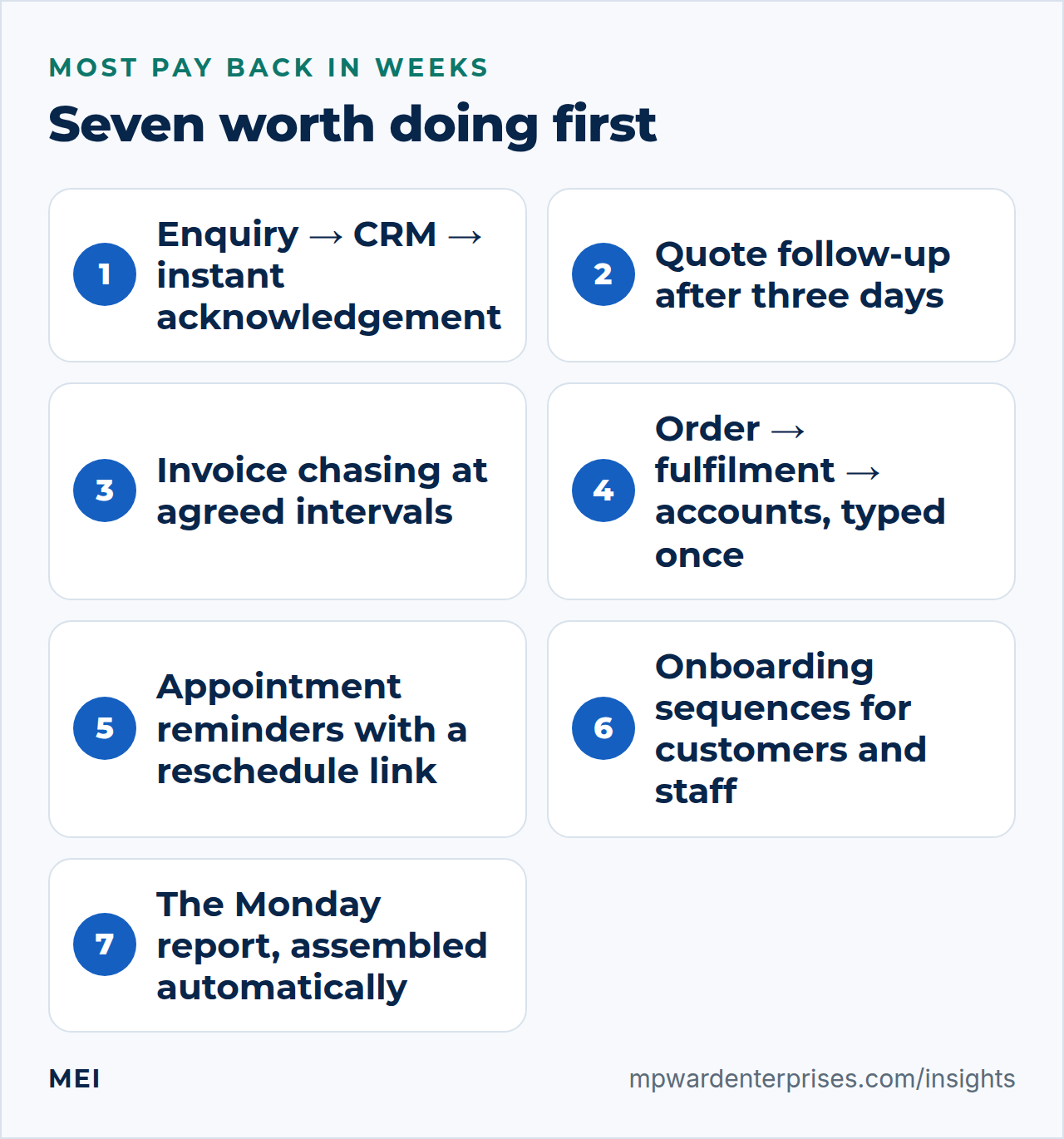
Seven automations worth doing first
- Enquiry to CRM to acknowledgement. A form submission creates a record, notifies the right person, and sends the customer a real reply within seconds. The highest-return automation most small businesses can make, because response speed decides who wins the job.
- Quote follow-up. A quote that has not been accepted after three days triggers a reminder. Most small businesses lose work to silence rather than to competitors.
- Invoice chasing. Automatic reminders at agreed intervals, escalating politely. It removes an awkward conversation and improves cash flow without anyone deciding to be the person who nags.
- Order to fulfilment to accounts. One order flows into the systems that pick it, bill it and record it, instead of being typed three times with three chances to differ.
- Appointment reminders. A message the day before, with a reschedule link. Reduces no-shows measurably for anything booked ahead.
- Onboarding sequences. New customer or new employee triggers the same checklist every time — the documents, the accounts, the welcome message.
- The Monday report. Numbers assembled and sent automatically rather than someone spending an hour in spreadsheets to produce what a query could.
Finding your own candidates
Do not start from a tool. Start from a week of observation, which costs nothing and is far more accurate than guessing.
- Ask everyone to note repeated tasks for one week. Task, how often, roughly how long. Nothing more structured than that.
- Look for the same data being typed twice. Every instance is both an automation candidate and an existing source of errors.
- Multiply to find the annual cost. Fifteen minutes a day is about sixty hours a year. Seen as a number rather than a nuisance, the case usually makes itself.
- Rank by frequency times annoyance. The tasks people hate are the ones that get skipped under pressure, which is where mistakes come from.
- Start with one. Finish it, confirm it works, then do the next. Three half-built automations are worse than one finished one.
Fix the process before you automate it
This is the rule that separates business process automation that helps from automation that entrenches a mess. Automating a bad process makes it bad faster and more consistently.
Before connecting anything, write the process down as it actually runs — not as it is supposed to. The act of writing usually reveals steps that exist only because someone once did it that way, approvals nobody looks at, and two people doing overlapping work. Remove those first. Quite often the step you were about to automate turns out to be unnecessary altogether, which is the cheapest possible outcome.
Then decide what happens when it goes wrong. Every automation needs an answer for the failure case: who is told, what the fallback is, and how you would notice it had stopped. Automation that fails silently is worse than a manual step, because at least a person notices they did not do something.
What to build it with
Three broad options, and most small businesses use a mixture.
| Approach | Good for | Watch for |
|---|---|---|
| Built-in features | Automations inside a tool you already pay for | Genuinely free — check here first, people rarely do |
| Connector platforms | Linking two systems quickly, no code | Per-task pricing that grows; fragile to vendor changes |
| Custom integration | Volume, complex rules, systems with real APIs | Costs more up front, cheaper at scale, needs an owner |
Start with the first row. A surprising proportion of what businesses pay a connector platform to do is already available inside their CRM, their accounting package or their website. When you do outgrow that, the trade-offs are in API integration for small business and custom software vs off the shelf.
Where AI fits, and where it does not
Most valuable business process automation involves no AI at all. "When a form is submitted, create a record and send an email" is deterministic, reliable and auditable. Adding a language model to that makes it slower, more expensive and less predictable.
AI earns its place where the input is unstructured and judgement is genuinely needed: summarising a long email thread, drafting a first reply for a human to approve, categorising free-text enquiries, extracting details from a supplier invoice that arrives as a PDF.
The rule we apply is that AI drafts and deterministic automation decides. Keep a person approving anything that reaches a customer, and keep the rules that move money or change records conventional. That boundary is also what makes the whole thing explainable when something goes wrong — and it belongs in your written AI policy alongside which tools staff may use.
The three that usually fail
- Automating the exception rather than the rule. The complicated edge case feels like the valuable one. It is not — it is rare, full of judgement, and will need a person anyway.
- Automation nobody owns. Built by someone who left, running quietly, understood by nobody. It works until a vendor changes something, and then it fails without a name attached.
- Chains with no monitoring. Five steps, each depending on the last, and no alert when step three stops. Businesses discover these when a customer asks why nobody replied.
All three have the same remedy: a named owner, a written description of what it does, and an alert when it does not run. The last one matters most, and it is the same principle as alerting on a missing backup in server monitoring.
Measuring whether it worked
Decide the measure before you build, or you will never be sure. Useful ones are concrete: hours returned per week, response time to a new enquiry, days to get an invoice paid, error rate in re-keyed data, no-show rate for appointments.
Take a baseline first — a week of the current numbers is enough. Without one you end up with an impression rather than a result, and impressions do not survive the first time the automation breaks.
Review after a month. Some automations deliver less than hoped because the task was rarer than people believed, and that is useful information: turn it off rather than maintaining it out of politeness.
Starting this month
Pick the enquiry-to-acknowledgement flow if you do not already have it. It is the highest-return business process automation available to most small businesses, it usually needs tools you already own, and the effect on win rate is immediate and visible.
Then run the week of observation and pick the next one from what people actually wrote down. If you would rather have the candidates identified and built properly, that is our AI & Business Automation work, with the lead-handling side covered by Automated Lead Follow-Up & CRM. A Business Tech Rescue Audit will map where your data is being typed twice.
Frequently asked questions
What is business process automation for a small business?
Removing the repeated manual steps between systems you already own — so a form submission creates a CRM record and sends a reply without anyone retyping it, or an order flows into fulfilment and accounts rather than being entered three times. At small-business scale it is rarely a platform purchase; it is a series of small connections. The test for a good candidate: it happens regularly, follows the same steps, and needs no judgement.
What should a small business automate first?
The path from enquiry to acknowledgement: a form submission creates a record, notifies the right person, and sends the customer a genuine reply within seconds. Response speed often decides who wins the job, the tools are usually already paid for, and the effect is immediate and visible. After that, quote follow-ups and invoice chasing tend to give the next-best return.
Do I need AI to automate business processes?
Usually not. Most valuable automation is deterministic — when this happens, do that — which is reliable, cheap and auditable. AI earns its place where input is unstructured and judgement is needed: summarising a thread, drafting a reply for approval, categorising free-text enquiries, extracting details from a PDF invoice. The rule worth keeping is that AI drafts and conventional automation decides, with a person approving anything customer-facing.
How do I find which processes to automate?
Ask everyone to note repeated tasks for one week — task, frequency, rough duration. Look for the same data being typed twice, since each instance is both a candidate and an existing source of errors. Multiply to find the annual cost: fifteen minutes a day is about sixty hours a year. Rank by frequency times annoyance, because tasks people hate get skipped under pressure. Then do exactly one, finish it, and move on.
Why do automation projects fail?
Three common reasons. Automating the exception rather than the rule — the complicated edge case feels valuable but is rare and needs judgement anyway. Automation nobody owns, built by someone who left and understood by no one, which works until a vendor changes something. And chains of steps with no monitoring, discovered only when a customer asks why nobody replied. All three are fixed by a named owner, a written description, and an alert when it stops running.
How do I know whether an automation was worth it?
Decide the measure before you build and take a baseline — a week of current numbers is enough. Useful measures are concrete: hours returned per week, response time to a new enquiry, days to payment, error rate in re-keyed data, no-show rate. Review after a month, and if an automation delivered less than hoped because the task was rarer than believed, turn it off rather than maintaining it out of politeness.
Sources and further reading
- U.S. Small Business Administration: Business Guide — operational and financial planning context for measuring what an automation is worth
- NIST: AI Risk Management Framework — the govern and manage functions behind keeping a human in the loop for consequential steps
- WordPress Developer Resources: REST API — the documented interface most small business websites can be automated through