
Looking for Zapier alternatives usually means one of two things: the per-task bill has outgrown the value, or a workflow you depend on is too fragile to trust. Those are different problems with different answers, and picking a replacement before knowing which one you have is how businesses end up migrating twice.
This guide covers five genuine alternatives with their honest trade-offs, the question that decides which suits you, what migration actually involves, and the case for not using a connector platform at all.
Work out why you are leaving first
Connector platforms are priced per task, which is fine at low volume and compounds unpleasantly as a business grows. A workflow firing a few times a day costs almost nothing; the same workflow firing on every order can quietly become one of your larger software bills.
The other reason is reliability. A chain of five steps across four vendors has many places to break, and when it does the failure is often silent — which is a problem of architecture rather than of any particular platform.
The distinction matters because the answers diverge. If cost is the problem, a cheaper platform solves it. If fragility is the problem, a cheaper platform just gives you the same fragility for less money, and the real answer is fewer moving parts.
Five Zapier alternatives worth considering
| Option | Suits | Trade-off |
|---|---|---|
| Another hosted connector platform | Same shape, lower cost or better pricing model | Same fragility; another vendor to depend on |
| Self-hosted automation platform | High volume, technical comfort, data control | You now run and patch it |
| Native features in tools you own | Simple connections between two systems | Limited scope, but usually free |
| Direct API integration | Volume, complex rules, long-term workflows | Build cost up front; needs an owner |
| Removing the automation | Workflows that fire rarely | Someone does it manually — sometimes correct |
The last row is genuinely a candidate, not a joke. Plenty of automations exist because they were easy to build rather than because they were worth building, and a workflow that runs twice a month can cost more in subscription and maintenance than the two minutes it saves.
Check what you already own first
This is the step almost everyone skips, and it resolves a surprising share of cases at zero cost.
Modern business tools have absorbed a lot of what connector platforms were built for. CRMs send sequences and update records on triggers. Accounting packages chase invoices. Form builders post to webhooks and notify multiple destinations. Ecommerce platforms fire events on orders. Your website, if it runs WordPress, exposes a documented REST API.
Before evaluating Zapier alternatives, list every workflow you currently pay for and check whether either endpoint can do it natively. In our experience a third can, and those are the cheapest wins available — no migration, no new vendor, one less dependency.
Self-hosted automation: the honest version
Self-hosted platforms are the most-recommended answer online and the one most often regretted, because the pitch stops at the licence fee.
The appeal is real: no per-task pricing, data stays on infrastructure you control, and unlimited runs for the cost of a small server. For a business running tens of thousands of tasks a month, the arithmetic is compelling.
The costs are operational. You now run a service that must be patched, backed up, monitored and upgraded, and when it breaks at 6am it is yours. Upgrades occasionally change behaviour in ways that quietly break a workflow. And it needs a named owner who will still be there in two years, which is the same requirement that sinks most small-business self-hosting.
The honest rule: self-host when the volume genuinely justifies it and you already run other infrastructure competently. If this would be the only server you look after, the maths rarely works once your time is counted — the same argument as in self hosted vs cloud.
When direct integration beats any platform
For a workflow that is central to your business, runs constantly and is unlikely to change, a direct integration between two systems is usually the better long-term answer.
It removes a vendor from the chain, has no per-task cost, and can handle rules a connector cannot express. It also fails more honestly: one system talking to another has fewer places to break than a chain through a third party.
The cost is a build, and the requirement is that someone owns it. For a workflow carrying real volume, that cost is usually recovered within a year against per-task pricing — and the integration keeps working at ten times the volume without the bill changing. The trade-offs are covered properly in API integration for small business.
The question that decides it
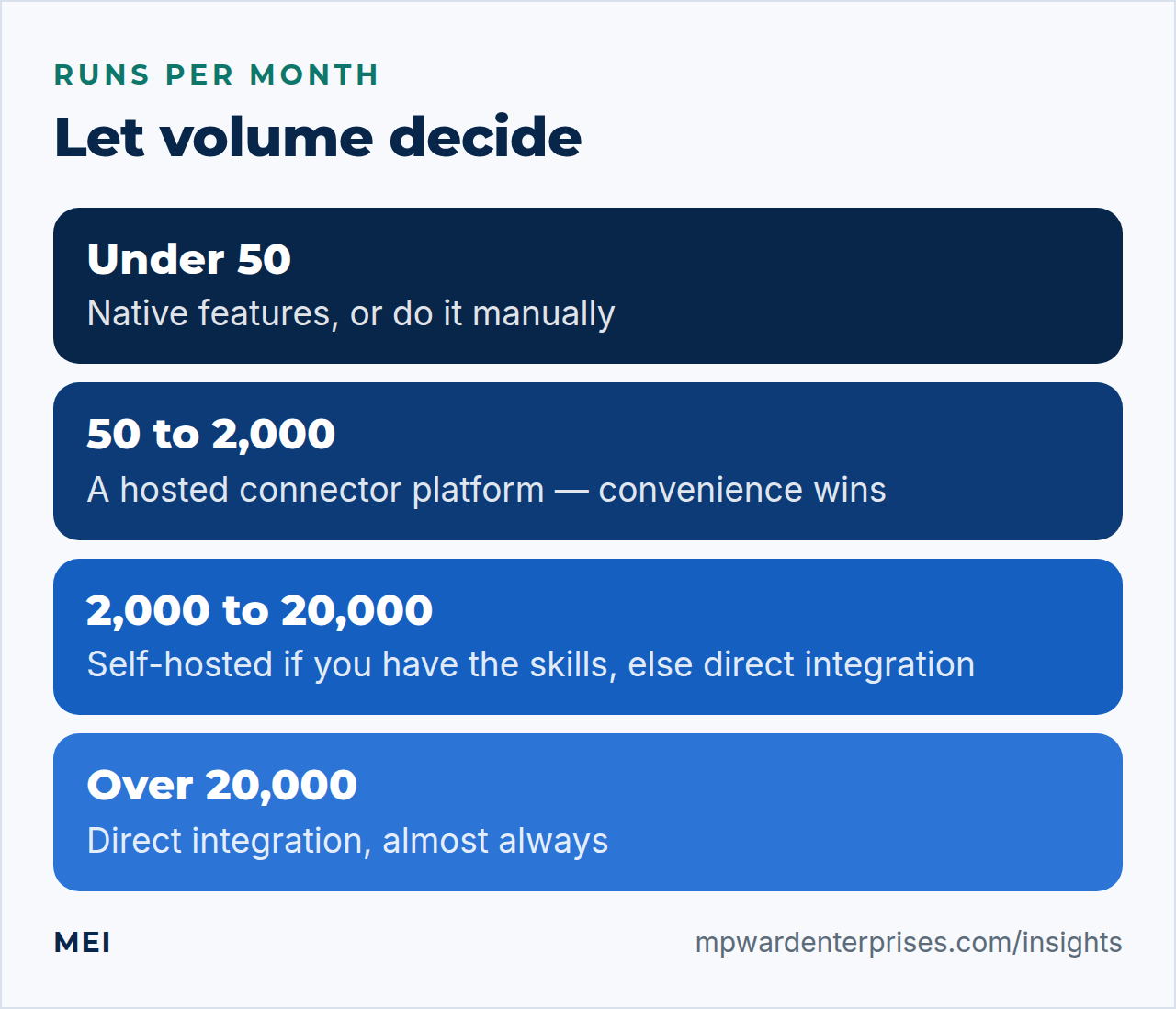
One question cuts through most of the comparison: how many times a month does this workflow actually run?
| Runs per month | Usually right |
|---|---|
| Under 50 | Native features, or do it manually |
| 50 to 2,000 | A hosted connector platform — convenience wins |
| 2,000 to 20,000 | Self-hosted, if you have the skills; otherwise direct integration |
| Over 20,000 | Direct integration, almost always |
Check the real figures in your current platform's history rather than estimating. Businesses are routinely wrong in both directions, and the number changes the answer completely.
What migration actually involves
Moving automations is more work than moving data, because the logic lives in the platform rather than in a file you can export.
- Document what exists. Every workflow: trigger, steps, destination, and who would notice if it stopped. This is also the audit that finds the ones nobody needs.
- Delete the dead ones. Expect a quarter. Workflows built for a campaign that ended or a tool you no longer use.
- Rebuild the important ones first on the new platform, and run both in parallel briefly.
- Test with real data, including the awkward cases — the order with no phone number, the name with an apostrophe.
- Add monitoring before you cut over. You need to know when a workflow stops, not when a customer tells you.
- Switch off the old one properly, and cancel the subscription. Half-migrated automation running in two places is worse than either.
Whatever you choose, monitor it
The failure mode that costs real money is not a platform being expensive. It is a workflow that stopped three weeks ago, where enquiries have been arriving and going nowhere, and nobody knew.
Every automation needs three things regardless of what runs it: a named owner, a written description of what it does and what depends on it, and an alert when it fails or simply does not run. That last one is the same principle as alerting on a missing backup, covered in server monitoring for small business.
A simple daily check that the important workflows ran at all is worth more than any amount of platform sophistication, and takes an afternoon to set up.
The short version
Work out whether your problem is cost or fragility. Check what your existing tools already do, which usually removes a third of the workflows. For what remains, let volume decide: a hosted platform in the middle range, direct integration at the top, and honest deletion at the bottom.
And resist moving to a self-hosted platform purely to save a subscription unless you already run infrastructure well — otherwise you have traded a predictable bill for an unpredictable obligation. If you would rather have the workflows mapped and rebuilt properly, that is our AI & Business Automation work, and the design principles are in business process automation. A Business Tech Rescue Audit includes an inventory of what is currently running and what it costs.
Frequently asked questions
What is the best Zapier alternative for a small business?
It depends on how often your workflows actually run. Under about 50 times a month, native features in tools you already own — or doing it manually — usually win. Between 50 and 2,000, a hosted connector platform is worth the convenience. From 2,000 to 20,000, self-hosting makes sense if you have the skills, otherwise direct integration. Above 20,000, direct integration almost always. Check real figures in your platform's history rather than estimating.
Is self-hosted automation actually cheaper?
On licence cost, yes — no per-task pricing and unlimited runs for the price of a small server. The costs that get left out are operational: you now patch, back up, monitor and upgrade a service, upgrades occasionally change behaviour in ways that break a workflow quietly, and it needs a named owner who will still be there in two years. If this would be the only server you look after, the arithmetic rarely works once your time is counted.
Can I replace a connector platform with features I already have?
Often, for a meaningful share of workflows. CRMs send sequences and update records on triggers, accounting packages chase invoices, form builders post to webhooks, ecommerce platforms fire events on orders, and a WordPress site exposes a documented REST API. List every workflow you currently pay for and check whether either end can do it natively — roughly a third can, at zero cost and with one less dependency.
What does migrating automations involve?
More work than moving data, because the logic lives in the platform rather than an exportable file. Document every workflow — trigger, steps, destination, who would notice if it stopped. Delete the dead ones, which is usually about a quarter. Rebuild the important ones first and run both in parallel briefly. Test with awkward real data. Add monitoring before cutting over. Then switch the old one off properly and cancel the subscription.
When is a direct API integration better than a platform?
When a workflow is central to the business, runs constantly, and is unlikely to change shape. It removes a vendor from the chain, has no per-task cost, handles rules a connector cannot express, and fails more honestly because there are fewer places to break. The cost is a build and the requirement is an owner — but at real volume that cost is usually recovered within a year, and the bill does not change as you grow.
How do I know if an automation has stopped working?
Only if you set up an alert, because the common failure is silent. Every automation needs three things regardless of what runs it: a named owner, a written description of what it does and what depends on it, and an alert when it fails or simply does not run. A simple daily check that the important workflows ran at all is worth more than any amount of platform sophistication and takes an afternoon to set up.
Sources and further reading
- WordPress Developer Resources: REST API — the documented interface that often removes the need for a connector between a site and another system
- U.S. Small Business Administration: Business Guide — the operational cost thinking behind counting your own time in a build-versus-subscribe decision
- NIST: AI Risk Management Framework — governance and monitoring expectations that apply equally to ordinary automated workflows