Nginx security headers are short instructions your web server attaches to every page, image and error message, telling the visitor's browser which risky behaviors to refuse. This guide adds the ones that matter for a WordPress site on Ubuntu 24.04 LTS or 26.04 LTS (pick yours with the switch below) in six steps: check what you send today, create one shared include file, repeat it where nginx would drop it, remove duplicates from PHP, roll out HSTS slowly, and watch a Content-Security-Policy in report-only mode. Allow about an hour; you need nginx, WordPress with working HTTPS and sudo.
Every command was run twice in disposable labs, once on Ubuntu 24.04 (nginx 1.24) and once on Ubuntu 26.04 (nginx 1.28), each with a real WordPress 7.1.3 install and never on a live server. Where the two releases differ, the page shows only the one you picked. We reproduced the traps that make a header silently disappear, and settled the claims only a browser can settle in headless Chromium, once, because a browser does not depend on the Ubuntu release.
Names and addresses such as example.com are placeholders, so swap in your own.
Choose your Ubuntu version
This guide covers both releases. Commands, file paths and version numbers change with your choice; everything else is the same.
JavaScript is off, so both versions are shown below and each block says which release it is for.
Before you start
You need an Ubuntu 24.04 LTS or 26.04 LTS server that already serves WordPress through nginx and PHP-FPM over HTTPS. If you are still building it, our guide to installing WordPress with Nginx on Ubuntu produces the layout used here, the Certbot guide adds the certificate, and hardening Ubuntu Server covers the basics around it. Nginx security headers are rules that browsers enforce, so a wrong one can break a page for real visitors. Three habits keep this safe.
- Keep a second SSH session open and run
sudo nginx -tbefore every reload. - Test the pages that earn money. After each step, load the home page, a post, the contact form and, if you sell online, the checkout.
- Know the way back. Delete the
includelines from the site file, runsudo nginx -t && sudo systemctl reload nginx, and the site behaves as before.
On Ubuntu 26.04, sudo is sudo-rs, a Rust rewrite, and the everyday tools used below (tr, cut, head, sort, uniq, tee and others) are the Rust versions from the uutils project, while sed, grep and cp are still the GNU ones. We ran every command as an admin user, and each behaved as it does on 24.04, so nothing in this guide changes because of them. sudo --version and ls --version tell you which implementation you have.
Why nginx security headers and not the other ways
Several places can add headers to a WordPress site, and they differ in what they reach. That matters because much of what your server sends never touches PHP: images, stylesheets, scripts and nginx's own error pages.
| Option | In plain English | Our verdict |
|---|---|---|
nginx add_header in one include file (this guide) |
The web server stamps every response, whoever produced it | Our choice. One file to edit, and the headers still arrive when PHP is down (we measured a 502 page). It needs care with inheritance (step 3) |
| A WordPress security or headers plugin | PHP adds headers while WordPress builds a page | Easy to switch on, but files nginx serves straight from disk never reach PHP, so they get nothing |
| A few lines in the theme | The same idea, written by hand | The same blind spots as a plugin, and it vanishes when you change themes |
| A CDN or firewall rule | The provider rewrites headers at its edge | Good if you already pay for one. Check for duplicates with your server's own headers |
.htaccess rules from older tutorials |
Instructions for Apache, a different web server | Nginx never reads them |
| Do nothing | Browsers use their built-in defaults | Not a disaster for a brochure site, but the cheap headers close real gaps and take minutes |
Think of the headers as house rules posted at every door. The browser is the guest who reads and obeys them. A rule missing from the side door, here a stylesheet or an error page, protects nothing there. Setting nginx security headers posts the notice at every door at once.
What each header does, in plain English
These are the six nginx security headers we use, with the value we start from and what happens if it is wrong. The first four are safe on almost any site. The last two need a plan, so each gets its own step.
| Header | What it tells the browser | Our starting value | If it is wrong |
|---|---|---|---|
X-Content-Type-Options |
Trust the file type the server declares; do not guess from the content | nosniff |
Almost nothing, unless a script or stylesheet is sent with the wrong type |
Referrer-Policy |
How much of the visitor's previous address to pass to the next site | strict-origin-when-cross-origin |
Stricter values hide where your visitors go from your own analytics |
Permissions-Policy |
Which browser features (camera, microphone, location) pages may use | camera=(), microphone=(), geolocation=() |
Breaks a page that needs one of them, such as an embedded map that asks for location |
X-Frame-Options and CSP frame-ancestors |
Who may show your pages inside a frame. Hiding your page under a transparent frame to steal clicks is called clickjacking | SAMEORIGIN and 'self' |
Breaks any page of yours that another site embeds on purpose |
Strict-Transport-Security (HSTS) |
Use only HTTPS for this site for the next N seconds | max-age=300, raised in stages |
Locks visitors out if HTTPS breaks, and cannot be taken back from the server |
Content-Security-Policy |
The only places a page may load scripts, styles, images and frames from | Report-only first | An enforced strict policy can leave a theme, page builder or shop unstyled or broken |
Older guides also list X-XSS-Protection, Expect-CT and Public-Key-Pins. OWASP's header cheat sheet says to leave all three out: the first can create weaknesses in otherwise safe sites (send 0 if you must send it), and the other two are retired. We send none of them.
Step 1: See what your site sends today
Ask the site before changing anything. curl -sI fetches only the headers: -s hides the progress meter and -I asks for the headers alone.
curl -sI https://example.com/Our stock lab site answered with Server: nginx/1.24.01.28.3 (Ubuntu) and none of the security headers. One URL is not enough, because different parts of the server answer different URLs. This script asks for seven typical ones and counts how often each header appears.
cat > ~/header-check.sh <<'EOF'
#!/bin/bash
# Counts how often each header appears for a few typical URLs: 0 = missing, 1 = good, 2 = duplicate
SITE=${1:-https://example.com}
HEADERS="X-Content-Type-Options Referrer-Policy Permissions-Policy X-Frame-Options Content-Security-Policy Strict-Transport-Security"
printf '%-46s' "URL (status)"
for h in $HEADERS; do printf '%-6s' "$(echo "$h" | tr -cd 'A-Z')"; done; echo
for path in / /wp-login.php /wp-json/ /robots.txt /no-such-page/ /.env /wp-includes/js/jquery/jquery.min.js; do
  out=$(curl -s -D - -o /dev/null "$SITE$path" | tr -d '\r')
  printf '%-46s' "$path ($(echo "$out" | head -1 | cut -d' ' -f2))"
  for h in $HEADERS; do printf '%-6s' "$(echo "$out" | grep -ci "^$h:")"; done
  echo
done
EOF
chmod +x ~/header-check.sh
~/header-check.sh
Each column is a header: XCTO is X-Content-Type-Options, RP Referrer-Policy, PP Permissions-Policy, XFO X-Frame-Options, CSP Content-Security-Policy and STS Strict-Transport-Security. A 0 means missing, 1 sent once, 2 sent twice. The file /.env should not exist, so nginx answers 403 and that row shows what an error page carries. Ours started like this:
URL (status)                                  XCTO  RP    PP    XFO   CSP   STS
/ (200)                                       0     0     0     0     0     0
/wp-login.php (200)                           0     1     0     1     1     0
/wp-json/ (200)                               1     0     0     0     0     0
/robots.txt (200)                             0     0     0     0     0     0
/no-such-page/ (404)                          0     0     0     0     0     0
/.env (403)                                   0     0     0     0     0     0
/wp-includes/js/jquery/jquery.min.js (200)    0     0     0     0     0     0
WordPress already sends a few headers itself. Its login page sends X-Frame-Options, a frame-ancestors policy and Referrer-Policy, and its REST API sends nosniff. WordPress's developer reference names send_frame_options_header() as the function behind the framing pair. Ordinary pages send none, and that mix sets up the duplicate problem in step 4.
Why this way?
An online scanner grades one page, usually the home page. A table by URL shows what a grade hides: the login page, error pages, the REST API and static files. In our lab a HEAD request (-I) and a full GET returned the same security headers, but the script uses a real GET in case an application treats HEAD differently.
Step 2: Create one headers file and include it
Put the starter nginx security headers in one file, then point the site at it. Ubuntu keeps reusable pieces of nginx configuration in /etc/nginx/snippets/. Each add_header line is one rule, and the word always at the end matters, as the table below shows.
sudo tee /etc/nginx/snippets/security-headers.conf > /dev/null <<'EOF'
# Security headers, sent on every response (errors included) because of "always"
add_header X-Content-Type-Options "nosniff" always;
add_header Referrer-Policy "strict-origin-when-cross-origin" always;
add_header Permissions-Policy "camera=(), microphone=(), geolocation=()" always;
add_header X-Frame-Options "SAMEORIGIN" always;
add_header Content-Security-Policy "frame-ancestors 'self'" always;
EOF
Clickjacking protection appears twice on purpose. frame-ancestors is the modern form and OWASP prefers it. X-Frame-Options is the older form, and WordPress sends it on its login page, so we match it. Both say that only your own site may frame your pages. frame-ancestors gets its own enforced header because default-src does not cover it, and we want it live now while the larger policy in step 6 is only being watched.
Now include the file in the HTTPS server block, hide the nginx version, test and reload. The sed line inserts the include under index index.php;, where our install guide has it. If your file differs, add the line by hand to the server block that listens on port 443, not to the port 80 block that only redirects.
sudo sed -i 's|^    index index.php;|&\n    include snippets/security-headers.conf;|' /etc/nginx/sites-available/example.com.conf
echo 'server_tokens off;' | sudo tee /etc/nginx/conf.d/server-tokens.conf > /dev/null
grep -n 'security-headers' /etc/nginx/sites-available/example.com.conf
sudo nginx -t && sudo systemctl reload nginx
sleep 2
~/header-check.sh
curl -sI https://example.com/ | grep -i '^server'
The version setting needs a different route on this release. The packaged /etc/nginx/nginx.conf already sets server_tokens build; in its http block, which sends the version plus the build name, and nginx accepts each setting only once per level. A second server_tokens line at that level, for example a one-line file in conf.d, makes nginx -t fail with "server_tokens" directive is duplicate.
Because the commands chain the reload to a passing test, nothing is reloaded after that error, and the checker prints the old table right under it, which is easy to overlook. Put server_tokens off; in the server blocks instead, where it overrides the http value. The second sed line below adds it to every block named after our example site: the HTTPS block and the port 80 redirect, whose answers announce the version too.
sudo sed -i 's|^    index index.php;|&\n    include snippets/security-headers.conf;|' /etc/nginx/sites-available/example.com.conf
sudo sed -i 's|^    server_name example.com www.example.com;|&\n    server_tokens off;|' /etc/nginx/sites-available/example.com.conf
grep -nE 'security-headers|server_tokens' /etc/nginx/sites-available/example.com.conf
sudo nginx -t && sudo systemctl reload nginx
sleep 2
~/header-check.sh
curl -sI https://example.com/ | grep -i '^server'
The grep should print one line.The grep should print three lines: the include, and a server_tokens line for each of the two blocks. After the reload, every row should show 1, except the two places where WordPress sends its own copies (step 4): the login page doubled three headers and the REST API doubled nosniff.
URL (status)                                  XCTO  RP    PP    XFO   CSP   STS
/ (200)                                       1     1     1     1     1     0
/wp-login.php (200)                           1     2     1     2     2     0
/wp-json/ (200)                               2     1     1     1     1     0
/robots.txt (200)                             1     1     1     1     1     0
/no-such-page/ (404)                          1     1     1     1     1     0
/.env (403)                                   1     1     1     1     1     0
/wp-includes/js/jquery/jquery.min.js (200)    1     1     1     1     1     0
Server: nginx
The last line is server_tokens off at work. Server went from nginx/1.24.01.28.3 (Ubuntu) to nginx, and the version text on nginx's own error pages went too. That does not make the server safer; it stops announcing which version, and so which known bugs, you run. Patching does the real work. Removing the word nginx needs a third-party module, which we skip.
Watch out: wait a moment after a reload
systemctl reload nginx returns before nginx has switched to the new settings. We changed a header, reloaded and asked for the page at once, ten times: nine of the tenall ten answers still carried the old value. That is why these commands include sleep 2. If a change seems to do nothing, wait two seconds before you suspect your edit.
Why this way?
One file means step 3 can repeat the whole set in a single line. always matters because nginx adds a header by default only to responses with status 200, 201, 204, 206, 301, 302, 303, 304, 307 or 308, according to its documentation. Everything else, including your error pages, goes out bare.
Keep server_tokens off in its own conf.d file; if you also uncomment the line in nginx.conf, nginx -t fails with "server_tokens" directive is duplicate.The version setting follows a different rule, because the packaged nginx.conf already uses the http level for it and nginx allows one server_tokens line per level. Editing that line to server_tokens off; also works and covers every site, but the file belongs to the nginx package, and we leave those alone.
| Response we tested | Without always |
With always |
|---|---|---|
| 200 page, 301 redirect | Headers sent | Headers sent |
403 from an nginx deny rule (/.env) |
No headers | Headers sent |
| 404 page built by WordPress | No headers | Headers sent |
405 from xmlrpc.php |
No headers | Headers sent |
| 502 with PHP stopped | No headers | Headers sent |
Step 3: Repeat the file wherever a location has its own add_header
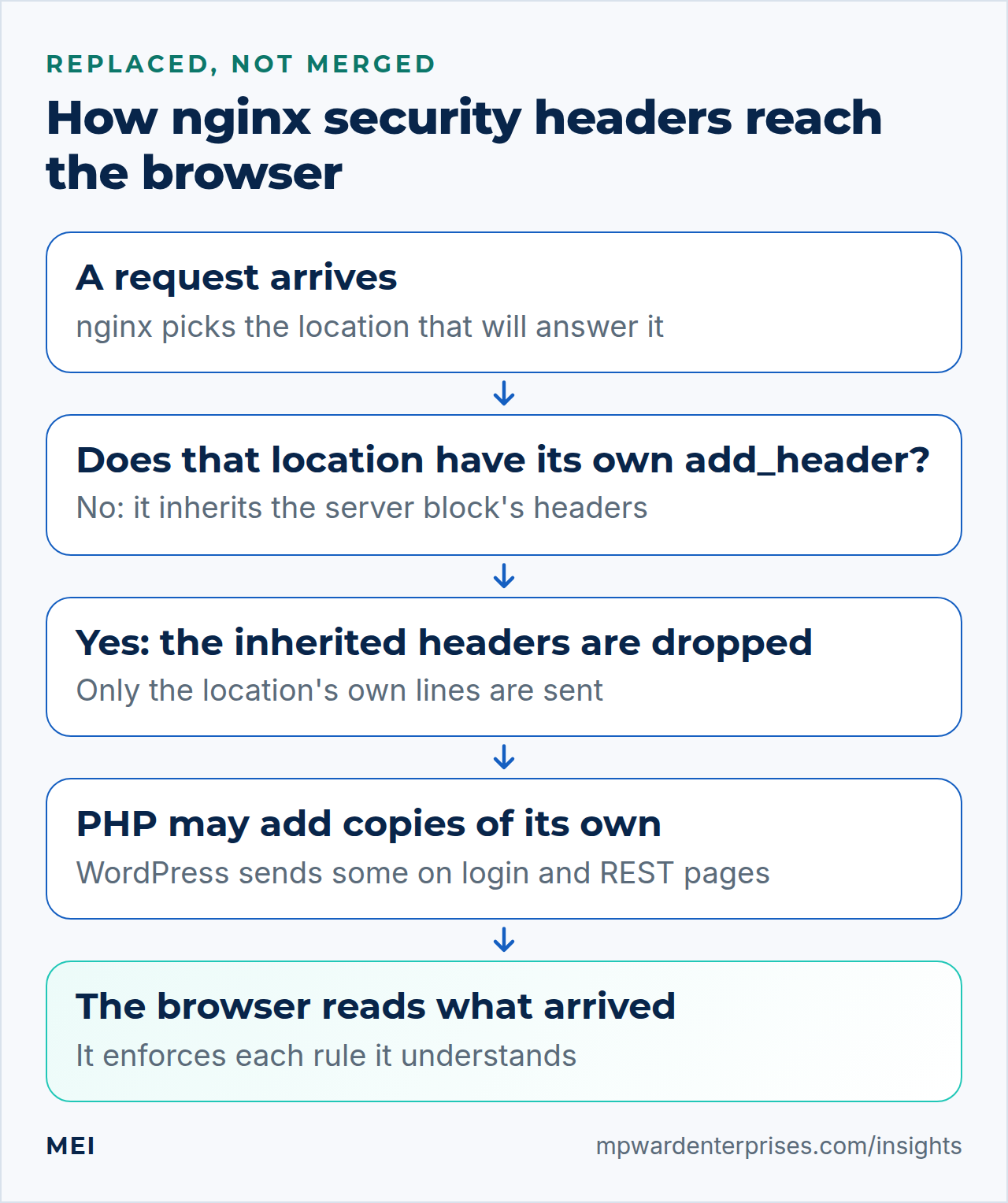
This rule surprises almost everyone. A location inherits the add_header lines of the server block above it only if the location has none of its own. The moment a location adds even one header, it stops inheriting all of them: they are replaced, not merged. nginx -t cannot warn you, because the configuration is valid.
Our install guide's static-file location uses expires, a separate mechanism that does not trigger the rule: the jQuery row above has all five headers. Many guides use add_header Cache-Control instead. On a test server, switch to it and watch the last row.
sudo cp /etc/nginx/sites-available/example.com.conf ~/example.com.conf.bak
sudo sed -i 's|^        expires 30d;|        add_header Cache-Control "public, max-age=2592000, immutable";|' /etc/nginx/sites-available/example.com.conf
sudo nginx -t && sudo systemctl reload nginx
sleep 2
~/header-check.sh | tail -1
The row fell from five 1s to all zeros. The same rule hits more than static files. We added one harmless add_header X-Cache-Status "BYPASS"; line to the PHP location, the kind of line page-cache setups commonly add (see our FastCGI cache guide). Every page PHP answered lost all five headers: the home page, robots.txt and the 404 page. The login page kept only the headers WordPress sends itself, and the REST API kept only nosniff.
The home page was affected because the PHP location answers it: for a pretty address, try_files finds no file and hands the request to index.php. So a header line there touches nearly every page. The fix is the same everywhere: repeat the include inside the location that sets its own header.
sudo sed -i '/add_header Cache-Control/i\        include snippets/security-headers.conf;' /etc/nginx/sites-available/example.com.conf
sudo nginx -t && sudo systemctl reload nginx
sleep 2
~/header-check.sh | tail -1
The row is back to five 1s. The include sits beside the location's own add_header, which is allowed: lines at the same level combine, and only the level above is replaced. To find every place this can bite, list the structure of the whole configuration. The numbers are positions in nginx's combined dump, and the last five lines are the snippet's own contents.
sudo nginx -T 2>/dev/null | grep -nE '^\s*(server \{|location|add_header|include snippets/security-headers)'A location line followed by an add_header but no include snippets/security-headers.conf is a location that has just dropped your headers. In our output only the static location had both lines.
Why this way?
Newer nginx has a switch for this. The documentation lists add_header_inherit merge;, which appends the upper level's headers instead of replacing them, and says it appeared in version 1.29.3. Neither Ubuntu package has it: 24.04 ships nginx 1.24 and 26.04 ships 1.28, and on both nginx -t stops with unknown directive "add_header_inherit". One repeated include works on every version, and the next person to read the file can see it.
Step 4: Remove the duplicates that PHP adds
The step 2 results showed 2s on the login page and the REST API. WordPress sends Referrer-Policy, X-Frame-Options and frame-ancestors from its login screen, and nosniff from its REST API, and nginx then adds its own copy. Are two copies a problem? We framed test pages from a different origin in headless Chromium.
| What the framed page sent | Chromium's behavior |
|---|---|
| No framing header | The page was shown inside the other site's frame |
X-Frame-Options: SAMEORIGIN once |
Refused |
The same X-Frame-Options twice |
Refused; Chromium treated the two as one |
DENY and SAMEORIGIN together |
Refused; it logged a warning and fell back to deny |
frame-ancestors 'self' once, or twice |
Refused |
So in current Chromium, identical duplicates did no harm. We still remove them: we tested one browser engine, other browsers and scanners may treat repeats differently, and when two copies disagree the result depends on which is read last. PHP's copy is the one to drop, because nginx has to cover every page and WordPress covers only a few.
sudo sed -i 's|^        fastcgi_read_timeout 120s;|&\n        fastcgi_hide_header X-Frame-Options;\n        fastcgi_hide_header Referrer-Policy;\n        fastcgi_hide_header X-Content-Type-Options;|' /etc/nginx/sites-available/example.com.conf
sudo nginx -t && sudo systemctl reload nginx
sleep 2
~/header-check.sh
fastcgi_hide_header drops a header PHP sent before nginx passes the response on; it does not touch headers nginx adds itself. The login page now shows one copy of each except Content-Security-Policy, which still shows 2, and should. We left it alone on purpose: a security plugin may send a real policy, and browsers enforce every policy they receive, so the two add up. The remaining copy equals ours (frame-ancestors 'self') and is harmless.
URL (status)                                  XCTO  RP    PP    XFO   CSP   STS
/ (200)                                       1     1     1     1     1     0
/wp-login.php (200)                           1     1     1     1     2     0
/wp-json/ (200)                               1     1     1     1     1     0
/robots.txt (200)                             1     1     1     1     1     0
/no-such-page/ (404)                          1     1     1     1     1     0
/.env (403)                                   1     1     1     1     1     0
/wp-includes/js/jquery/jquery.min.js (200)    1     1     1     1     1     0
Why this way?
Now one place decides. If you later change the headers file to Referrer-Policy: same-origin, WordPress's login page would otherwise send both values, and the browser would use the last one it read. Ubuntu's PHP-FPM sends no X-Powered-By by default (expose_php is Off, and our baseline showed none). If yours does, add fastcgi_hide_header X-Powered-By; to the same location.
Step 5: Add HSTS (Strict-Transport-Security), slowly
HSTS, short for Strict-Transport-Security, tells a browser to use only HTTPS for your site for a set number of seconds. It is the one header here that cannot be taken back from your server. A browser that knows the rule treats any certificate problem on your site as fatal, with no "proceed anyway" button, which RFC 6797 requires. Promise a year, let the certificate lapse next week, and visitors who remember the rule are locked out until you fix it.
So the first value is 300 seconds, five minutes, and a mistake clears itself almost at once. The HSTS preload site recommends the same ramp, 5 minutes, then 1 week, then 1 month, waiting out each stage while you watch for problems.
| Stage | Value | What to do before the next stage |
|---|---|---|
| 1. Trial | max-age=300 |
Browse the whole site and every subdomain you use. Check that the certificate renews on its own |
| 2. One week | max-age=604800 |
Wait the week out and listen for "site not secure" complaints |
| 3. One month | max-age=2592000 |
Wait the month out |
| 4. One year | max-age=31536000 |
Where most small sites can stay |
Add the header to the same file. It is included only in the HTTPS block, which matters: RFC 6797 says a host must not send HSTS over plain HTTP, and MDN adds that browsers ignore it there. The commands check both answers.
echo 'add_header Strict-Transport-Security "max-age=300" always;' | sudo tee -a /etc/nginx/snippets/security-headers.conf
sudo nginx -t && sudo systemctl reload nginx
sleep 2
curl -sI https://example.com/ | grep -i '^strict-transport'
curl -sI http://example.com/ | grep -i '^strict-transport' || echo "none over plain HTTP"
You should see Strict-Transport-Security: max-age=300 once, then "none over plain HTTP". The STS column of the checker now shows 1 on every row, because the static location repeats the include. To move to the next stage, change the number in one place:
sudo sed -i -E 's/max-age=[0-9]+/max-age=604800/' /etc/nginx/snippets/security-headers.conf
sudo nginx -t && sudo systemctl reload nginx
Two additions appear in every HSTS guide, and both deserve suspicion. includeSubDomains extends the rule to every subdomain for as long as the number runs, including the forgotten staging.example.com, the webmail host and the office device that only speaks HTTP. Add it only after you list every subdomain and check each one over HTTPS. The preload word is the bigger decision.
Watch out: preload is a one-way door
The preload list ships inside browsers, so even a first visit uses HTTPS. To qualify, hstspreload.org requires a valid certificate, an HTTP-to-HTTPS redirect, HTTPS on every subdomain, and a header with max-age of at least 31,536,000 (one year), includeSubDomains and preload. It warns that inclusion cannot easily be undone: removal takes months to reach users through a browser update, with no guarantees for other browsers. OWASP lists the preload form as its example value, with a caution that a certificate problem can then lock out legitimate users.
We would stay at one year without preload unless every address under the domain will serve HTTPS for good.
Why this way?
We verified what the server sends, not what a browser remembers; a server lab cannot inspect that. The standards are clear, though. A browser learns the rule only from an HTTPS response, so the very first visit is unprotected (preloading fixes that). To end the rule early you send max-age=0 over HTTPS, and it reaches each visitor only when they return. If a CDN or a Certbot option (--hsts) already sends HSTS, do not add this line as well.
Step 6: Add a Content-Security-Policy, in report-only mode
A Content-Security-Policy (CSP) lists the only places a page may load scripts, styles, images, fonts and frames from; anything else is refused. It is the most powerful header here and the only one that can break a site on day one, so we run it in report-only mode first. The browser checks the policy, reports what it would have blocked, and blocks nothing.
Why a strict policy breaks WordPress
A CSP with default-src or script-src refuses inline scripts by default, as MDN's guide explains, and WordPress is full of them. Our stock lab front page (WordPress 7.1.3, the default Twenty Twenty-Five theme, no plugins) has 16 inline style blocks, 7 inline style= attributes and 4 inline script blocks, one of them pure data. The login page has 7 inline scripts. None carries a nonce. Page builders and shop plugins usually add more, plus scripts from other hosts.
We tried the strictest simple policy, default-src 'self', both ways. In report-only mode the page looked the same and the browser sent 27 reports: 16 style blocks, 7 style attributes, 3 inline scripts (one was WordPress's speculation rules) and 1 background worker. Enforced, the same policy stripped the theme's colors and fonts and left plain browser styling. That gap is the whole argument for report-only.
A starter policy and a place for reports
This policy allows what a plain WordPress site needs and little more. It sits in a map so the dashboard and login page can be excluded: they lean on inline code and outside hosts, and an empty value makes nginx send no header. The same file defines the report log, a rate limit for each address and a local sink for incoming reports.
sudo tee /etc/nginx/conf.d/csp.conf > /dev/null <<'EOF'
# The Content-Security-Policy-Report-Only policy. It is reported on, never enforced.
# wp-admin and wp-login.php get no policy (an empty value means "send no header").
map $request_uri $csp_policy {
    ~^/wp-(admin|login\.php)  "";
    default  "default-src 'self'; script-src 'self' 'unsafe-inline'; style-src 'self' 'unsafe-inline'; img-src 'self' data: https:; font-src 'self' data:; worker-src 'self' blob:; object-src 'none'; base-uri 'self'; form-action 'self'; report-uri /csp-report";
}

# Where the browsers send their reports
log_format csp_reports escape=json '{"time":"$time_iso8601","ip":"$remote_addr","body":"$request_body"}';
limit_req_zone $binary_remote_addr zone=csp_reports:1m rate=30r/m;

server {
    listen 127.0.0.1:8081;
    location / { return 204; }
}
EOF| Directive | In plain English |
|---|---|
default-src 'self' |
Anything not covered below may come only from your own site |
script-src, style-src with 'unsafe-inline' |
Your own files plus inline code, which WordPress needs today |
img-src, font-src |
Images from your site, small embedded images and any HTTPS site (Gravatar, partner logos); fonts from your site only |
worker-src 'self' blob: |
WordPress's emoji loader starts a background worker from a blob: address; our first report showed it |
object-src, base-uri, form-action |
No old-style plugins, no hijacked base address, and forms may post only to your own site |
report-uri /csp-report |
Send a short JSON report here for each violation |
Now add the receiving address and switch the header on. nginx records a request body only when something consumes it, so a plain return 204 logs an empty body (we tested). Passing the request to the local sink makes nginx read it. The location accepts only POST, caps the body at 16 KB and rate-limits each address, because anyone on the internet can post to it.
sudo tee /etc/nginx/snippets/csp-report-location.conf > /dev/null <<'EOF'
location = /csp-report {
    limit_except POST { deny all; }
    limit_req zone=csp_reports burst=30 nodelay;
    client_max_body_size 16k;
    client_body_buffer_size 16k;
    access_log /var/log/nginx/csp-reports.log csp_reports;
    proxy_pass http://127.0.0.1:8081;
}
EOF
sudo sed -i 's|^    index index.php;|&\n    include snippets/csp-report-location.conf;|' /etc/nginx/sites-available/example.com.conf
echo 'add_header Content-Security-Policy-Report-Only $csp_policy always;' | sudo tee -a /etc/nginx/snippets/security-headers.conf
sudo nginx -t && sudo systemctl reload nginx
sleep 2
curl -sI https://example.com/ | grep -i '^content-security-policy-report-only' | cut -c1-90
curl -sI https://example.com/wp-login.php | grep -ci '^content-security-policy-report-only'
The home page should show the report-only header, and the login page 0, because the map excluded it. Prove the pipe with a made-up report; you should see 204 and the logged line. The log lives in /var/log/nginx/, so Ubuntu's stock nginx rotation already covers it (see our logrotate guide).
curl -s -o /dev/null -w '%{http_code}\n' -X POST -H 'Content-Type: application/csp-report' \
  -d '{"csp-report":{"effective-directive":"img-src","blocked-uri":"https://images.example.net/x.png"}}' \
  https://example.com/csp-report
sudo tail -n 1 /var/log/nginx/csp-reports.log
Read the reports, then tighten
Browse your site as a visitor would, then summarize what arrived. For a quick look without any log, open the browser's developer-tools Console: each violation prints a line saying the policy is report-only and nothing was blocked. This command counts reports by directive and outside host; it needs jq, a small JSON tool (sudo apt install jq).
sudo jq -r '.body | fromjson? | ."csp-report"? | [."effective-directive", (."blocked-uri" | sub("^(?<h>[a-z-]+://[^/]+).*"; .h))] | @tsv' /var/log/nginx/csp-reports.log | sort | uniq -c | sort -rn | head -20To make this realistic we added a lab post with a YouTube embed, a tracking script and a Google Fonts stylesheet, and browsed it in Chromium. This is illustrative output from that made-up page:
     14 font-src	https://fonts.gstatic.com
      2 style-src-elem	https://fonts.googleapis.com
      2 script-src-elem	https://stats.example.net
      2 frame-src	https://www.youtube.com
Each line is a decision. Do you use that host on purpose? Add it to the right directive in csp.conf: here https://fonts.googleapis.com to style-src, https://fonts.gstatic.com to font-src and https://www.youtube.com to a new frame-src. Did you not know about it? Then you have found a script or embed to investigate. Change one thing at a time.
On a WooCommerce site, visit the cart, checkout and payment return pages specifically: payment providers load scripts and frames from their own hosts and may post forms to them.
When the log stays quiet for a few weeks across every kind of page, enforce the policy by renaming the header in the file. You can keep a stricter report-only line beside it; browsers apply both.
sudo sed -i 's/add_header Content-Security-Policy-Report-Only/add_header Content-Security-Policy/' /etc/nginx/snippets/security-headers.conf
sudo nginx -t && sudo systemctl reload nginx
sleep 2
~/header-check.sh | head -3
After enforcing, the CSP column shows 2 on every row. That is intended: your policy and the frame-ancestors header are two separate headers, and browsers apply both. On the login page the second copy is WordPress's own, and the starter policy is not sent there at all.
Watch out: this policy is modest
It stops a page loading scripts, styles, fonts and frames from hosts you never listed, and forms posting elsewhere. It does not stop injected inline code, because it allows 'unsafe-inline', and MDN's guide says plainly that this keyword defeats much of the purpose of a CSP. A strict policy uses a fresh nonce on each script, and stock WordPress does not put nonces on its inline scripts, so nginx alone cannot get you there. Treat this step as one layer, not the finish line. We confirmed that reports arrive through report-uri.
MDN also describes a newer report-to directive that browsers prefer when both are present, but it did not deliver in our headless test browser, so we could not verify it.
Why this way?
Report-only is the safe doorway: the Report-Only header supports every CSP directive except sandbox, so what you test is what you will later enforce. A hosted reporting service is the alternative to our own log. It saves the disk and the jq, but you send your visitors' browsing details to a third party.
Check your work: the finished nginx security headers setup
Run the checker once more. After the six steps, while the policy is still report-only, every column should show 1, with one 2 for Content-Security-Policy on the login page. Then compare your site file with ours. The comments stand for lines that stay exactly as they were: your logging, the uploads and dotfile deny rules (keep them above the PHP location) and the listen and ssl_certificate lines Certbot wrote.
server {
    server_name example.com www.example.com;
    root /var/www/example.com/public;
    index index.php;
    include snippets/csp-report-location.conf;
    include snippets/security-headers.conf;

    # client_max_body_size, logs, uploads and dotfile rules: unchanged

    location / {
        try_files $uri $uri/ /index.php?$args;
    }

    location ~ \.php$ {
        include snippets/fastcgi-php.conf;
        fastcgi_pass unix:/run/php/php8.38.5-fpm-siteuser.sock;
        fastcgi_read_timeout 120s;
        fastcgi_hide_header X-Frame-Options;
        fastcgi_hide_header Referrer-Policy;
        fastcgi_hide_header X-Content-Type-Options;
    }

    location ~* \.(?:css|js|mjs|jpe?g|png|gif|webp|avif|svg|woff2?)$ {
        include snippets/security-headers.conf;
        add_header Cache-Control "public, max-age=2592000, immutable";
        access_log off;
    }

    # listen and ssl_certificate lines from Certbot: unchanged
}
On Ubuntu 26.04, both server blocks, the HTTPS one shown here and the port 80 redirect, also carry the server_tokens off; line from step 2.
Then look through a browser's eyes: open the developer tools, choose the Network tab, reload and read the first request's response headers. A mistyped Permissions-Policy feature shows in the Console; when we misspelled geolocation, Chromium printed Unrecognized feature, and the finished lab site produced no header warnings. Public header scanners grade only one page, so keep using the table.
Troubleshooting: what the symptoms mean
| What you see | Likely cause | What to do |
|---|---|---|
| Headers on pages but not on images, CSS or one URL | That location has its own add_header, which replaced the inherited ones |
Step 3: add include snippets/security-headers.conf; inside it |
| Nearly every page lost its headers after you added a cache or status header | The line went into the PHP location, which answers most pages | Add the include to that location too, then rerun the checker |
| Headers missing on 404, 403 or 502 pages only | always is missing from a line |
Add always; to every add_header in the file |
| A column shows 2 on the login page or REST API | WordPress and nginx both send it | Step 4: fastcgi_hide_header for that name in the PHP location |
You edited the file but curl shows the old answer |
The reload had not finished, or you edited the wrong server block | Wait two seconds, then check sudo nginx -T | grep security-headers |
nginx -t says unknown "csp_policy" variable or unknown log format "csp_reports" |
The csp.conf file is missing, misnamed, or lost its map or log_format |
Recreate it in /etc/nginx/conf.d/ as in step 6 and test again |
| The site looks unstyled, or an embed vanished, after step 6 | The policy was enforced before the reports were clean | Rename the header back to Content-Security-Policy-Report-Only, reload, read the reports |
| Visitors see a certificate warning they cannot click past | HSTS is active and the certificate is invalid or expired | Renew the certificate at once. This is why stage 1 uses 300 seconds |
One more symptom on Ubuntu 26.04: "server_tokens" directive is duplicate from nginx -t means a second server_tokens line sits at the http level, for example in a conf.d file copied from an older guide. Move it into the server blocks, as step 2 shows, and the headers checker will work again.
What nginx security headers cannot do
Headers are requests that browsers choose to honor. A script, a bot or an attacker with a command-line tool ignores every one of them. They limit what a hostile page can do to your visitors; they do not stop the intrusion itself. They do not patch a vulnerable plugin, replace strong passwords and two-factor login, throttle guessing (see nginx rate limiting for WordPress) or close ports (see our UFW guide). Cookies, TLS settings and file permissions are separate controls, and a clean scanner grade is not a security assessment.
If a CDN or proxy sits in front of nginx, check the headers from outside, because it may add, remove or double them. With a TLS-passthrough proxy such as the one in our HAProxy SNI routing guide, nginx still sends them, because the proxy never opens the encrypted traffic.
Common mistakes
- Adding an
add_headerline in a location and forgetting the include. Theserver-level headers silently stop applying there. - Leaving out
always. Error pages go out unprotected. - Enforcing a policy copied from a blog. It was written for a different site. Start in report-only mode.
- Turning on
includeSubDomainsorpreloadbecause a scanner asked. Both reach beyond the one site you tested. - Testing only the home page. Check the login page, an error page, a static file and the REST API too.
- Setting the same header in nginx, a plugin and a CDN. Pick one owner per header.
Keep your nginx security headers healthy
Once a month, run ~/header-check.sh and read the Content-Security-Policy report summary. After you add a plugin, an embed, a font or a payment provider, expect new reports and browse the affected pages. Put the HSTS stage dates in a calendar. After any change to the site file, run the checker again, because the inheritance rule can undo your headers without a single error. Our WordPress maintenance checklist and the Linux server hardening checklist list the other recurring jobs.
Getting help
If you would rather have someone set up your nginx security headers and watch the reports, MEI's Network Architecture and Security service covers firewall and server hardening, access control and monitoring, and starts at $1,500, scoped after an assessment. WordPress Engineering and Plugin Development covers performance, security hardening and migrations, and starts at $1,200, fixed scope or hourly. We focus on the highest-impact, most likely risks, and we do not promise perfect security.
Frequently asked questions
What are nginx security headers?
Extra HTTP response headers that nginx adds with the add_header directive, such as X-Content-Type-Options, Referrer-Policy, Permissions-Policy, Strict-Transport-Security and Content-Security-Policy. They tell the browser which risky behaviors to refuse. They protect visitors; they do not patch a vulnerable site.
Which security headers does a WordPress site need?
A sensible starter set is X-Content-Type-Options nosniff, Referrer-Policy strict-origin-when-cross-origin, a Permissions-Policy that turns off features you do not use, and clickjacking protection with frame-ancestors and X-Frame-Options. Add Strict-Transport-Security slowly, and Content-Security-Policy in report-only mode first.
Why did my add_header disappear inside a location block?
nginx inherits add_header lines from the level above only if the current level has none of its own. One add_header in a location, even for caching, replaces every inherited header. Repeat an include file in that location. Version 1.29.3 and later also offer add_header_inherit merge, but Ubuntu 24.04 ships nginx 1.24 and Ubuntu 26.04 ships 1.28, so neither has it.
Should I use HSTS preload?
Usually not for a small business site. Preload needs a max-age of at least one year, includeSubDomains and HTTPS on every subdomain, and removal can take months to reach browsers. Start with max-age=300, raise it in stages, and stay at one year unless you are certain.
Can I use a strict Content-Security-Policy on WordPress?
Not easily with nginx alone. WordPress, themes and page builders use inline scripts and styles, and a strict policy blocks them. Start with Content-Security-Policy-Report-Only, read the reports, and enforce a source-list policy only after the reports stay quiet. A nonce-based policy needs support from the theme and plugins.
Do I need both X-Frame-Options and frame-ancestors?
They say the same thing, and modern browsers follow frame-ancestors. We send both because older software reads X-Frame-Options and WordPress itself sends it on the login page. Keep the values matching, so the two never disagree.
Sources and further reading
- nginx documentation: ngx_http_headers_module — add_header, the always parameter, inheritance between levels, add_header_inherit (1.29.3), expires
- RFC 6797: HTTP Strict Transport Security (HSTS) — no click-through on certificate errors, never sent over plain HTTP, max-age=0, includeSubDomains
- HSTS Preload List: submission requirements — preload requirements, removal takes months, the 300 s / 1 week / 1 month ramp
- MDN: Content Security Policy (CSP) guide — inline code blocked by default, nonces and hashes, report-only rollout, multiple policies
- MDN: Content-Security-Policy-Report-Only — violations reported but not enforced, report-uri versus report-to, sandbox ignored
- MDN: CSP frame-ancestors directive — who may embed a page, no fallback to default-src, relation to X-Frame-Options
- OWASP HTTP Headers Cheat Sheet — recommended values, set Referrer-Policy explicitly, omit X-XSS-Protection, Expect-CT and Public-Key-Pins
- WordPress developer reference: send_frame_options_header() — WordPress sends X-Frame-Options SAMEORIGIN and frame-ancestors 'self'
- nginx documentation: ngx_http_core_module (server_tokens) — server_tokens takes on, off, build or a string in the http, server and location contexts; build (since 1.11.10) adds the build name to the version