A small business tech stack is the set of tools and services your company runs on: email, files, devices, website, customer records, money and the protections that keep them working. The best small business tech stack is not the biggest one. It is the smallest set that covers seven layers, with an owner, an administrator login you control and a way out for every tool in it.
Most owners do not choose a stack; they accumulate one. A free email account here, a website builder there, a spreadsheet that quietly became the customer database. Each choice made sense at the time, and together they produce a tangle that nobody fully understands and that fails at the worst moment. This guide shows you how to see your stack as seven layers, what belongs in each one, and how to fix the gaps in the right order.
What is a small business tech stack?
In software, a "tech stack" means the layers of technology an application is built on. For a business the idea is the same, applied to the whole company: the tools and services you rely on, arranged in layers, where each layer depends on the ones beneath it. If your sign-in layer is weak, a good email system is not safe. If your backup layer is missing, nothing above it can be recovered.
That is why a small business tech stack is worth designing instead of letting it grow. Three questions test every tool in it. Who owns it? One named person, with a deputy. Who holds the administrator login? The company, never a contractor or a former employee. How do you leave? You can export your data and move to something else. We use those three tests throughout this guide.
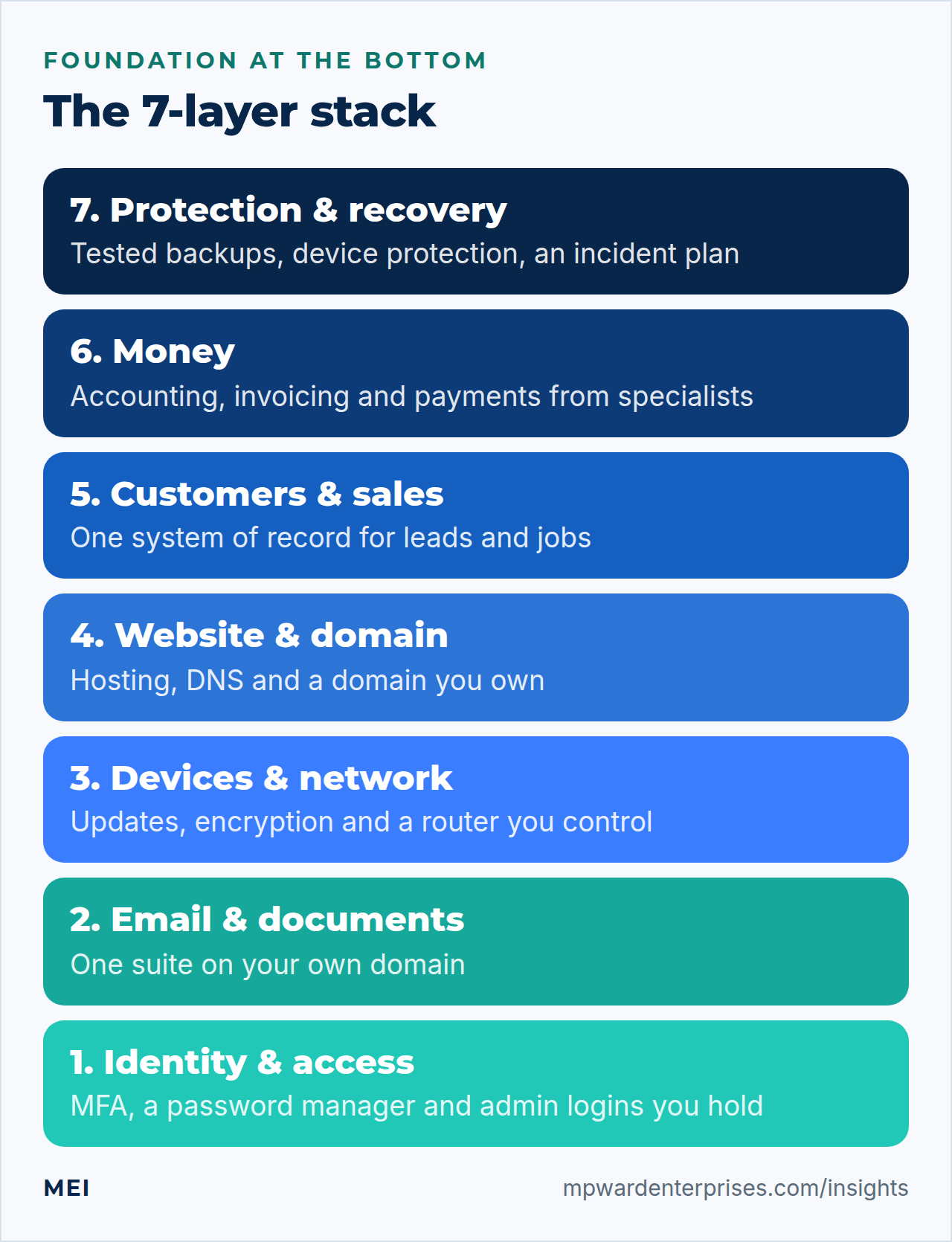
The 7 layers of a small business tech stack
The layers run from the foundation upward. Official guidance points the same way. NIST's Small Business Quick-Start Guide, a companion to its Cybersecurity Framework, organizes advice into six functions: govern, identify, protect, detect, respond and recover. Its identify function starts with knowing what you rely on, by keeping an inventory of hardware, software, systems and services. CISA's Cyber Essentials frames it as six elements: yourself, your staff, your systems, your surroundings, your data and your crisis response.
Layer 1: Identity and access
Every other layer sits behind a login, so this is where to start. NIST calls enabling multi-factor authentication one of the fastest, cheapest ways to protect your data, and says to begin with the accounts that can reach the most sensitive information: banking, accounting and tax, merchant, email, your Google, Microsoft or Apple ID, your password manager and your website. It also suggests a password manager to generate and protect strong passwords.
Not every second factor is equal. CISA ranks security keys as the strongest, then authenticator apps that use number matching, then apps with one-time codes, then biometrics, with codes sent by text message or email the weakest. Use an authenticator app or a key on the accounts that matter most, and text-message codes only where nothing better is offered.
- Choose: a business password manager with shared vaults and an administrator console, multi-factor authentication on every account that offers it, and two people who can recover each critical account.
- Skip: passwords in a shared spreadsheet, one login that everybody uses, and administrator rights for people who do not need them.
Layer 2: Email, calendar and documents
This is the layer everyone has and many get wrong. Use your own domain for email ([email address]) on a mainstream suite run by a provider whose core business it is: Google Workspace or Microsoft 365 suit most small companies. For a sense of cost, Google's list prices when we checked in October 2026 were $7, $14 and $22 per user per month for its three Business plans, so a ten-person team spends from $70 to $220 a month. Check current prices and limits before you buy, because both change.
Then make sure your mail arrives. SPF, DKIM and DMARC are DNS records that prove a message really came from you; our guide to SPF, DKIM and DMARC explained covers them, and emails going to spam shows what happens without them.
- Choose: one suite, your own domain, shared addresses such as info@ and billing@ that are not tied to one person, and two administrators.
- Skip: consumer email accounts for business, automatic forwarding to personal addresses, and running your own mail server unless you have the skills to keep it trusted. Our guide to self hosted vs cloud explains why email is among the hardest things to host well.
Layer 3: Devices and network
Laptops, phones and the router are where most of your exposure sits. NIST's guide gives a short list: change default manufacturer passwords, turn on automatic updates for software and operating systems, enable full-disk encryption on laptops and tablets, and keep an inventory of what you own. It also asks whether you have acceptable use policies for business devices and for employee-owned devices that reach business resources.
- Choose: a business-grade router or firewall with current firmware and a separate guest Wi-Fi network, a few standard device models instead of a dozen, and an inventory that lists who has what.
- Skip: consumer routers left on their default passwords, devices that no longer receive security updates, and a bring-your-own-device free-for-all with no rules.
Layer 4: Website, domain and DNS
Your website is the one part of the stack the public sees, and three things matter more than the design. First, you own the domain: it is registered in the company's name, locked at the registrar and protected with multi-factor authentication, and you control the DNS records. Second, the hosting fits the site; our VPS vs shared hosting guide shows when to move. Third, someone maintains it, as in our WordPress website maintenance checklist. A site that was fast on launch day and has not been touched since is a liability.
- Choose: a registrar account the company owns, hosting that someone patches and backs up, and a site you can export.
- Skip: a designer or agency registering your domain in their own name, site builders that lock your content in, and a contact form that nobody tests. If yours has stopped delivering, see WordPress contact form not sending email.
Layer 5: Customers and sales
This layer holds the thing that pays you: your leads, customers and jobs. The principle is one system of record. Pick a place, a CRM or at the smallest end a well-structured shared spreadsheet, where every inquiry and customer is recorded once, and make everything else feed it. Website forms, calls and email should land in the same place and be followed up on the same day. Automating that follow-up is where this layer pays back; see our guide to automated lead follow up.
- Choose: one CRM or shared lead list, forms that write into it, and booking and quoting tools that connect to it. Our guide to API integration for small business explains how.
- Skip: leads trapped in personal inboxes, five tools that each hold a different version of the customer, and buying a large CRM before you have a follow-up habit.
Layer 6: Money
Accounting, invoicing, payroll and payments are the layer where an outage or a breach costs the most and where a specialist provider's scale helps the most. Our rule is to rent this layer. Use a reputable accounting package and a payment processor that handles card data for you instead of building your own. Turn on multi-factor authentication for every banking, accounting and merchant account, as NIST advises, and make sure at least two people can get in.
- Choose: mainstream accounting and payment services, with a separate login for each person who needs access, including your bookkeeper.
- Skip: homemade payment forms, card numbers in email or spreadsheets, and shared bank logins.
Layer 7: Protection and recovery
The top layer is the one that holds up the rest. NIST's guide lists the basics: back up your data and test the backups, install and maintain antivirus on all business devices including servers, plan how you would respond to an incident, and prepare a recovery playbook. It suggests engaging a service provider to monitor your systems if you lack the resources to do it in-house, and assessing whether cybersecurity insurance is appropriate.
Backups deserve the most care. CISA warns that many ransomware variants hunt for accessible backups and delete or encrypt them, and recommends offline, encrypted copies and regular restore tests. Follow the 3-2-1 backup rule, write down who to call and what to do first in a business continuity plan, and work through our small business cybersecurity checklist to put the controls in order.
- Choose: backups with an off-site copy and a scheduled restore test, protection on every device, alerts that reach a real person, and a one-page incident plan.
- Skip: backups on the same machine or network drive that ransomware can reach, and security products bought before multi-factor authentication and tested backups are in place.
How to choose a tool: five tests
When a new tool is on the table, run it through five tests before you pay for it.
- Does it do a job that matters?Name the layer it belongs to and the problem it solves. If you cannot, wait.
- Does it fit what you already have?It should connect to your other tools or at least export to them, so you are not retyping data.
- Can you leave?Check that you can export your data in a standard format, and what it costs to do so.
- Is it supported and maintained?Look for regular updates, a clear security contact and a vendor that will still exist next year.
- Is the total cost clear?Count per-user charges, add-ons, renewal increases and the hours it takes someone to run it.
Keep a stack register
A stack register is a one-page table of every tool you pay for or rely on. It is the simplest way to spot overlaps, orphaned accounts and renewals that would otherwise surprise you. NIST's guide recommends the same practice for assets: record the owner, the sensitive data each one can reach, and whether multi-factor authentication is required to get in. These example rows show the format.
| Tool | Job it does | Owner | Admin login held by | Renews | MFA on? | Can you export? |
|---|---|---|---|---|---|---|
| Email suite | Mail, calendar, files | Office manager | Owner and IT partner | Monthly | Yes | Yes |
| Accounting package | Books and invoices | Bookkeeper | Owner | Annual | Yes | Yes |
| Website hosting | Public website | Owner | Company account | Annual | Yes | Yes, backup tested |
Review the register every quarter. It takes half an hour and catches the most common problems: a tool nobody uses, two tools doing one job, and an account that still belongs to someone who left.
Seven signs your small business tech stack needs attention
- You cannot name the owner of each tool.
- A former employee or contractor still has administrator access.
- Two tools do the same job and you pay for both.
- Customer information lives in someone's personal inbox or phone.
- Nobody has restored a backup in the last year.
- Renewals arrive as surprises.
- Your domain is registered in someone else's name.
If three or more are true, run a proper review before you buy anything new. Our IT audit for small business gives you a 12-point way to do it, and an outside audit finds what familiarity hides.
How your small business tech stack grows with you
A stack for two people and a stack for twenty-five are not the same size, though the seven layers stay the same. As a rule of thumb, a very small team needs a mail and documents suite, a password manager with multi-factor authentication, accounting, a tested backup and a maintained website. Around five to ten people, add a shared customer system, standard devices and someone accountable for support. Beyond that, add written policies, single sign-on and, often, co-managed support.
These are our rules of thumb, not standards; the cost side is covered in our guide to small business IT support cost.
Where to start this week
- List every tool.Open your card statements and your email inbox for subscription receipts, and write each one in the register.
- Turn on multi-factor authenticationfor your ten most important accounts, starting with email, banking and your domain registrar.
- Confirm who owns the domainand who holds the administrator login for the website and the email suite.
- Restore one backupto a test location and check that it works.
- Book a review.Put the quarterly register check in the calendar, or hand it to someone who will do it every time.
Getting help with your stack
Choosing and maintaining a small business tech stack is a recurring job, not a project. MEI's Business Tech Rescue Audit, which starts at $497, reviews your website, email, hosting, security posture and backups together and ends with a prioritized plan. If you would rather have the routine handled, Managed Website & IT Care starts at $149 a month and covers updates, backups, monitoring and reporting under a written scope.
Frequently asked questions
What is a small business tech stack?
A small business tech stack is the collection of tools and services a company uses to run: email and documents, devices and network, website, customer and sales systems, accounting and payments, and the security and backup tools that protect them. Thinking of them as layers shows which depend on which, and where a gap puts everything above it at risk.
What is the best small business tech stack?
There is no single best stack, but the best one for a small business is the smallest set that covers all seven layers: identity, email and documents, devices, website and domain, customers and sales, money, and protection and recovery. Choose mainstream, supported tools with export options, give each an owner, and keep the administrator logins in the company's hands.
How many tools should a small business use?
As few as cover the seven layers, with one tool per job. Overlap is the common problem: two tools for the same task double the cost, double the logins to secure and split your data. A quarterly review of your stack register helps you spot and remove duplicates.
Should a small business use Microsoft 365 or Google Workspace?
Both are mainstream, well-supported choices. Pick the one your team and customers already use, compare the administrator and security features against your needs, and avoid running both. Google listed its Business plans at $7, $14 and $22 per user per month in October 2026, with monthly billing and a limit of 300 users; compare Microsoft's current price list before you decide.
How much should a small business spend on technology?
No single figure fits every business, because it depends on how much of your work runs through technology. A practical approach is to list what you already pay for, add the hours someone spends running it, and compare the total with what a day without email, your website or your customer records would cost. Then fund the cheap, high-impact controls first: multi-factor authentication and tested backups.
Sources and further reading
- NIST SP 1300: Cybersecurity Framework 2.0 Small Business Quick-Start Guide — the six functions, asset inventory, multi-factor authentication, updates, encryption, backups, incident response and recovery (February 2024)
- CISA: Require Multifactor Authentication — how security keys, authenticator apps, biometrics and text-message codes rank
- CISA: Cyber Essentials — six elements: yourself, your staff, your systems, your surroundings, your data and your crisis response
- CISA: #StopRansomware Guide — why ransomware targets accessible backups, and the case for offline, encrypted copies and restore tests
- Google Workspace: Pricing — Business Starter, Standard and Plus list prices and the 300-user limit (checked October 2026)